
Preliminary
LDLib provides a wide range of widgets. You can review their functionalities and APIs on their respective pages. In this section, we introduce the fundamental concepts that underlie all widgets, ensuring you have a solid understanding of their common principles.
All widgets inherit from the Widget class. As a result, they all share a set of universal APIs.
Basic properties
All properties can be accessed via Java / KubeJS.
var id = widget.getId();
var pos = widget.getPosition();
widget.setSize(10, 32);
widget.setSlefPosition(10, 10);| Field | Description |
|---|---|
id | Widget id, it doesn't have to be unique,and can be empty. |
selftPosition | Self position represents the relative local position in the parent widget |
parentPosition | Parent widget's global position. |
position | Global position in the window, which is computed by the self position and parent position. |
size | Widget size, this property affect the rect collid dection, e.g. hover, click, etc. |
isVisible | Whether the widget is visible, only affect rendering, logic is still working. |
isActive | Whether the widget logic is working. |
align | align position refer to the parent. |
backgroundTexture | background texture. |
hoverTexture | darw texture while mouse hover. |
overlay | overlay texture above the background texture. |
parent | parent widget. |
align | align position refer to the parent. |
about position
Position is an important concept. Check the image below: 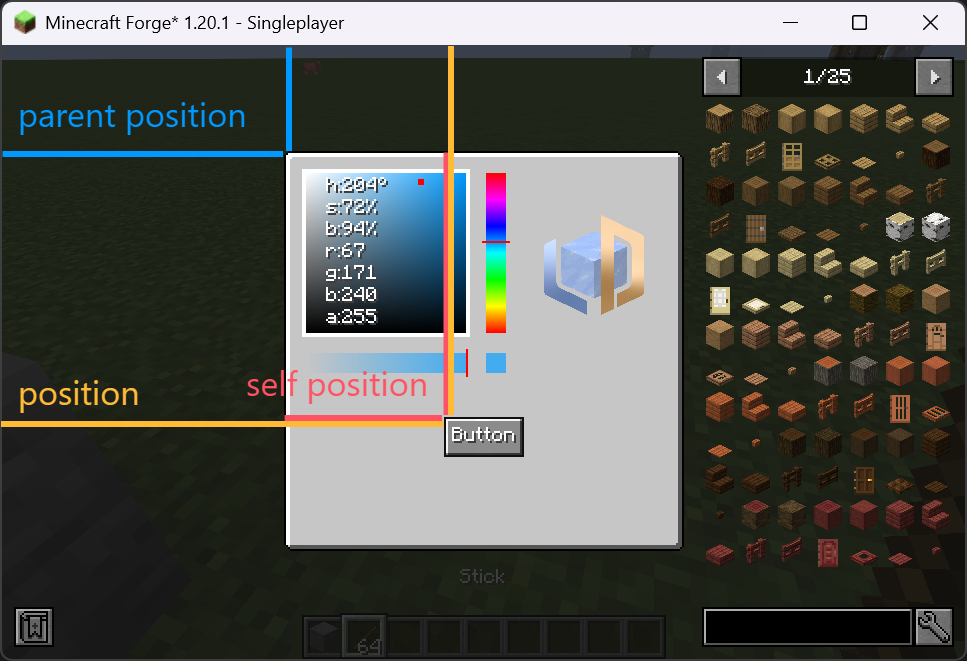
APIs
setHoverTooltips()
Used to define the tooltips while the mouse hovered. It support both string and component as input.
widget.setHoverTooltips("this is a button");
// widget.setHoverTooltips("line 1", "line2");Textures
LDLib provides massive different types of textures, choose what you want:). See GUI Textures to check supported textures.
setBackground()
Used to set the background texture of the widget.
setHoverTexture()
Used to set the hover texture of the widget.
widget.setBackground(new ResourceTexture("ldlib:textures/gui/icon.png"));isMouseOverElement()
TO check whether the mouse over the widget.
widget.isMouseOverElement(mouseX, mouseY);