Introduction
Configurable is LDLib2's annotation-based property editing system. It turns Java objects into editable UI, so editor tools can inspect a selected object, edit its fields, and record the change into history without hand-building every property panel.
The UI Editor uses this system for element properties, textures, renderers, style objects, editor settings, and many inspector panels. For a custom editor, Configurable is the usual way to expose "selected object properties" to the user.
IDE support
LDLib annotations are easier to read with the LDLib Dev Tool IDEA plugin. It adds highlighting, syntax checks, navigation, completion, and annotation support for LDLib2 projects. See Java Integration.
For example, TestConfigurators is just a normal data object with annotated fields and a few helper methods. The imports are omitted here, but the shape is the same as the test source:
@LDLRegister(name = "configurators", registry = "ldlib2:menu_test")
@NoArgsConstructor
public class TestConfigurators implements IConfigurable, IPersistedSerializable {
    @Configurable
    @ConfigNumber(range = {-5, 5})
    private float numberFloat = 0.0f;

    @Configurable
    @ConfigColor
    private int numberColor = -1;

    @Configurable
    private boolean booleanValue = false;

    @ConfigHeader("Header")
    @Configurable(tips = "Test tip 0")
    private String stringValue = "default";

    @Configurable
    private ResourceLocation resourceLocation = LDLib2.id("test");

    @Configurable
    private Direction enumValue = Direction.NORTH;

    @Configurable
    private Vector3f vector3fValue = new Vector3f(0, 0, 0);

    @Configurable
    private Vector3i vector3iValue = new Vector3i(0, 0, 0);

    @Configurable
    private Quaternionf quaternionfValue = new Quaternionf(0, 0, 0, 1);

    @Configurable
    private BlockPos blockPosValue = BlockPos.ZERO;

    @Configurable
    private AABB aabbValue = new AABB(0, 0, 0, 1, 1, 1);

    @Configurable
    @ConfigNumber(range = {0, 1}, type = ConfigNumber.Type.FLOAT)
    private Range rangeValue = Range.of(0, 1);

    @Configurable
    private TransformRef transformRef = new TransformRef();

    @ConfigHeader("Array Like")
    @Configurable
    private int[] intArray = new int[]{1, 2, 3};

    @Configurable
    private List<Boolean> booleanList = new ArrayList<>(List.of(true, false, true));

    @Configurable
    private Component componentValue = Component.translatable("ldlib.author");

    @Configurable(subConfigurable = true)
    private final TestToggleGroup toggleGroup = new TestToggleGroup();

    @Configurable
    @ConfigList(
            configuratorMethod = "buildTestGroupConfigurator",
            addDefaultMethod = "addDefaultTestGroup"
    )
    private final List<TestGroup> groupList = new ArrayList<>();

    @Configurable
    @ConfigSelector(candidate = {"A", "B", "C"})
    private String stringSelector = "A";

    @Configurable
    @ConfigSelector(
            candidate = {"north", "west", "east"},
            subConfiguratorBuilder = "subConfiguratorBuilder"
    )
    private Direction subConfiguratorSelector = Direction.NORTH;

    @Configurable
    @ConfigSearch(searchConfiguratorMethod = "createBlockSearchConfigurator")
    private Block blockSearch = Blocks.STONE;

    @Configurable
    private ItemStack item = new ItemStack(Items.STONE);

    @Configurable
    private FluidStack fluid = new FluidStack(Fluids.WATER, 1000);

    @Configurable
    @ConfigRL(ConfigRL.Type.ITEM_TAG_KEY)
    private ResourceLocation itemTagKey = ItemTags.AXES.location();

    @Configurable
    private EntityType<?> entityType = EntityType.PIG;

    @Override
    public ModularUI createUI(Player player) {
        var root = new ScrollerView();
        root.layout(layout -> {
            layout.width(250);
            layout.height(350);
        }).setId("root");

        var group = new ConfiguratorGroup("root");
        group.setCollapse(false);
        group.setTips("Test tip 0", "Test tip 1", "Test tip 2");
        buildConfigurator(group);

        return new ModularUI(UI.of(root.addScrollViewChild(group)));
    }

    private Configurator buildTestGroupConfigurator(
            Supplier<TestGroup> getter,
            Consumer<TestGroup> setter
    ) {
        var instance = getter.get();
        return instance != null ? instance.createDirectConfigurator() : new Configurator();
    }

    private TestGroup addDefaultTestGroup() {
        return new TestGroup();
    }

    private void subConfiguratorBuilder(Direction direction, ConfiguratorGroup group) {
        switch (direction) {
            case NORTH -> group.addConfigurator(new Configurator("NORTH"));
            case WEST -> {}
            case EAST -> group.addConfigurator(new Configurator("EAST"));
            default -> group.addConfigurator(new Configurator("DEFAULT"));
        }
    }

    private SearchComponentConfigurator.ISearchConfigurator<Block> createBlockSearchConfigurator() {
        return new SearchComponentConfigurator.ISearchConfigurator<>() {
            @Override
            public Block defaultValue() {
                return Blocks.STONE;
            }

            @Override
            public void search(String word, IResultHandler<Block> searchHandler) {
                var lowerWord = word.toLowerCase();
                for (var key : BuiltInRegistries.BLOCK.keySet()) {
                    if (key.toString().toLowerCase().contains(lowerWord)) {
                        searchHandler.acceptResult(BuiltInRegistries.BLOCK.get(key));
                    }
                }
            }

            @Override
            public String resultText(Block value) {
                return BuiltInRegistries.BLOCK.getKey(value).toString();
            }
        };
    }

    public static class TestToggleGroup implements IToggleConfigurable {
        @Getter
        @Setter
        private boolean isEnable = false;

        @Configurable
        @ConfigSelector(candidate = {"north", "west", "south", "east"})
        private Direction enumValue = Direction.NORTH;
    }

    public static class TestGroup implements IConfigurable {
        @Configurable
        @ConfigNumber(range = {0, 1}, type = ConfigNumber.Type.FLOAT)
        private Range rangeValue = Range.of(0, 1);

        @Configurable
        private Direction enumValue = Direction.NORTH;

        @Configurable
        private Vector3i vector3iValue = new Vector3i(0, 0, 0);
    }
}
After buildConfigurator(group) runs, LDLib2 turns those fields into an editable panel:
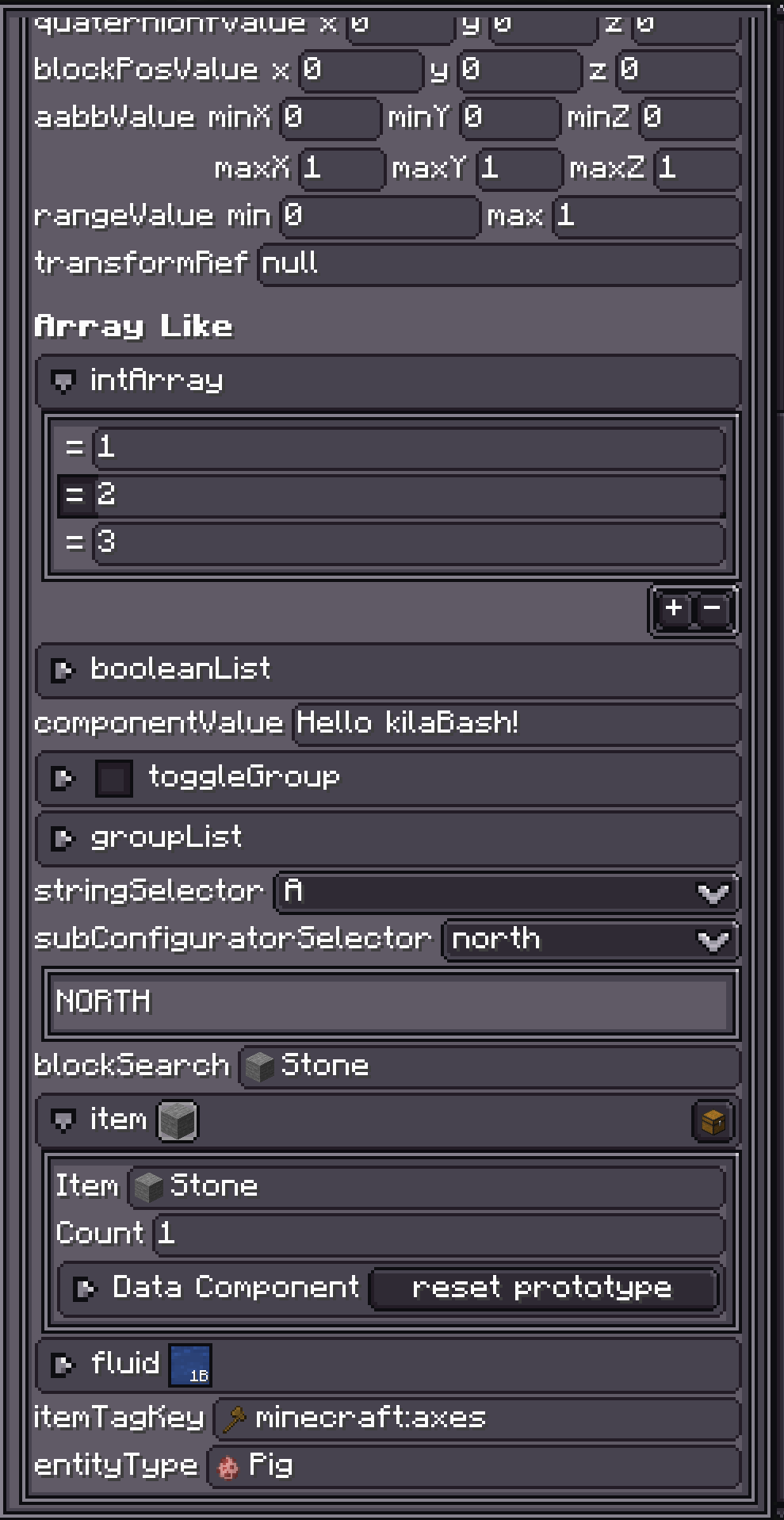
TestConfigurators.
flowchart LR
    A["IConfigurable object"] --> B["ConfiguratorParser"]
    B --> C["Configurable fields"]
    C --> D["IConfiguratorAccessor"]
    D --> E["Configurator UI"]
    E --> F["Inspector"]
Chapter Map
Start with Getting Start if you only want to expose a few fields in an editor inspector.
Annotations covers @Configurable and the helper annotations that tune names, tips, ranges, selectors, lists, search fields, setters, and resource locations.
Accessors explains how LDLib2 chooses a UI control from a Java type, and how to register support for your own type.
Configurator UI covers the actual UI nodes created by accessors: Configurator, ConfiguratorGroup, array/list groups, events, and copy-paste behavior.
Inspector and History explains how the editor InspectorView displays an IConfigurable, listens for changes, and records undo/redo actions.
Examples points to source files worth reading after you understand the flow.
When To Use It
Use Configurable when your object has editor-facing properties: a shop entry, animation clip, node graph constant, renderer setting, UI element style, or any data model selected by a custom view.
If the property panel is mostly regular fields, annotate the fields and let ConfiguratorParser build the UI. If the panel needs custom layout, conditional rows, or custom controls, override buildConfigurator(...) and add configurators manually.
@Configurable fields are persisted by default. PersistedParser treats them like @Persisted fields unless @Configurable(persisted = false) is used. See PersistedParser for the serialization side.