
ScrollerView
自 2.2.1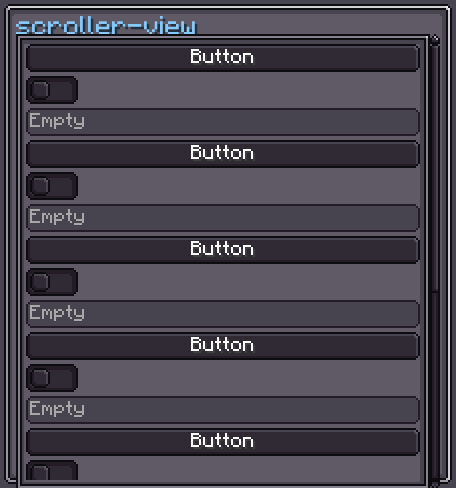
ScrollerView 是一个可滚动的容器。它在 viewPort 内部包裹了一个 viewContainer,并提供可选的水平和垂直滚动条,当内容溢出时自动显示。通过代码或 XML 添加到 ScrollerView 的子元素都会被放置在 viewContainer 内部。
INFO
UIElement 中记录的所有内容(布局、样式、事件、数据绑定等)同样适用于此处。
用法
java
var sv = new ScrollerView();
sv.scrollerStyle(style -> style.mode(ScrollerMode.VERTICAL));
for (int i = 0; i < 20; i++) {
    sv.addScrollViewChild(new Label().setText("Item " + i, false));
}
parent.addChild(sv);XML
xml
<scroller-view>
    <label>Item 1</label>
    <label>Item 2</label>
    <label>Item 3</label>
</scroller-view>
直接写在 XML 中的子元素会被放置在 viewContainer 内部。
内部结构
| CSS class | 描述 |
|---|---|
.__scroller_view_vertical-container__ | 行 flex 容器,容纳 viewPort 和垂直滚动条。 |
.__scroller_view_view-port__ | 裁剪视口,默认带有 5 px 的内边距和边框纹理。 |
.__scroller_view_view-container__ | 实际的内容容器,子元素被放置于此。 |
.__scroller_view_vertical-scroller__ | 垂直滚动条(右侧)。 |
.__scroller_view_horizontal-scroller__ | 水平滚动条(底部)。 |
ScrollerView 样式
INFO
scroller-view-mode
启用哪些滚动轴。可选值:HORIZONTAL、VERTICAL、BOTH。
默认值:BOTH
java
sv.scrollerStyle(style -> style.mode(ScrollerMode.VERTICAL));INFO
scroller-vertical-display / scroller-horizontal-display
每条滚动条的可见性策略。可选值:AUTO(仅当内容溢出时显示)、ALWAYS、NEVER。
默认值:AUTO
java
sv.scrollerStyle(style -> style
    .verticalScrollDisplay(ScrollDisplay.ALWAYS)
    .horizontalScrollDisplay(ScrollDisplay.NEVER)
);INFO
scroller-view-margin
当垂直滚动条可见时,为水平滚动条预留的右侧边距。
默认值:5
css
scroller-view {
    scroller-view-margin: 5;
}INFO
adaptive-width / adaptive-height
启用后,ScrollerView 会根据内容容器的计算宽度或高度自动调整自身大小。
默认值:false
java
sv.scrollerStyle(style -> style.adaptiveHeight(true));INFO
min-scroll / max-scroll
对每次滚动事件中滚动条滑块移动距离的限制(以像素为单位)。
默认值:5 / 7
java
sv.scrollerStyle(style -> style.minScrollPixel(0f).maxScrollPixel(20f));字段
| 名称 | 类型 | 访问权限 | 描述 |
|---|---|---|---|
viewContainer | UIElement | public final | 容纳所有已添加子元素的容器。 |
viewPort | UIElement | public final | 裁剪区域(带有边框纹理和内边距)。 |
verticalContainer | UIElement | public final | 行 flex 容器,包裹 viewPort 和 verticalScroller。 |
horizontalScroller | Scroller.Horizontal | public final | 水平滚动条。 |
verticalScroller | Scroller.Vertical | public final | 垂直滚动条。 |
方法
| 方法 | 返回类型 | 描述 |
|---|---|---|
addScrollViewChild(UIElement) | ScrollerView | 向 viewContainer 添加一个子元素。 |
addScrollViewChildAt(UIElement, int) | ScrollerView | 在 viewContainer 的指定索引位置插入一个子元素。 |
addScrollViewChildren(UIElement...) | ScrollerView | 向 viewContainer 添加多个子元素。 |
removeScrollViewChild(UIElement) | boolean | 从 viewContainer 移除一个子元素。 |
clearAllScrollViewChildren() | void | 移除 viewContainer 中的所有子元素。 |
hasScrollViewChild(UIElement) | boolean | 如果该元素是 viewContainer 的子元素,则返回 true。 |
getContainerWidth() | float | 计算的内容宽度(包含溢出的子元素)。 |
getContainerHeight() | float | 计算的内容高度(包含溢出的子元素)。 |
scrollerStyle(Consumer<ScrollerViewStyle>) | ScrollerView | 以流式方式配置样式。 |
viewContainer(Consumer<UIElement>) | ScrollerView | 配置 viewContainer。 |
viewPort(Consumer<UIElement>) | ScrollerView | 配置 viewPort。 |
verticalContainer(Consumer<UIElement>) | ScrollerView | 配置 verticalContainer。 |
horizontalScroller(Consumer<Scroller>) | ScrollerView | 配置水平滚动条。 |
verticalScroller(Consumer<Scroller>) | ScrollerView | 配置垂直滚动条。 |