
ScrollerView
Since 2.2.1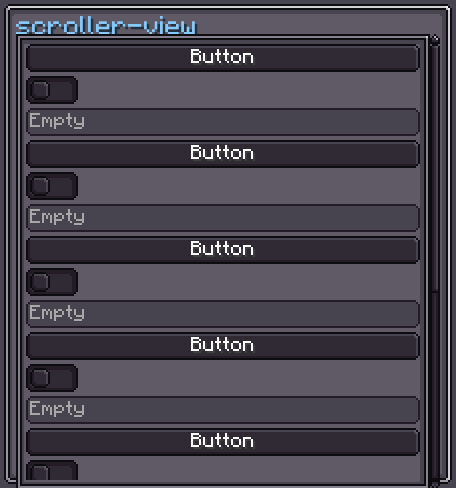
ScrollerView is a scrollable container. It wraps a viewContainer inside a viewPort and provides optional horizontal and vertical scroll bars that appear automatically when content overflows. Children added to a ScrollerView in code or XML are placed inside viewContainer.
INFO
Everything documented on UIElement (layout, styles, events, data bindings, etc.) applies here too.
Usage
var sv = new ScrollerView();
sv.scrollerStyle(style -> style.mode(ScrollerMode.VERTICAL));
for (int i = 0; i < 20; i++) {
    sv.addScrollViewChild(new Label().setText("Item " + i, false));
}
parent.addChild(sv);XML
<scroller-view>
    <label>Item 1</label>
    <label>Item 2</label>
    <label>Item 3</label>
</scroller-view>
Direct XML children are placed inside viewContainer.
Internal Structure
| CSS class | Description |
|---|---|
.__scroller_view_vertical-container__ | Row flex container holding viewPort and the vertical scroller. |
.__scroller_view_view-port__ | Clipping viewport with default 5 px padding and border texture. |
.__scroller_view_view-container__ | The actual content container where children are placed. |
.__scroller_view_vertical-scroller__ | Vertical scroll bar (right side). |
.__scroller_view_horizontal-scroller__ | Horizontal scroll bar (bottom). |
ScrollerView Style
INFO
scroller-view-mode
Which scroll axes are enabled. Values: HORIZONTAL, VERTICAL, BOTH.
Default: BOTH
sv.scrollerStyle(style -> style.mode(ScrollerMode.VERTICAL));INFO
scroller-vertical-display / scroller-horizontal-display
Visibility policy for each scroll bar. Values: AUTO (show only when content overflows), ALWAYS, NEVER.
Default: AUTO
sv.scrollerStyle(style -> style
    .verticalScrollDisplay(ScrollDisplay.ALWAYS)
    .horizontalScrollDisplay(ScrollDisplay.NEVER)
);INFO
scroller-view-margin
Right margin reserved for the horizontal scroller when the vertical scroller is also visible.
Default: 5
scroller-view {
    scroller-view-margin: 5;
}INFO
adaptive-width / adaptive-height
When enabled, the ScrollerView resizes itself to match the content container's computed width or height.
Default: false
sv.scrollerStyle(style -> style.adaptiveHeight(true));INFO
min-scroll / max-scroll
Clamp bounds (in pixels) on how far the scroll bar thumb travels per scroll event.
Defaults: 5 / 7
sv.scrollerStyle(style -> style.minScrollPixel(0f).maxScrollPixel(20f));Fields
| Name | Type | Access | Description |
|---|---|---|---|
viewContainer | UIElement | public final | Container holding all added children. |
viewPort | UIElement | public final | Clipping region (has border texture and padding). |
verticalContainer | UIElement | public final | Row flex container wrapping viewPort and verticalScroller. |
horizontalScroller | Scroller.Horizontal | public final | Horizontal scroll bar. |
verticalScroller | Scroller.Vertical | public final | Vertical scroll bar. |
Methods
| Method | Returns | Description |
|---|---|---|
addScrollViewChild(UIElement) | ScrollerView | Adds a child to viewContainer. |
addScrollViewChildAt(UIElement, int) | ScrollerView | Inserts a child at a specific index in viewContainer. |
addScrollViewChildren(UIElement...) | ScrollerView | Adds multiple children to viewContainer. |
removeScrollViewChild(UIElement) | boolean | Removes a child from viewContainer. |
clearAllScrollViewChildren() | void | Removes all children from viewContainer. |
hasScrollViewChild(UIElement) | boolean | Returns true if the element is a child of viewContainer. |
getContainerWidth() | float | Computed content width (includes overflowing children). |
getContainerHeight() | float | Computed content height (includes overflowing children). |
scrollerStyle(Consumer<ScrollerViewStyle>) | ScrollerView | Configures the style fluently. |
viewContainer(Consumer<UIElement>) | ScrollerView | Configures viewContainer. |
viewPort(Consumer<UIElement>) | ScrollerView | Configures viewPort. |
verticalContainer(Consumer<UIElement>) | ScrollerView | Configures verticalContainer. |
horizontalScroller(Consumer<Scroller>) | ScrollerView | Configures the horizontal scroll bar. |
verticalScroller(Consumer<Scroller>) | ScrollerView | Configures the vertical scroll bar. |