
Blueprint Concepts
MBD2 21.1.1Five things decide how a blueprint behaves: which events it hooks, which machine its nodes act on, which values the machine can set from outside, how it is attached, and what happens when it breaks.
Entry nodes
A blueprint runs only from an event entry node. The mbd2/event group has one per machine event, and a graph with none is dead — MBD2 logs a warning when it loads:
Machine blueprint … has no event entry nodes — it will never run.
Every event listed on the KubeJS events page has an entry node, plus one KubeJS does not expose: Use Item On (right click with an item in hand). Two exceptions are worth remembering:
- Fuel Burning Finish never fires in
21.1.1, for the same reason its KubeJS handler does not. Client Tick,Custom Data UpdateandCustom Keyframerun on the client, andBuild UIruns on both sides — the machine UI is constructed on the server and on every client that opens it. Nodes that write server state are skipped on the client rather than throwing, and client-only nodes such asPlay State Soundare skipped on the server; every action node declares which side it is for.
Several entry nodes for the same event are allowed and all of them run, in node-creation order, which is not shown on the canvas. MBD2 warns about it; do not let two of them write the same thing.
The machine a node acts on
Machine nodes take an optional machine input. Leave it unwired and the node acts on the blueprint's own machine — which is what a blueprint almost always wants. Wire it to reach another one:
| Node | Gives you |
|---|---|
| This Machine | This blueprint's machine, as an explicit value |
| Machine At Position | The machine at a world position, if there is one |
| As Multiblock Controller / As Multiblock Part | The controller or part view of a machine |
| Controller Machine / Part Machine | Across a formed structure, in the mbd2/multiblock group |
The same rule applies to the target on an Info node: unwired means this machine, this machine's recipe logic, this machine's definition.
Parameters
A blueprint exposes a parameter by declaring an INPUT graph variable. There is no separate manifest. The variable's name, type and default become one row in the machine's Inspector, so a pack author configures the blueprint without opening it.
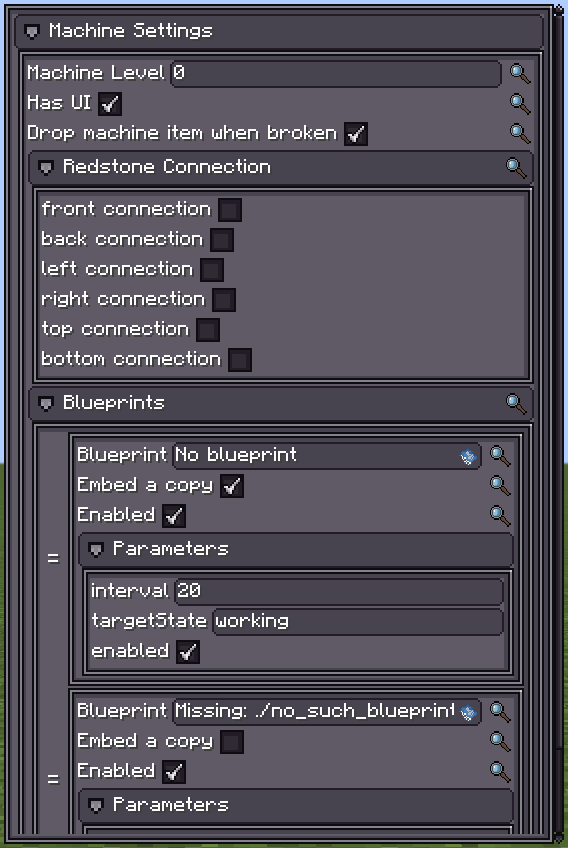
Values are stored as serialised graph constants, so a BlockPos parameter and a BlockPos constant node round-trip through the same codec.
Variables of the other kinds are ordinary graph state: a SetVar is this machine's value for this blueprint and persists across ticks for as long as the machine is loaded. It is not saved with the block — use the machine's custom data for anything that must survive a chunk unload, as heat_buildup does.
Reference or inline
| Mode | Stored | Use when |
|---|---|---|
| Reference (default) | The resource path, e.g. built-in(mbd2:overclock) | The blueprint is shared across machines and edited in one place |
| Embed a copy | A snapshot of the whole graph | The machine must be self-contained — shipped to someone without your .bp file |
A referenced blueprint whose file is missing shows as Missing: <path> in the Inspector and does nothing. Built-ins always resolve, including on a dedicated server with no content directory.
Ordering
A machine's blueprint list is an ordered pipeline. For a value-modifying event each blueprint reads what the previous one wrote, so binding redstone_control, then overclock, then chance_output is three bindings rather than one graph with switches. For a cancellable event, cancelling is a union: any blueprint may cancel and all of them still run.
Bind a blueprint that rewrites the recipe after anything that chooses it, and before anything that reads the final duration.
Execution and failure
One executor per machine per blueprint, built on the first event it receives — not at definition load, because a graph's constants (items, blocks, fluids) only decode once registries are frozen.
A node that throws is caught. The blueprint logs once, with a stack trace, and is silent afterwards:
Machine blueprint … failed handling MachineTickEvent; further failures from this blueprint will not be logged
A broken blueprint therefore costs you its behaviour, not the machine's tick or the server. Check logs/latest.log after any graph edit — the failure is reported once, at the first occurrence, and never again until the machine reloads.
Building UI from a graph
Blueprints can hook Build UI and build machine UI with generic UI nodes — load a template, select by id, add a child, attach a stylesheet, set a class, listen for a click. The Auto IO panel built-in is the worked example, and it is built entirely from general nodes: there is no "auto IO panel" node.
Two constraints shape any UI blueprint:
- The client cannot read runtime values. Runtime values are server-side and never synced. Publish what the panel must draw through the machine's
@DescSyncedcustom data instead. - Merge, do not replace. Another blueprint, or the editor-authored UI, may already own the screen. Load a shared container by a known id and append to it.