
Slot Names and the Recipe Viewer UI
MBD2 21.1.1Every recipe content carries two independent names:
| Field | Answers | Affects |
|---|---|---|
slotName | which Trait handles this content | Recipe matching and IO in the world |
uiName | which widget displays this content | The JEI/REI/EMI recipe page only |
They never influence each other. A content with a slotName and no uiName is routed to a named handler and displayed in the default widget; a content with a uiName and no slotName is displayed somewhere specific and handled by whichever Trait is free.
slotName: routing to a Trait
Declaring names on the Trait
Every recipe-capability Trait has three fields in the Inspector, next to each other:
| Field | Meaning |
|---|---|
| Recipe Handler IO | Whether the Trait counts as an input, an output, or both during matching |
| Distinct | The Trait is used only if it can satisfy all content of its capability on its own |
| Slot Names | The list of names this Trait answers for |
Slot Names is a list of free-form strings. It is empty unless you fill it in, and an empty list means "this Trait handles unnamed content only".
A slot name is not the Trait's name
The Trait's name (input_items, coolant, …) is what getTraitByName takes. Slot Names is a separate list, and a recipe's slotName is matched against that list — never against the Trait name.
How matching uses it
Contents are split into two buckets before any handler is asked: unnamed, and grouped by slot name.
- Distinct handlers are tried first. A distinct handler is only used if it can take every unnamed content and its Slot Names contain every name the recipe uses for that capability. It is all or nothing — a distinct handler is never combined with another handler.
- Then non-distinct handlers, in order. Each is offered the remaining unnamed content, and only those named groups whose name appears in its Slot Names.
- Anything still unclaimed at the end is a failure. For inputs the recipe simply does not match; for outputs MBD2 logs
io error while handling a recipe <id> outputsand the recipe fails.
So a name that no Trait declares silently makes the recipe unrunnable. That is the single most common cause of "the recipe is in JEI but the machine never starts".
On a multiblock
A formed controller collects its parts' handlers and wraps each one together with the merged set of slot names it saw, so a part's Slot Names are visible to the controller's recipe logic. Nothing has to be re-declared on the controller.
Overriding at runtime
slot_names is a runtime value, so a single machine can answer for different names than its definition says. Changing it rebuilds the machine's capability proxy — and the proxy of every controller the machine is a part of — so the change is visible to matching immediately.
uiName: binding to the recipe viewer
The recipe viewer page is a UI template owned by the recipe type (Recipe Display UI in the editor). MBD2 fills it in by looking up element IDs.
The default ID
When uiName is empty, MBD2 looks for an element whose ID matches:
@<capability>_<io>_<index><capability>is the capability's registry name —item,fluid,forge_energy, …<io>isimportfor inputs andexportfor outputs<index>is the content's position within that capability's list for that IO, starting at 0
So the second fluid output of a recipe is @fluid_export_1, regardless of how many item outputs come before it.
This form is matched anchored: only an element whose whole ID is exactly that string is bound.
Setting uiName explicitly
An explicit uiName is matched as a substring, not an exact ID. uiName('bonus') binds every element whose ID contains bonus — bonus, bonus_output, my_bonus_slot. That is deliberate: one content can drive several widgets at once. It also means a short name can capture elements you did not intend, so prefer a distinctive one.
What binding does
The capability decides. For items, the element must be an ItemSlot; it receives the stack, or a scrolling data source when the ingredient matches several items, and is marked as an input or output for the recipe viewer's own lookups. The content's tooltips — chance, per-tier chance boost, per-tick — are appended to whatever the element already shows.
An element that no content matches is left exactly as the editor drew it. It is not hidden.
Reserved element IDs
These are looked up by exact ID, not by regex, and are filled in for every recipe:
| ID | Element type | Behavior |
|---|---|---|
@progress_bar | ProgressBar | Animated 0 → 1 loop on a 2 s cycle; tooltip shows the duration |
@duration | Label | Text set to the recipe duration |
@condition | any | Hidden when the recipe has no conditions; otherwise a hover tooltip listing one row per condition |
@custom_data | Button | Hidden when the recipe has no data; clicking opens a dialog with the NBT pretty-printed |
Two different ID conventions
@… IDs belong to the recipe viewer template. A machine's own UI uses ui: IDs — ui:machine_name, ui:progress_bar, ui:fuel_bar, ui:xei_lookup. uiName has no effect on the machine UI.
The Recipe Display UI editor
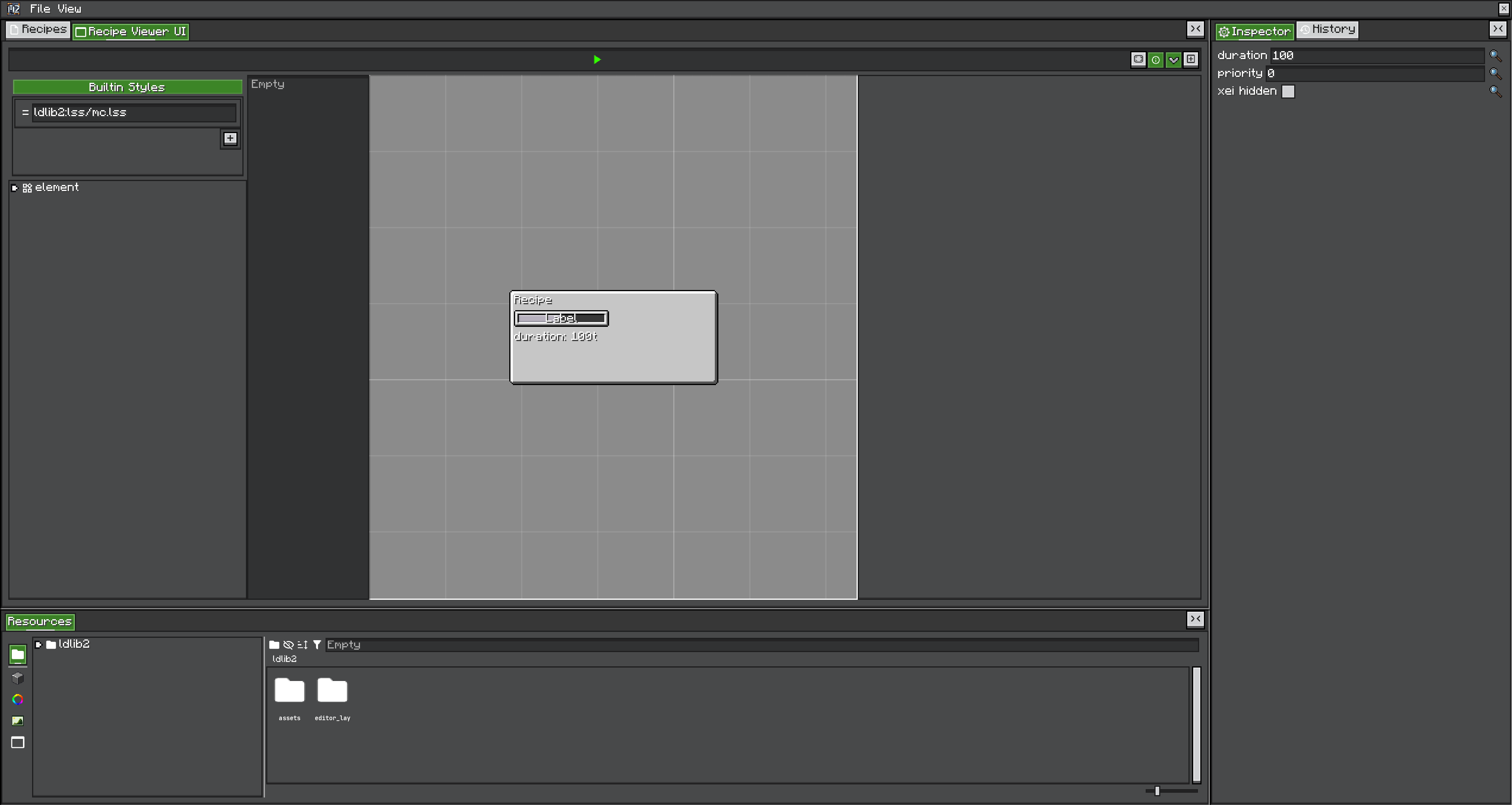
The RecipeType UI View adds elements with the right IDs for you:
| Action | Adds |
|---|---|
| Add Input / Add Output | One content widget for a chosen capability, with the next free index for that capability and IO |
| Progress Bar, Duration Text, Conditions Group, Custom Data | The matching reserved element |
| Generate All | A whole template built from the recipe type's built-in recipes |
Generate All only sees built-in recipes
It scans the recipes stored in the recipe type project and creates as many widgets per capability and IO as the largest of them needs. A recipe type whose recipes all come from KubeJS or datapacks has no built-in recipes, so Generate All produces an empty layout. Either add the widgets by hand, or author one representative recipe in the editor first and generate from that.
The default template that a new recipe type ships with contains only @progress_bar and @duration — no content widgets at all. Until you add them, recipes show a progress bar and nothing else.
Setting both fields
Both are modifier state on the recipe builder: they decorate every content created while they are active. The callback form restores the previous value afterwards and is the safer one.
- KubeJS: see Modifier state machine and the routing example.
- Java: the same fluent fields on
MBDRecipeBuilder, withslotName(null)/uiName(null)to clear.
Checklist
- The recipe's
slotNameappears in some Trait's Slot Names list — not in its Trait name. - That Trait's Recipe Handler IO supports the direction the content is used in.
- If the Trait is Distinct, it can satisfy every content of that capability by itself.
- The recipe viewer template has an element whose ID matches —
@<capability>_<io>_<index>by default. - That element is the type the capability binds to (
ItemSlotfor items, and so on). - After changing Slot Names at runtime, matching is retried on the next recipe search, not on the running recipe.