
Lights and Fog
Since 2.2.8This page covers the two FX objects of the light system: Light, which lights the scene, and Fog Volume, which gives the light something to shine through. Add either from the FX hierarchy: right-click → New → Light or Fog Volume.
Light Object
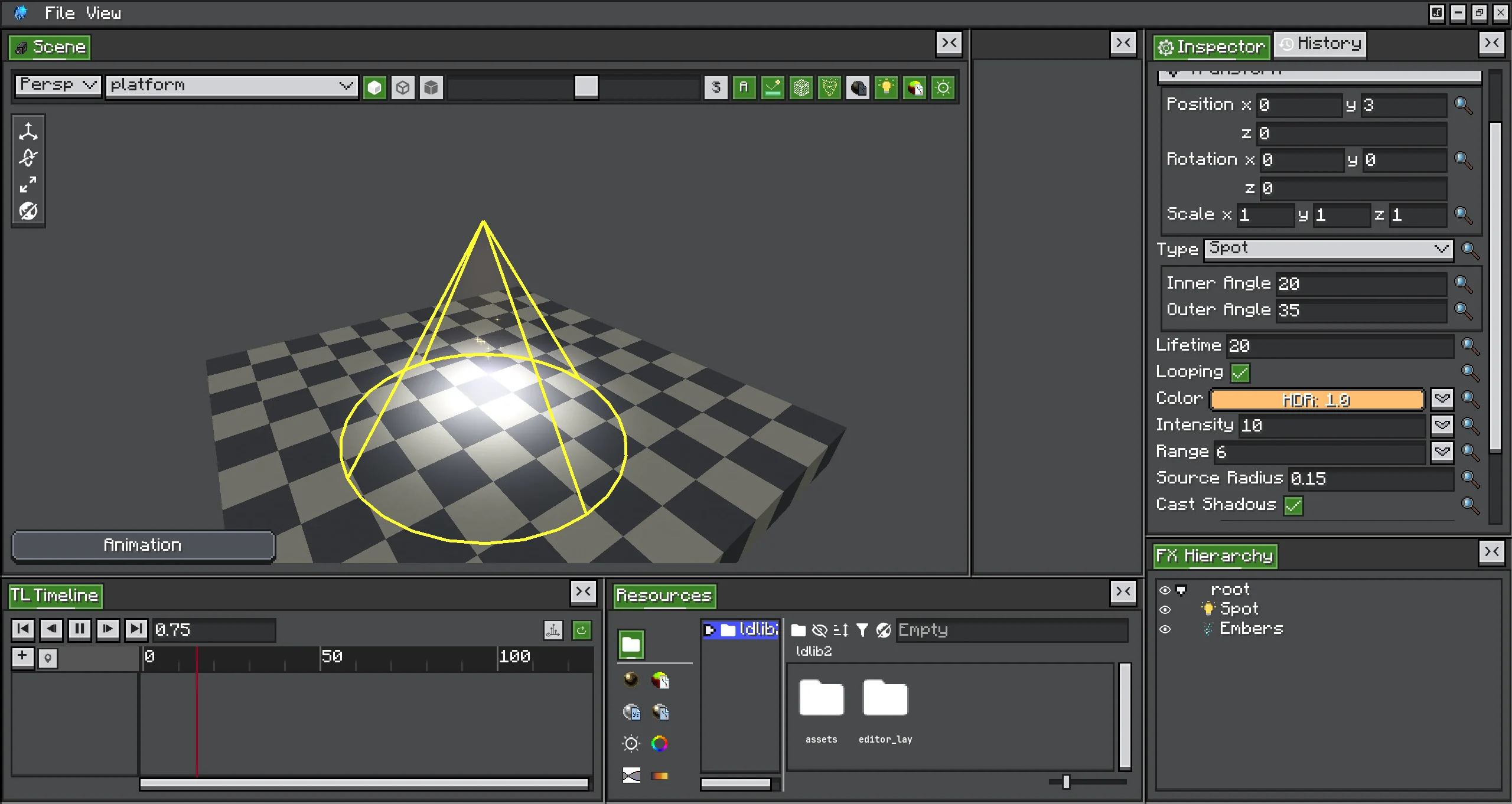
A Light is a point or spot light that moves with its transform. A spot light shines along the object's local -Y axis, so rotate the object to aim it.
| Option | Default | What it does |
|---|---|---|
| Type | Point | Point shines in every direction. Spot shines in a cone along local -Y. |
| Lifetime | 20 ticks | How long the light lasts. The Color, Intensity, Range and Strength curves run over this lifetime. |
| Looping | on | Restarts the curves at the end. A looping light keeps its FX alive, like a looping emitter. With Looping off, the light removes itself after Lifetime. |
| Color | white | HDR colour over the lifetime: constant, random, gradient or random gradient. The HDR intensity multiplies the brightness. |
| Intensity | 10 | Brightness over the lifetime. Light falls off with the square of the distance. |
| Range | 10 | Distance in blocks at which the light reaches zero. |
| Inner Angle | 20 (0–89) | Spot only: half-angle in degrees of the fully lit core. |
| Outer Angle | 35 (0.1–90) | Spot only: half-angle in degrees where the cone fades to zero. |
| Source Radius | 0.15 (0–8) | Size of the emitting sphere in blocks. 0 gives hard shadows; larger values give softer edges. |
| Cast Shadows | on | Lets blocks block this light. Only the most important lights get shadows each frame. |
| Flicker | 0 (0–1) | How much the intensity randomly dips, like a flame. 0 is steady. |
| Flicker Speed | 8 (0–50) | How fast the flicker changes. |
| Volumetric → Strength | off → 1 | Makes the light glow in the air. See Volumetric Lights. |
Intensity, Range and Strength accept a constant, a random range, a curve or a random curve. The two angle rows appear under Type only while it is Spot.
The light shines only while its object is active and visible, so an Activator track can switch it on and off. Its random values are picked once each time the object starts.
Shadows
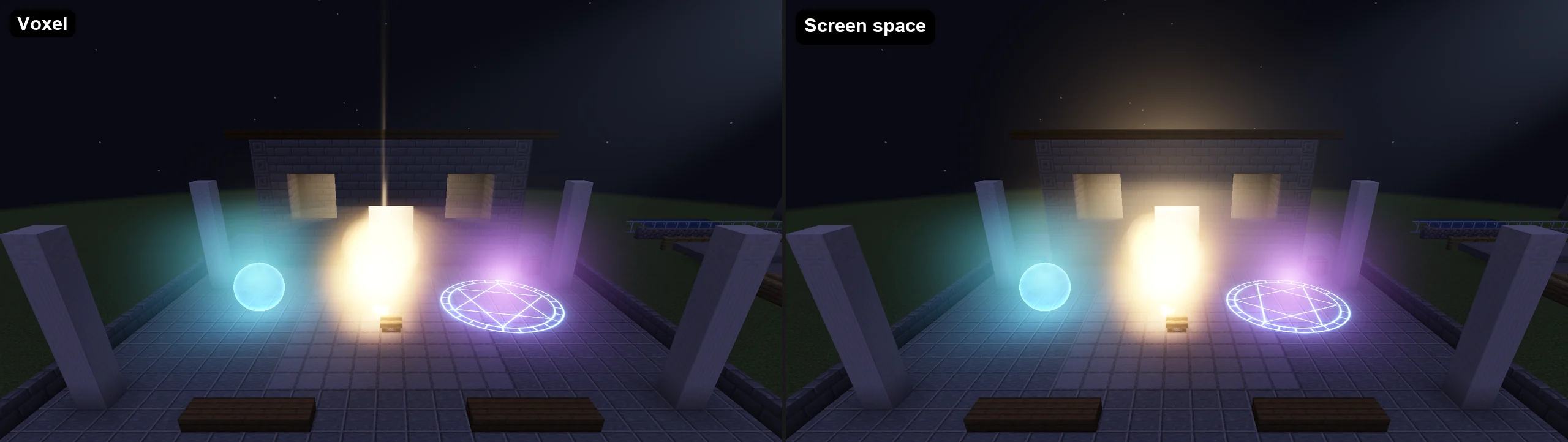
A light casts shadows when its Cast Shadows is on and the client's Shadows setting is not Off. Shadows are limited by Shadowed lights per frame (default 8, at most 32). Photon ranks the lights by brightness × intensity × range² / distance², and the top lights with Cast Shadows get shadows. The others still light the scene, without shadows.
| Mode | How it finds blockers | Strengths | Limits |
|---|---|---|---|
| Voxel (default) | Traces rays through a half-block voxel copy (2×2×2 per block) of the blocks around the camera, plus a short screen-space contact shadow. | Light never leaks through walls or ceilings, even when the blocker is off screen. | Details smaller than half a block (fences, panes, entities) rely on the contact shadow. A newly visited area takes a few frames to get shadows; see Voxel build budget (ms). |
| Screen space | Traces the depth buffer toward each light. | Cheaper; no voxel copy. | Sees only what is on screen, so light leaks past blockers you cannot see. Screen shadow thickness trades leaks through thin walls against long false shadows. |
| Off | None. | Cheapest. | No shadows. |
In Voxel mode, blocks block light by their occlusion shape. Leaves block light. Glass and other blocks that do not occlude let it through.
Soft shadows (on by default) widen the shadow edge by each light's Source Radius. A radius of 0 gives a hard edge even with soft shadows on.
Volumetric Lights
Turn on Volumetric on a light and set its Strength to make the light visible in the air it crosses. A point light gets a halo; a spot light gets a beam. A Strength of 1 is a light haze.
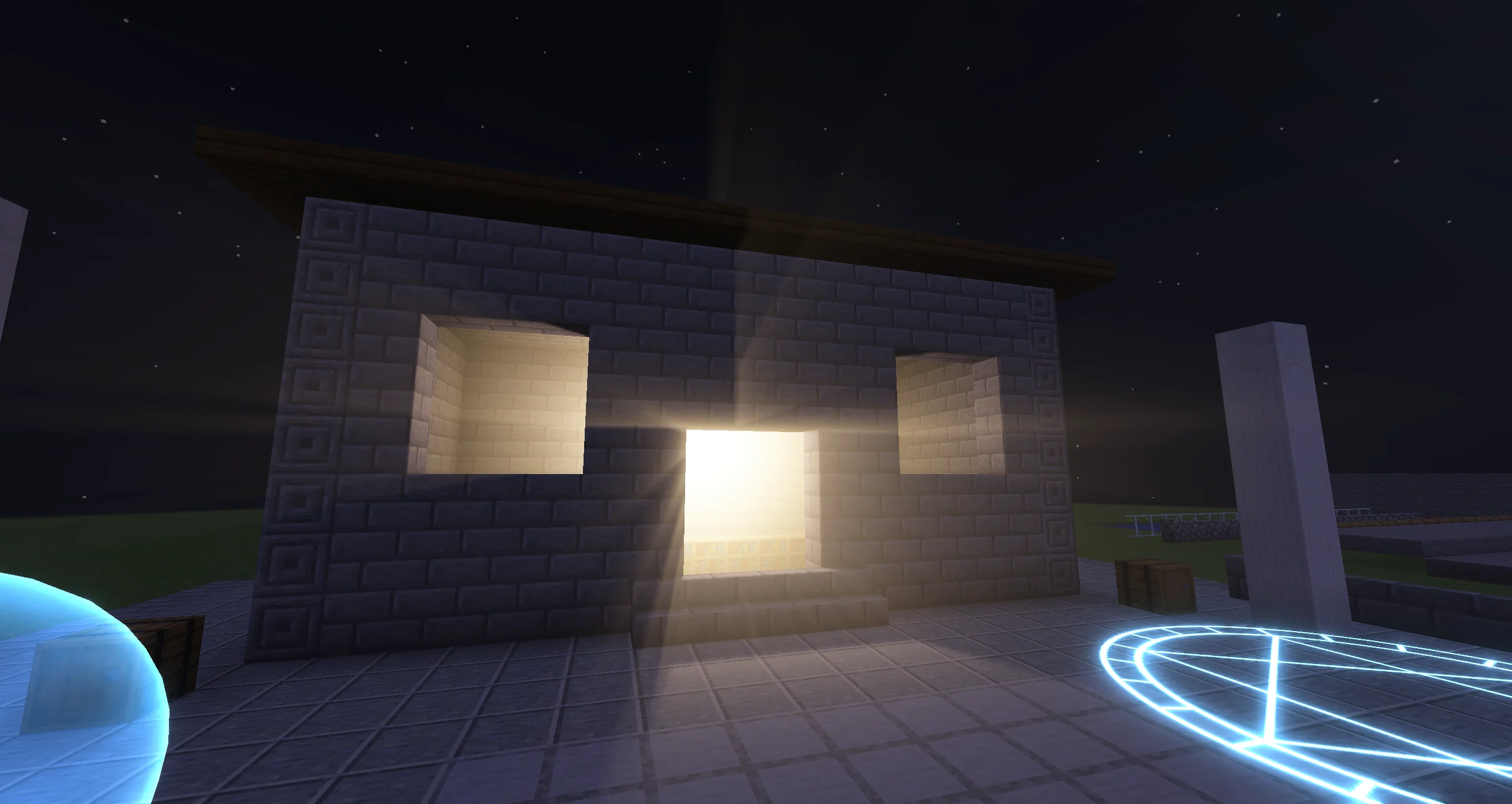
With Cast Shadows and Voxel shadows, whatever blocks the light also shadows its glow, so a spot light behind a window casts shafts. This needs the light to be among the shadowed lights of the frame.
The client settings shape every volumetric light:
- Volumetric lighting turns halos, beams and fog volumes on or off.
- Volumetric haze multiplies how thick the air looks. 1 is what effects are made for; 0 turns the glow off.
- Forward scattering makes the glow brighter when you look toward a light.
- Volumetric samples sets the integration steps. More is smoother and costs more.
A light without Volumetric costs nothing in the volumetric pass.
Fog Volume
A Fog Volume is a box or sphere of fog that the lights scatter in. The object's transform places, sizes and rotates it: at scale 1 the shape is 1 block across, so a scale of (16, 4, 16) makes a 16 × 4 × 16 block fog bank.
| Option | Default | What it does |
|---|---|---|
| Shape | Box | Box or Sphere. |
| Lifetime | 100 ticks | How long the fog lasts. The Density, Color and Emission curves run over this lifetime. |
| Looping | on | Repeats the lifetime instead of ending after it. |
| Density | 1 | How thick the fog is over its lifetime. 1 is a light mist. |
| Edge Falloff | 0.3 (0–1) | The share of the shape, from its surface inwards, over which the fog thins out to nothing. |
| Color | white | The colour the fog scatters light with. |
| Absorption | 0.5 (0–1) | How much the fog also hides what lies behind it. 0 only adds light; 1 hides as much as it scatters. |
| Emission | black | HDR light the fog gives off on its own, without any light shining on it. |
| Noise → Strength | off → 0.6 (0–1) | Breaks the fog up into drifting wisps. Strength is how much the noise thins and thickens it. |
| Noise → Scale | 2 (0.1–32) | The size of the wisps in blocks. |
| Noise → Wind | (0.5, 0, 0.2) | How fast the wisps drift, in blocks per second along the world axes. |
Fog shows only where a light reaches it, or where Emission is set. Every light lights it, whether or not the light is volumetric. With Voxel shadows, shadow-casting lights cut shafts through it.
Fog volumes need Volumetric lighting on, and Volumetric haze multiplies their density. Under a shader pack they also need Volumetric lighting with shader packs. Up to 32 fog volumes are drawn per frame, nearest first.
Draw Order of Haze and Fog
- The darkening from Absorption is applied before particles are drawn, so a flame in front of a fog bank stays bright.
- The glow of halos, beams and fog is added last, after particles and post effects.
- Without a shader pack, vanilla distance fog fades lights, halos and fog volumes with distance, as it fades the terrain.
Editor Preview
- Lights and fog show live in the Scene and follow Timeline seeks.
- The Scene top bar has a Show dynamic lights toggle (light icon). It hides the lights in the editor only.
- With shape outlines visible, a Light draws its range as a yellow sphere or cone, and a Fog Volume draws a cyan box or sphere.
- The editor's scene world is fully lit, so light pools look fainter there than at night in game. Check the final look in a dark place in game.
- The client settings apply in the editor too. With Enable dynamic lights off, the editor shows no light.
Timeline
These properties can be animated with Animation tracks and record mode; see Animation Tracks and Record Mode.
| Object | Animatable properties |
|---|---|
| Light | Color, Intensity, Range, Inner Angle, Outer Angle, Source Radius, Flicker, Cast Shadows, Volumetric (on/off), Volumetric Strength |
| Fog Volume | Density, Color, Emission, Absorption, Edge Falloff |
| Particle Emitter | Light Emission (on/off), Color, Intensity, Range |
Type, Lifetime, Looping, Flicker Speed, Shape and the Noise settings are not animatable. To change a light's values from Java for one playback, see Override an Authored Light.