
Timeline Editor and Playback
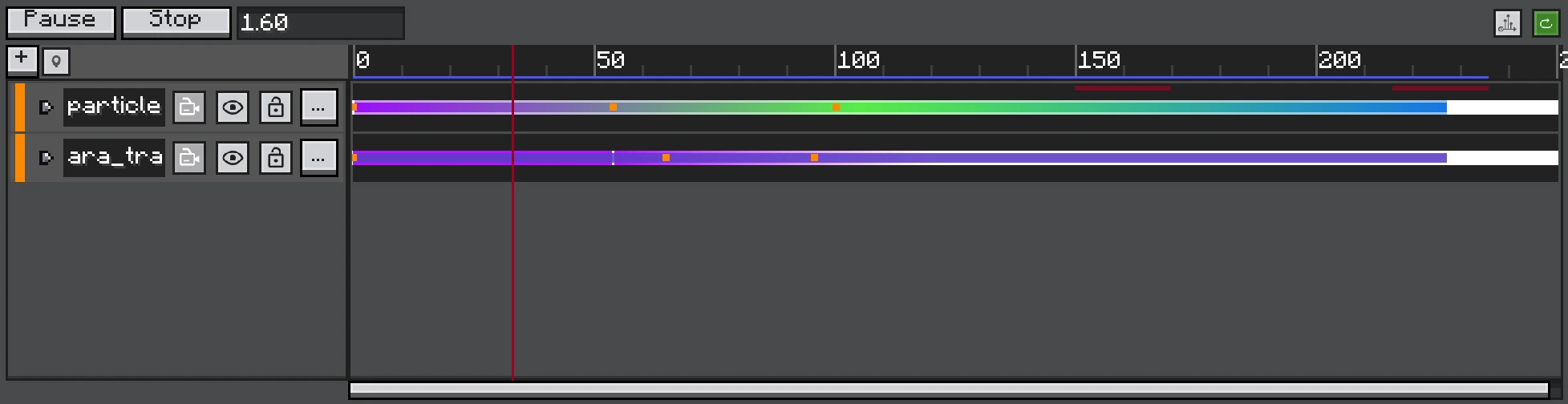
Captured from the maximized window so track names, clip ranges, keys, and the red playhead remain readable.
The Timeline panel combines a track tree, time ruler, clip lanes, and property editors. Select a track or property to expose the operations relevant to that item.
Transport
| Control | Behaviour |
|---|---|
| Play/Pause | Advance or freeze the master Timeline clock. |
| Stop/Restart | Reset runtime objects and evaluate from time zero. |
| Loop | Replay the preview range in the editor. |
| Scrub | Evaluate the effect at the pointer time without normal forward playback. |
Signals and audio are gated during editor scrubbing so dragging the playhead does not repeatedly fire gameplay events or overlap sounds. In-world forward playback enables both.
Time and Zoom
The ruler is measured in ticks. Zoom changes the pixels-per-tick scale around the pointer; horizontal scrolling moves the visible time window. The red playhead is the current evaluation time.
Selection and Editing
- Drag an empty lane region to box-select items.
- Use Ctrl/Shift according to the editor selection behaviour for multi-select.
- Drag selected clips or keys as a group.
- Edge guides snap to nearby clip/key boundaries.
- Clip lanes reject overlapping placement where the track requires one active clip.
- Copy/paste preserves relative offsets and refuses an invalid overlap instead of silently corrupting timing.
Fast Seek
Scrubbing far forward may need to replay simulation from the start because particle state is not a pure function of one timestamp. The editor coalesces repeated seek requests and uses fast replay so pointer movement does not enqueue a full simulation for every intermediate pixel.
Editor vs In-World
The editor uses an isolated particle manager and post-effect stack. Audio preview is forced non-positional when needed so it remains audible from the preview camera. In-world playback uses the executor's real level, entity/block anchor, signal hooks, and global post stack.
Timing check
Preview once by scrubbing for layout, then play forward from zero to verify Control restarts, random seeds, Signals, Audio, and post-effect fades.