
glTF Models
Since 2.2.5Since 2.2.5, Photon reads glTF 2.0 files (.glb and .gltf) as a mesh source. A glTF mesh works everywhere an OBJ or JSON model does: in the Model render mode and in the Mesh emission shape. Since 2.2.7, a rigged file can also play its animations; see Animated glTF Models.
Import a File
- Open the Mesh resource panel in the editor.
- Drop one or more
.glbor.gltffiles onto it from outside the game..objand.jsonmodels import the same way. - A file that already lives under
<gameDir>/ldlib2/assets/is used where it is. Any other file is copied into theldlib2asset pack. The editor asks for the path and suggestsmodels/<file name>.
The new Mesh resource uses the glTF Model source. A file with a skeleton and at least one animation gets the Animated glTF Model source instead, so it plays as soon as you drop it in.
To point an existing mesh at a file, set Model Source to glTF Model and click select a glb / gltf file.
| Field | Default | Description |
|---|---|---|
| glTF Location | – | The file, as a resource location. |
| Flip V | off | Mirrors UVs vertically (v = 1 - v). glTF already uses a top-left UV origin like Minecraft, so leave it off unless an export comes out upside-down. |
Photon does not watch the file. After you export it again, click reload mesh.
Since 2.2.6.a, an .fxpack export also packs the .glb and .gltf files its effects use. See Distribution.
What Photon Reads
| Part of the file | Behaviour |
|---|---|
| Container | .glb, or .gltf with its buffers embedded as data: URIs. A .gltf that points at a separate .bin file is rejected; export it as .glb instead. |
| Scene | The default scene only. Every node's transform is baked into the vertices. |
| Primitives | TRIANGLES only. Strips, fans, lines and points are skipped. |
| Vertex data | POSITION, NORMAL, TEXCOORD_0 and TANGENT. A primitive without normals gets flat face normals. One without UVs gets (0, 0) everywhere. |
| Ignored | Materials, textures, cameras, morph targets, vertex colours and extra UV sets. Photon draws the mesh with its own materials. |
Positions are used as exported:
- 1 glTF unit is 1 block. Blender exports 1 metre as 1 unit.
- Photon does not center or rescale the mesh. The file's origin sits on the particle; use the renderer's
modelPivotto move it. - No axes are swapped. glTF and Minecraft are both Y-up and right-handed.
- In the Model render mode, the particle's size scales the mesh. Size
1draws it at its exported size.
Vertex Tangents
Since 2.2.5Tangent-space normal mapping needs a tangent on every vertex. The Model render mode has a tangent toggle for this; it is off by default. Turn it on when a Shader Graph reads the Tangent or Bitangent node or uses the Transform node's Tangent space, or when a custom shader reads the tangent attribute.
- A glTF primitive with
TANGENTkeeps its own tangents. - OBJ and JSON models, and glTF primitives without tangents, get tangents generated from the UVs and smoothed across shared edges. When one file mixes both kinds of primitive, the whole mesh is generated.
- The toggle needs GPU instancing.
- While it is off, the vertex layout carries no tangent at all. The Tangent / Bitangent nodes and the Transform node's Tangent space then have no real frame to report.
- Billboards, trails, AraTrails and beams always carry an exact tangent, except on the non-instanced CPU path.
For the shader side (PHOTON_TANGENT and the attribute layout), see Vertex Formats and GPU Instancing.
Animated glTF Models
Since 2.2.7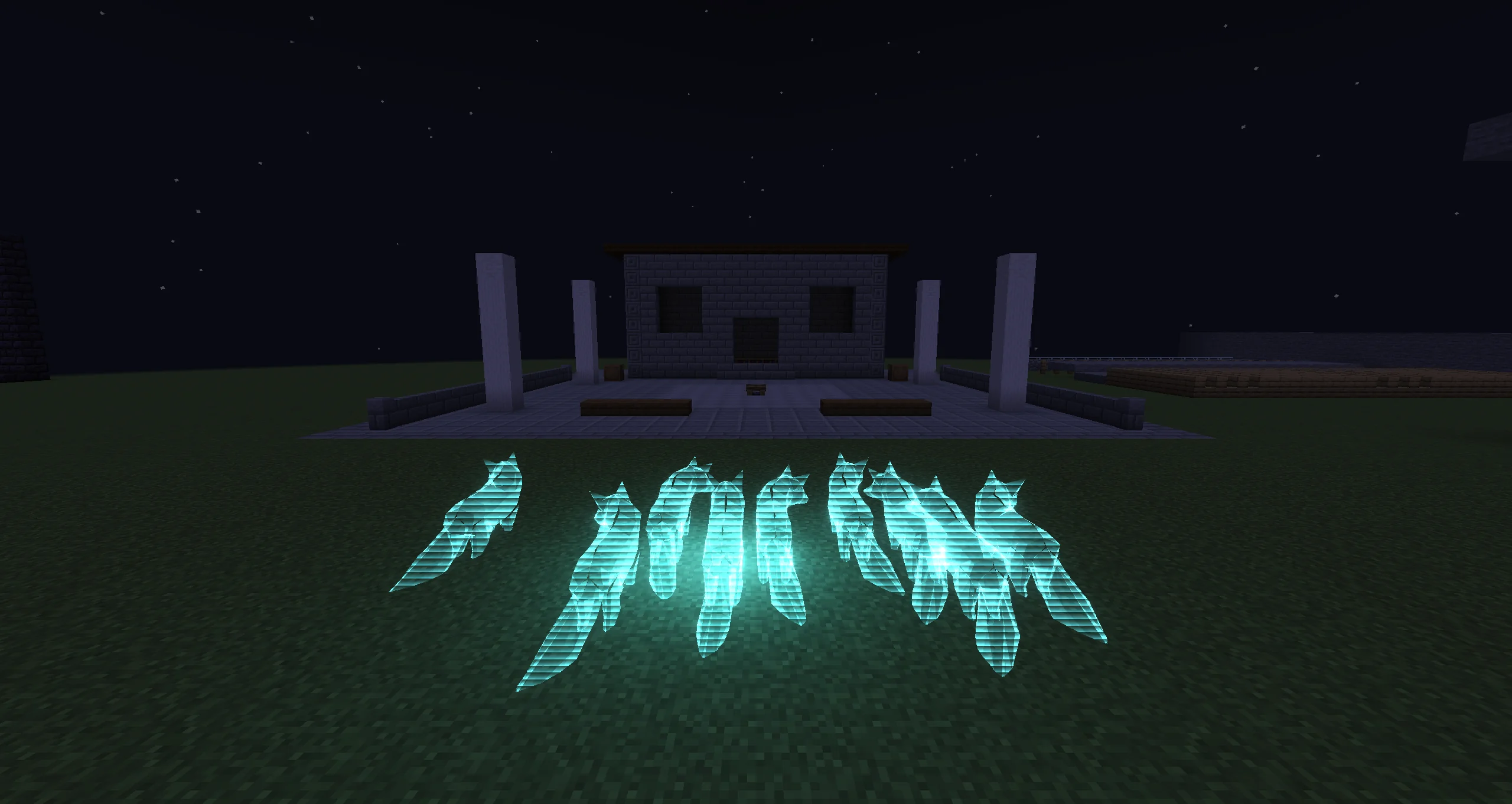
Since 2.2.7, the Animated glTF Model source plays a clip from a rigged glTF file on every particle that draws it. Dropping a file with a skeleton and at least one animation into the Mesh resource panel creates this source. Animation-only files and plain meshes import as glTF Model.
Fields
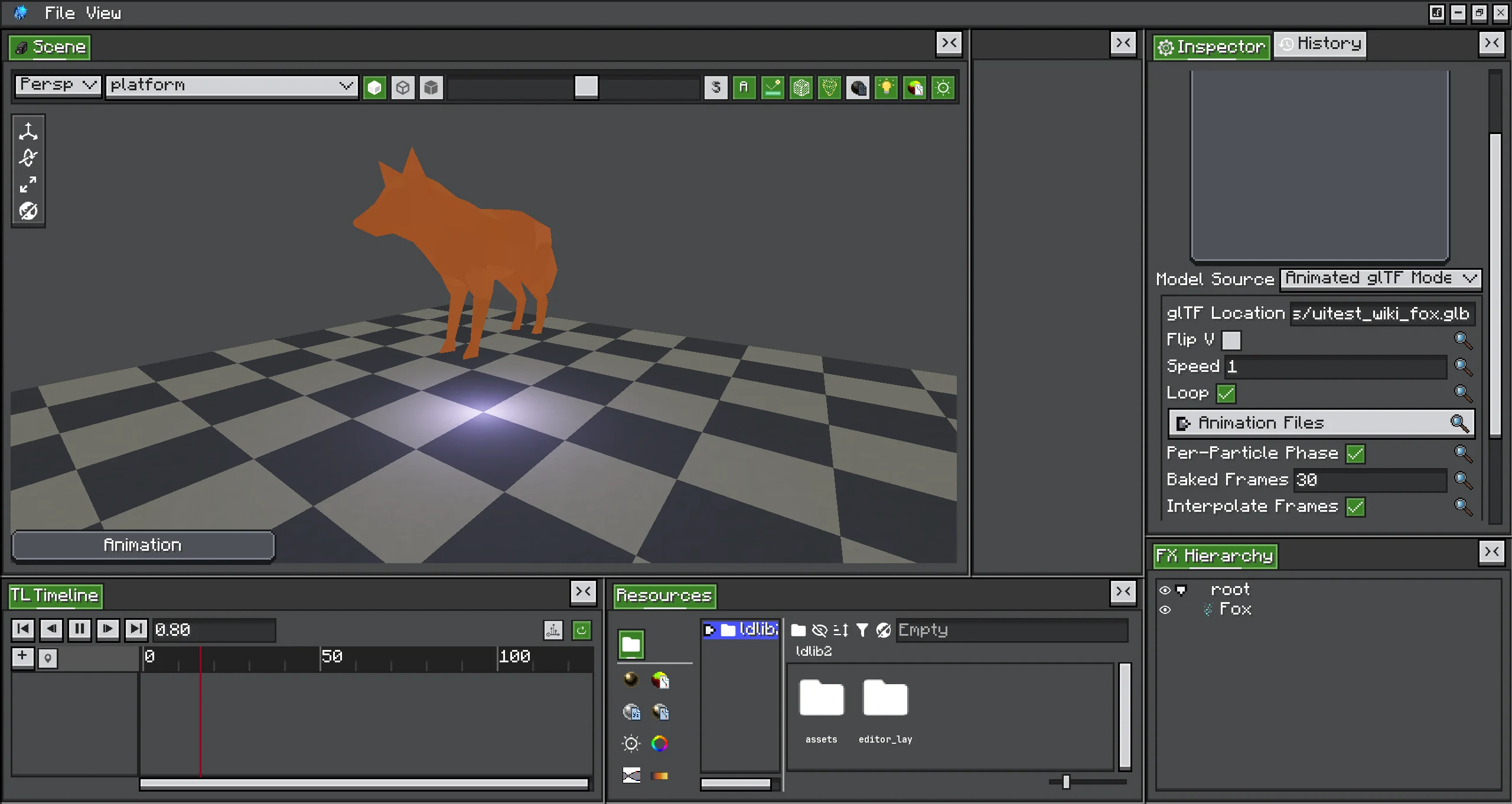
| Field | Default | Description |
|---|---|---|
| glTF Location, Flip V | –, off | Same as the glTF Model source. |
| Animation | (first in the file) | Dropdown of the clips in the file and in Animation Files. Stored by name, so a re-export that reorders the clips keeps the choice. |
| Speed | 1 | Playback rate. 2 is twice as fast; a negative value plays backwards. With Phase From = Lifetime, it is how many times the clip plays over a particle's life. |
| Loop | on | Restarts the clip when it ends. Off holds the last frame. |
| Animation Files | empty | Extra .glb files whose clips are added to the list. See Extra Animation Files. |
| Per-Particle Phase | off | Gives every particle its own point in the clip instead of posing them all alike. |
| Baked Frames | 30 (2–240) | Per-Particle Phase only. How many poses to bake. More is smoother and larger. |
| Interpolate Frames | on | Per-Particle Phase only. Blends adjacent baked frames instead of snapping. Costs one more texel fetch per vertex. |
| Phase From | Random | Per-Particle Phase only. Random: a stable per-particle offset from the shared clock. Lifetime: the clip plays Speed times from spawn to death. |
The panel also has the select a glb / gltf file and reload mesh buttons.
The Clock
The animation does not follow the emitter's own time.
- In the editor, it follows the timeline playhead. Scrubbing scrubs the pose, and pausing holds it.
- In the world, it follows the level's game time. Every instance of every effect reads the same clock, so a clip does not restart when an effect starts.
Because game time is far past the end of any clip, a clip with Loop off sits on its last frame in the world, unless Phase From is Lifetime. Use Lifetime for one-shot animations.
Shared Clock and Per-Particle Phase
| Per-Particle Phase off (shared clock) | Per-Particle Phase on | |
|---|---|---|
| How the pose is made | The CPU skins the mesh once per frame. | The clip is baked once into a pose table; the vertex shader poses each particle from it. |
| Particles | All in lockstep. | Each at its own point of the clip. |
| Per-frame cost | One skinning pass for each model + clip + Speed + Loop, shared by every emitter that uses them. | None after the bake. |
| Normals | Follow the deformation. | Baked with the positions, so they follow too. |
Tangents (tangent toggle) | Follow the deformation. | Not baked; they stay in the rest pose. |
Per-Particle Phase works with and without GPU instancing.
The pose table holds (Baked Frames + 1) × vertices × 16 bytes. It is capped at 2,000,000 texels (32 MiB). That is about 64,000 vertices at the default 30 frames. Above the cap, Photon does not bake: the model keeps animating, but in lockstep as with Per-Particle Phase off, and the log says once how many texels it would need. Lower Baked Frames to bring it under the cap.
The mesh preview and the emission shape always show the shared-clock pose, even with Per-Particle Phase on.
Extra Animation Files
Exporters often write one file for the character and one file per animation. Add the animation files to Animation Files:
- Their clips are matched onto the model's skeleton by joint name. Both files must be exports of the same rig.
- A file with one clip adds it under the file's name, for example
runforrun.glb. A file with several clips adds them as<file name>/<clip name>. - Channels whose joints the model does not have are dropped, and the log says how many. A file whose joints match none of the model's adds nothing.
Rig Support
- Up to 4 bone influences per vertex (
JOINTS_0/WEIGHTS_0). LINEAR,STEPandCUBICSPLINEkeyframe interpolation.- Morph-target (
weights) channels are dropped. - Animated nodes without a skin, such as a propeller or a spinning gem, animate too.
Emission Shapes
A Mesh shape that uses an animated source spawns on the current shared-clock pose, so spawn points follow the animation. The sampling weights (edge lengths and triangle areas) stay those of the rest pose: a stretched limb gets its unstretched share. See Emission and Shapes.
Tips
- One-shot animations (a jump, an opening flower): turn on Per-Particle Phase and set Phase From to Lifetime. Speed
1plays the clip once over each particle's life. With Speed above1and Loop off, the clip ends early and holds its last frame. - Flocks and swarms: Per-Particle Phase with Phase From = Random keeps the particles out of lockstep.
- Big meshes: lower Baked Frames and keep Interpolate Frames on. The table grows with the frame count. A long clip at a low frame count looks stepped without interpolation: 30 frames of a 4-second clip is 7.5 poses per second.
- Normal-mapped animated models: use the shared clock. With Per-Particle Phase, the tangents stay in the rest pose.