
Editor and Projects
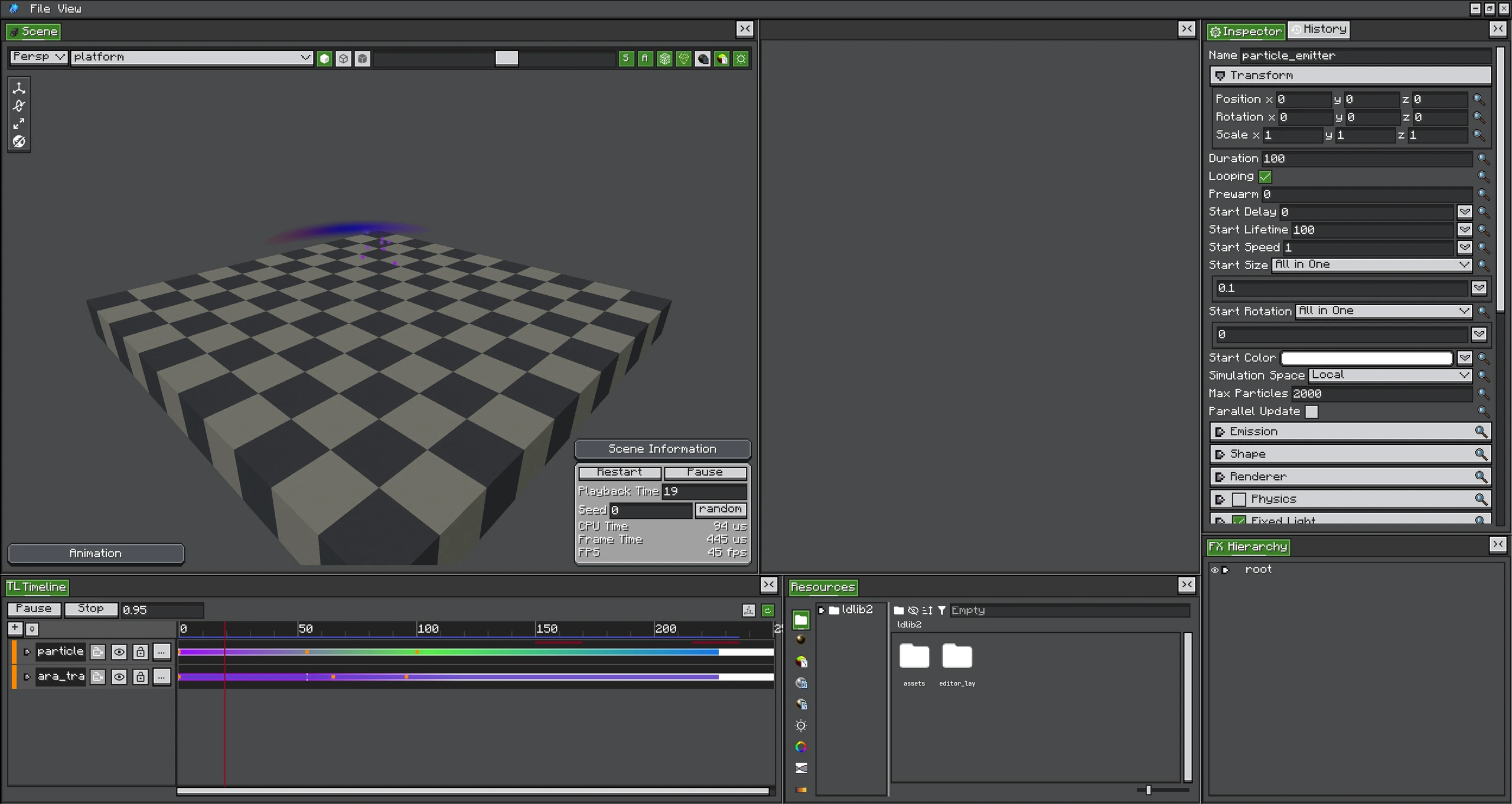
Photon uses the LDLib2 editor framework. The FX project adds a real-time scene, an FX object hierarchy, and a Timeline to the standard resource and Inspector workflow.
Workspace
| Area | Purpose |
|---|---|
| FX Hierarchy | Create, name, parent, reorder, duplicate, and select FX objects. |
| Scene | Preview the runtime, inspect shapes, move objects, and control playback. |
| Inspector | Edit the selected object's transform, emitter config, modules, material, and renderer. |
| Resources | Create and reuse materials, graphs, curves, gradients, colors, and meshes. |
| Timeline | Sequence objects, animate transforms/config values, play audio, and submit post effects. |
| History | Inspect and undo editor commands. |
File Types
| File | Role |
|---|---|
.fxproj | Editable project file, including project metadata and the authored FX definition. |
.fx | Compressed runtime definition. It references resources by path. |
.fxpack | Resource-pack zip containing one or more effects and their collected dependencies. |
*.material.nbt | Reusable material resource. |
*.shader_graph.nbt | Particle/material Shader Graph. |
*.shader_function.nbt | Reusable shader function graph. |
*.fullscreen_graph.nbt | Fullscreen shader pass. |
*.render_graph.nbt | Multi-pass post-effect graph. |
*.mesh.nbt | Reusable mesh source. |
Project Resources
An FXProject installs Material, Shader Graph, Shader Function, Fullscreen Graph, Render Graph, Color, Curve, Gradient, and Mesh resource panels. A resource can be dragged into a compatible Inspector field or graph input.
File-backed resources under <gameDir>/ldlib2/assets/ can be shared by several projects. Built-in resources are read-only. Saving a graph resource recompiles dependent materials or passes.
Authoring and Runtime Files
Do not treat .fxproj and .fx as interchangeable:
- Edit and save the project as
.fxproj. - Export
.fxfor local runtime use when all referenced resources already exist. - Export
.fxpackwhen the effect must travel with its dependencies.
The editor stamps exported FX data with a project format version. Photon applies registered data fixes while loading older versioned files.
Practical Rules
- Give runtime-controlled objects stable, unique names; Java code can find them with
FXRuntime#findObject. - Keep reusable graphs, materials, gradients, and meshes in named resource folders instead of duplicating inline data.
- After changing a resource file outside the editor, reload resources before judging the preview.
- Use lowercase resource paths without spaces for anything that will ship in a resource pack.