
Additional GPU Data
Since 2.2.0
Additional and Custom streams vary values per instance without splitting the renderer into one draw call per particle.
Additional GPU Data exposes simulation values to a material without rebuilding particle geometry on the CPU. It has two parts:
- Built-in channels such as normalized age, velocity, emitter position, trail-point life, or beam direction.
- Up to four Custom Data streams, each sampled as a
vec4and optionally overridden at runtime.
Built-in Channel Matrix
| Channel | Type | Particle | Trail/AraTrail | Beam |
|---|---|---|---|---|
| random | float | ✓ | ✓ | ✓ |
| t (normalized age) | float | ✓ | ✓ | ✓ |
| age / lifetime | float | ✓ | — | — |
| position / velocity | vec3 | ✓ | — | — |
| isCollided | float | ✓ | — | — |
| emitter t / age | float | ✓ | ✓ | ✓ |
| emitter position / velocity | vec3 | ✓ | ✓ | ✓ |
| point t / point life | float | — | ✓ | — |
| beam direction / length | vec3 / float | — | — | ✓ |
Unsupported combinations return zero. point t is interpolated along a trail segment. Beam direction is end - start; normalize it when only orientation is needed.
Read Built-in Channels in Shader Graph
Add an Additional Data node and choose a registered channel. Its output type matches the matrix above. The compiler automatically enables channels read by the graph, so Shader Graph does not require the corresponding manual toggle. Vertex logic reads the fixed PhotonData record and creates a varying automatically when fragment logic consumes it.
Non-instanced CPU paths and node previews return zero. A channel unsupported by the active renderer also returns zero.
Configure Custom Data Streams
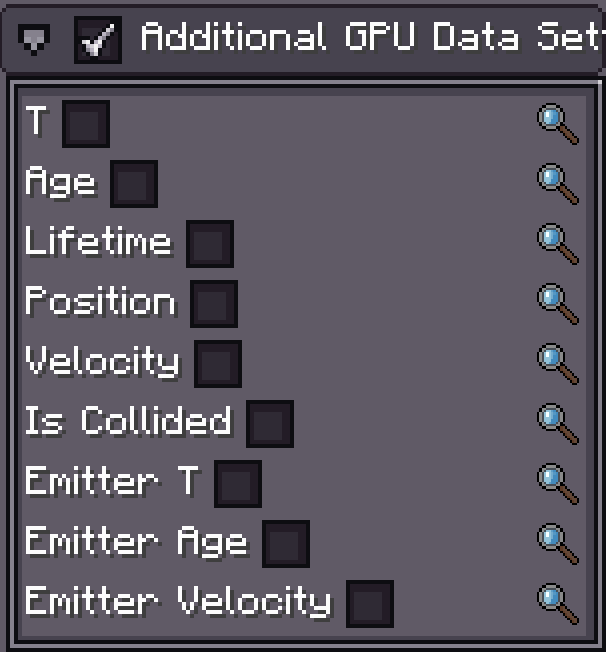
- Enable Additional GPU Data Setting in the emitter Inspector.
- Add streams to the Custom Data list, up to four.
- Select a stream type, time source, and function for each channel.
Stream index is its zero-based list position. Shader Graph and hand-written shaders both read by index. Renaming a channel is display-only and does not alter the GPU layout; moving or deleting a stream changes every later index.
| Stream type | Inspector content | GPU value |
|---|---|---|
| Vector | 1–4 independently named Number Functions | vec4(x, y, z, w); unused components are zero |
| Color | one HDR Color/Gradient Function | vec4(r, g, b, a); HDR RGB may exceed 1 |
Time Source
| Source | Sample x | Supported emitters |
|---|---|---|
| Self | normalized life of the particle/beam, or normalized segment life for Trail/AraTrail | all |
| Emitter | normalized time of the owning emitter | all |
| Length | position along trail length | Trail and AraTrail |
All channels in one stream share the time source. A Random Function uses a stable key per particle and stream, so uploading the buffer again each frame does not resample it into flicker.
Read Custom Data in Shader Graph
The Custom Data node belongs to particle Shader Graphs and Shader Function Graphs, not Fullscreen Graphs.
- Add a Custom Data node.
- Set Index to the emitter stream index
0..3. - The node always outputs one
vec4. - Split x/y/z/w for a Vector stream; use a Color stream directly for color or emission.
For example, stream 0 can store dissolve in x and UV distortion in y:
Custom Data (Index 0)
        │
      Split
      ├─ x ──> Alpha / Dissolve Threshold
      └─ y ──> UV Offset Strength
The node calls photon_custom_data(index) in the vertex stage. When fragment logic consumes the output, the compiler creates a varying automatically; no manual out/in is needed. It also marks the material as a Custom Data consumer, causing the renderer to upload four fixed RGBA32F PhotonCustomData texels per instance.
The result is vec4(0) for:
- node previews;
- non-instanced CPU rendering;
- disabled Additional GPU Data;
- a missing stream;
- an index above 3. A negative node option is clamped to stream 0.
Test on the actual GPU-instanced particle, trail, beam, or AraTrail renderer rather than relying on node preview.
Read Custom Data in Custom Shader Material
This is supported, but it uses a different interface from Shader Graph. Custom Shader Material receives one appended vec4 instance attribute per Custom Data stream.
Do not call photon_custom_data()
photon_custom_data() reads the PhotonCustomData buffer texture. That buffer is uploaded only when a Shader Graph material in the same pass actually consumes Custom Data, so it is not a stable hand-written-material interface. Declare attributes in Custom Shader Material.
Attribute Locations
With no manually enabled built-in channels, stream 0 begins at:
| Renderer define | Stream 0 location |
|---|---|
PARTICLE_INSTANCE | 8 |
PARTICLE_MODEL_INSTANCE | 9 |
TRAIL_INSTANCE | 3 |
ARA_TRAIL_INSTANCE / ARA_TRAIL_TUBE_INSTANCE | 3 |
BEAM_INSTANCE | 6 |
Each manually enabled, uploadable built-in channel consumes one attribute location:
customLocation = rendererBaseLocation
               + enabledUploadableBuiltinChannelCount
               + streamIndex
Built-in channels follow the registry order shown in the matrix above. Enabling another toggle may move every Custom Data stream, so keep emitter settings and GLSL together. Beam direction/length are derived in the shader and consume no attribute.
Vertex Shader Example
This example assumes no built-in channel toggles and reads stream 0:
#version 330 core
#moj_import <photon:particle.glsl>

#if defined(PARTICLE_INSTANCE)
layout(location = 8) in vec4 iCustom0;
#define HAS_CUSTOM0
#elif defined(PARTICLE_MODEL_INSTANCE)
layout(location = 9) in vec4 iCustom0;
#define HAS_CUSTOM0
#elif defined(TRAIL_INSTANCE) || defined(ARA_TRAIL_INSTANCE) \
   || defined(ARA_TRAIL_TUBE_INSTANCE)
layout(location = 3) in vec4 iCustom0;
#define HAS_CUSTOM0
#elif defined(BEAM_INSTANCE)
layout(location = 6) in vec4 iCustom0;
#define HAS_CUSTOM0
#endif

out vec4 custom0;

void main() {
    ParticleData particle = getParticleData();
    // ...compute gl_Position and other varyings...

#ifdef HAS_CUSTOM0
    custom0 = iCustom0;
#else
    custom0 = vec4(0.0); // preview and non-instanced CPU paths
#endif
}
Read it through a matching fragment varying:
in vec4 custom0;

void main() {
    float dissolve = custom0.x;
    vec3 emission = custom0.rgb;
    // ...
}
Declaring a stream in GLSL is not enough: the emitter must create that stream and enable Additional GPU Data. When also reading legacy built-in channels, declare those attributes according to their enabled order and recalculate the Custom Data location.
Runtime Override
All four emitter runtimes expose a CustomDataRuntime. Override one stream/channel without editing the shared authored configuration:
ParticleEmitter sparks = (ParticleEmitter) runtime.findObject("sparks");

// Stream 0, channel 0 (X/R). RuntimeValue accepts the authored function type.
sparks.runtime().customData.slot(0, 0)
        .set(new Constant(0.85f));

// Return to the value authored in the editor.
sparks.runtime().customData.slot(0, 0).clear();
Trail, Beam, and AraTrail use the same runtime().customData.slot(stream, channel) pattern. A Color stream is exposed as its color binding; scalar/vector streams expose their component bindings.
WARNING
Timeline Animation and Java write the same RuntimeValue slots. The most recent write wins for that sample. If a Timeline clip drives a slot every frame, a one-time Java set() will appear to be ignored. Either animate another stream, update after Timeline evaluation, or keep ownership in one system.
Performance
Shader Graph uploads only channels used by the compiled pass. Custom stream buffers are created only when a graph reads Custom Data. Legacy shaders require manual toggles and upload the declared attributes. Prefer a few packed streams shared by many particles over many unique materials that prevent batching.