
Keymap
Since 2.2.40Every Editor has its own Keymap. A keymap is a list of EditorActions, each with a stable id, default chords, a context, and a handler. Users can rebind any action from Settings → Keymap, and editors, views, and projects can add their own actions.
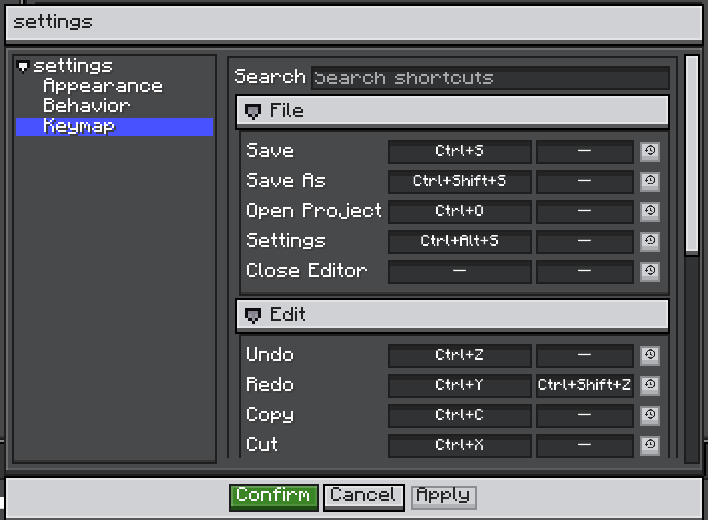
How a Key Press Is Resolved
The dispatcher listens on the editor in the bubble phase. A control that already consumed the key, such as a text field typing a character, stops the event first, so the keymap never sees it.
When several actions share a chord, Keymap#candidates orders them by context specificity, then priority, then registration order (newest first). A handler that returns false passes the chord to the next candidate. This is how one key can serve several panels.
Built-in Actions
The ids are constants in EditorActions.
| Action | Id | Default | Alternative |
|---|---|---|---|
| Save | ldlib2:editor.save | Ctrl+S | |
| Save As | ldlib2:editor.save_as | Ctrl+Shift+S | |
| Open Project | ldlib2:editor.open_project | Ctrl+O | |
| Settings | ldlib2:editor.settings | Ctrl+Alt+S | |
| Close Editor | ldlib2:editor.close | unbound | |
| Undo | ldlib2:editor.undo | Ctrl+Z | |
| Redo | ldlib2:editor.redo | Ctrl+Y | Ctrl+Shift+Z |
| Copy / Cut / Paste | ldlib2:editor.copy / cut / paste | Ctrl+C / Ctrl+X / Ctrl+V | |
| Duplicate | ldlib2:editor.duplicate | Ctrl+D | |
| Select All | ldlib2:editor.select_all | Ctrl+A | |
| Find | ldlib2:editor.find | Ctrl+F | |
| Next Tab | ldlib2:editor.next_view | Ctrl+PageDown | Ctrl+Tab |
| Previous Tab | ldlib2:editor.previous_view | Ctrl+PageUp | Ctrl+Shift+Tab |
| Maximize Pane | ldlib2:editor.maximize_pane | Ctrl+M | |
| Minimize Window | ldlib2:editor.minimize_window | Ctrl+Alt+Down | |
| Maximize / Restore Window | ldlib2:editor.maximize_window | Ctrl+Alt+Up |
The Edit actions (Undo through Find) do not act on their own. They send the matching CommandEvents command to whatever has the focus, so the focused view decides what "copy" or "undo" means. See Command Handling.
Save works the same way: the focused view gets the save command first, and the editor saves the project only if no view claims it.
Define an Action
EditorAction.builder(MyIds.RUN_PREVIEW)
        .category(KeymapCategories.GENERAL)
        .defaultChord(KeyChord.key(GLFW.GLFW_KEY_F5))
        .defaultAlternative(KeyChord.ctrl(GLFW.GLFW_KEY_R))
        .when(KeyContext.focusWithin(PreviewView.class))
        .onAction(this::runPreview)
.build();| Builder method | Description |
|---|---|
category(String) | Settings page group. A translation key; constants are in KeymapCategories (GENERAL, FILE, EDIT, VIEW, WINDOW). Unknown strings show as themselves. Default GENERAL. |
displayName(Component) | Name on the settings page. Default: the translation key keymap.<namespace>.<path>, for example keymap.ldlib2.editor.save. |
defaultChord(KeyChord) | Main default chord. Default unbound. |
defaultAlternative(KeyChord) | Optional second default chord. |
when(KeyContext) | When the action may run. Default KeyContext.global(). |
priority(int) | Breaks ties between actions of equal specificity. Higher runs first. |
onAction(Runnable) | Handler that always counts as handled. |
onAction(Handler) | Handler that returns false to pass the chord on. |
build() throws IllegalStateException if no handler was set.
Chords
KeyChord is a GLFW key code plus modifiers. Use the factory methods: KeyChord.key(key), ctrl(key), shift(key), alt(key), ctrlShift(key), ctrlAlt(key), or KeyChord.of(key, ctrl, shift, alt). KeyChord.UNBOUND means no key.
On macOS, the Command key is read as Ctrl.
Contexts
| Context | Runs when | Specificity |
|---|---|---|
KeyContext.global() | Always. | 0 |
KeyContext.withProject() | A project is open. | 10 |
KeyContext.notTyping() | The focus is not in a text field, text area, or code editor. | 10 |
KeyContext.focusWithin(Class) | The focus is on an element of that type, or inside one. | 100 |
a.and(b) | Both hold. | The higher of the two |
KeyContext.of(predicate, specificity) | Your own condition. | Given |
A more specific context is tried first, whatever the registration order. A candidate whose context does not hold is skipped, so it never hides the action behind it.
Register Actions
From an editor subclass
Override initKeymap() and call super. To change what a built-in action does, register your own action under the same EditorActions id. It replaces the built-in one.
@Override
protected void initKeymap() {
    super.initKeymap();
    keymap.register(EditorAction.builder(EditorActions.FIND)
            .category(KeymapCategories.EDIT)
            .defaultChord(KeyChord.ctrl(GLFW.GLFW_KEY_F))
            .onAction(this::openShopSearch)
            .build());
}
From a project
The editor outlives the project, so register in IProject#onLoad and unregister in onClosed:
private ISubscription actions = () -> {};

@Override
public void onLoad(Editor editor) {
    actions = editor.getKeymap().registerAll(
            EditorAction.builder(MyIds.RUN_PREVIEW)
                    .defaultChord(KeyChord.key(GLFW.GLFW_KEY_F5))
                    .when(KeyContext.focusWithin(PreviewView.class))
                    .onAction(this::runPreview)
                    .build());
}

@Override
public void onClosed(Editor editor) {
    actions.unsubscribe();
}
register and registerAll return an ISubscription. Unsubscribing does nothing if another action has since been registered under the same id, so a view being disposed cannot remove its successor.
Registered actions appear on the Keymap page and can be rebound like built-in ones.
Show the Current Shortcut
Shortcuts can change, so never write them into translation strings. Read them from the keymap:
| API | Use |
|---|---|
Keymap#menuLabel(id, translationKey) | A menu entry name with the bound chord after it in grey. |
Keymap#shortcutHint(id) | Only the grey chord, or an empty component when unbound. |
Keymaps.of(element) | The keymap of the editor that contains an element, or null. |
Keymaps.shortcutTooltip(element, id, fallback) | A tooltip line for a button. Uses fallback when the element is not inside an editor. |
menu.leaf(Icons.PLAY, editor.getKeymap().menuLabel(MyIds.RUN_PREVIEW, "shop.menu.run_preview"), this::runPreview);User Bindings
KeymapSettings stores only the bindings the user changed. An action the user never touched keeps following its default, so a later version can change a default without overriding the user.
All editors share one settings file, config/ldlib2/editor.json. Bindings for actions the current editor does not know are kept, so saving one editor does not wipe another editor's keymap.
On the Keymap page:
- the search box filters actions,
- clicking a chord field records the next key you press, including
Esc, BackspaceorDeleteclears the binding,- clicking elsewhere cancels recording,
- each row has a reset button, and chords used by more than one action are marked.
Changes take effect when the settings dialog is applied.
Keep Keys in a Focused Control
A custom control that handles a key without stopping the event can still lose it to a shortcut. Override these UIElement methods to keep it:
| Method | Description |
|---|---|
ownsKey(UIEvent) | Return true for keys this element takes while it has the focus. The keymap does not run any action for them. |
isTextInput() | Return true while the user types into this element. KeyContext.notTyping() reads it. |
Built-in text fields, text areas, and code editors already implement both.
Esc and the old behavior settings
Before 2.2.40, BehaviorSettings handled Esc, Save, Save As, and the settings panel. These are keymap actions now. BehaviorSettings#shouldCloseOnEsc is deprecated: if it was on, the editor binds Esc to ldlib2:editor.close once, on first load.