
Getting Started
This page builds the smallest useful graph: one graph definition, a few node classes, and a GraphEditorView that displays the graph.
The examples mirror the test sources under com.lowdragmc.lowdraglib2.test.noddegraphtoolkit.
Create a Graph Type
A graph type extends Graph. Most graph types use GraphNodeRegistry so annotated node classes are discovered automatically.
public class TestGraph extends Graph {
    public static final GraphNodeRegistry NODE_REGISTRY =
            GraphNodeRegistry.create(LDLib2.id("test_graph"), TestGraph.class);

    @Override
    public List<Class<? extends Node>> getSupportNodes() {
        return NODE_REGISTRY.getNodeClasses();
    }

    @Override
    public @Nullable List<TypeHandle> getSupportTypes() {
        var types = new HashSet<>(CustomGraphModelImpl.detectSupportedTypes(graphModel));
        types.add(TypeHandles.FLOAT);
        types.add(TypeHandles.STRING);
        types.add(TypeHandles.BOOL);
        return List.copyOf(types);
    }
}
getSupportNodes() controls which node classes can be created in the graph.
getSupportTypes() controls constant nodes and variable types. Returning null lets LDLib2 detect types from registered node ports.
Create a Node
A normal node extends Node and is registered with @NodeAttribute.
@NodeAttribute(name = "test_concat", group = "test", graphTypes = {TestGraph.class})
public class TestStringConcatNode extends Node {
    @Override
    public Component getDisplayName() {
        return Component.literal("Concat");
    }

    @Override
    public void onDefinePorts(IPortDefinitionContext context) {
        context.addInputPort("a", String.class).build();
        context.addInputPort("b", String.class).build();
        context.addOutputPort("out", String.class).build();
    }
}
name is the registry id inside the graph toolkit. group is used by the item library. graphTypes binds the node to graph types.
Create a Graph Instance
Use graph.graphModel to create variables, nodes, and wires.
public static Graph createTestGraph() {
    var graph = new TestGraph();

    graph.graphModel.createVariable("test_v", Float.class, 10f, null);

    graph.graphModel.createNodeModel(new TestStringConcatNode(), new Vector2f(200, 200));
    var constant = graph.graphModel.createNodeModel(new TestConstantNode(), new Vector2f(0));
    var add = graph.graphModel.createNodeModel(new TestAddNode(), new Vector2f(150));

    graph.graphModel.createWire(
            constant.getOutputsById().get("out"),
            add.getInputsById().get("in2")
    );

    return graph;
}
Wires connect output ports to input ports. Compatibility is checked by port direction, port type, capacity, and Java type assignability.
Show It in an Editor View
Use GraphEditorView for normal graph editing UI.
It wraps GraphView and adds the features most graph tools need: save handling, dirty state, breadcrumbs, subgraph dive, external subgraph save support, and consistent graph view creation for nested graph levels.
var editorView = new GraphEditorView();
editorView.loadGraph(createTestGraph(), savedTag -> {
    // Persist savedTag to your project, resource, or screen state.
});
Add it to an LDLib2 Editor workspace:
placeView(editorView, () -> centerWindow.getLeftTop());Or use it inside a simple ModularUI:
var editorView = new GraphEditorView();
editorView.layout(layout -> {
    layout.widthPercent(100);
    layout.heightPercent(100);
});
editorView.loadGraph(createTestGraph(), savedTag -> {});

return new ModularUI(UI.of(editorView), player);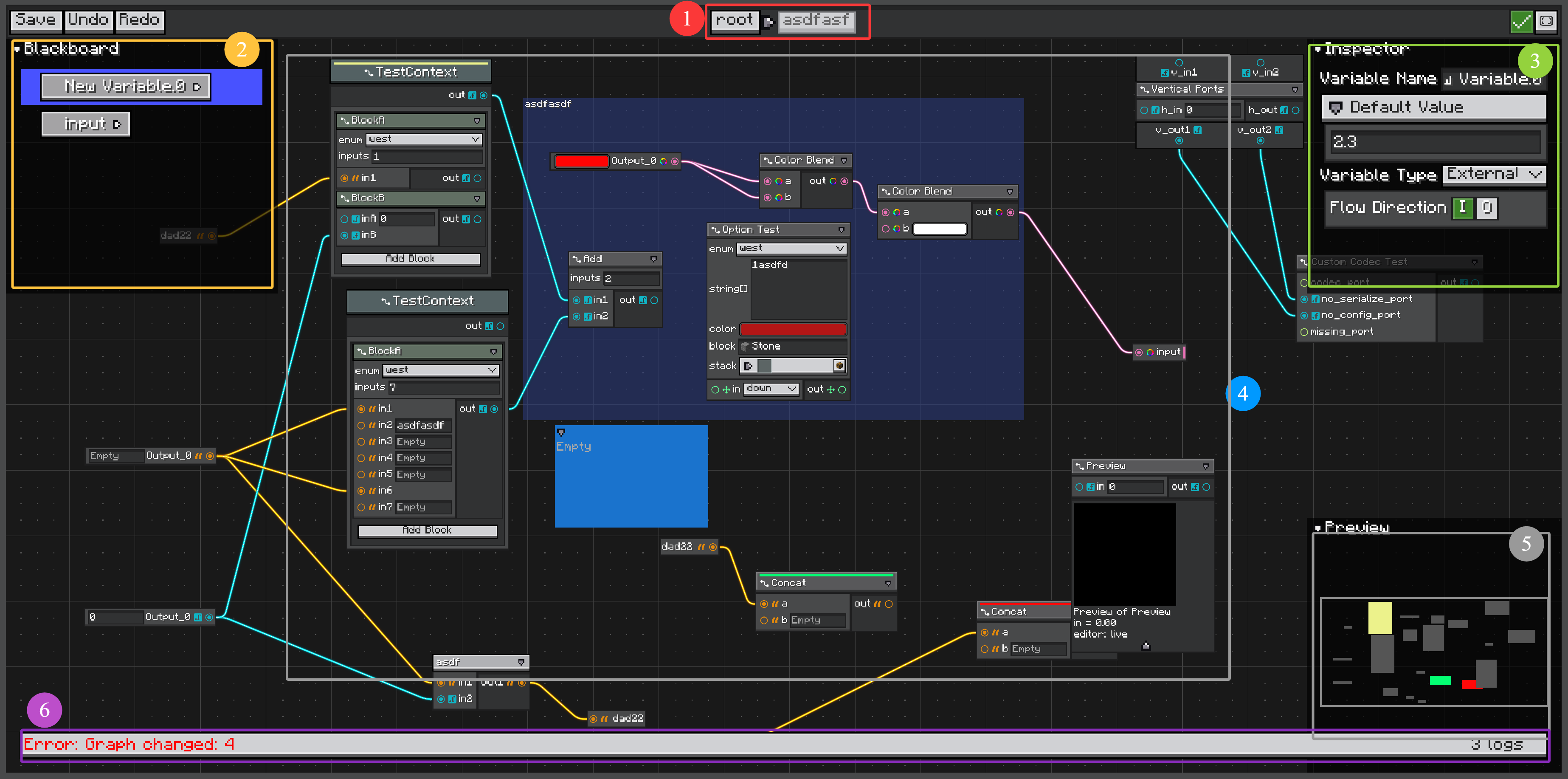
Editor Layout
The marked areas in the screenshot are:
Subgraph breadcrumb
Shows the current graph path. Use it to see whether you are editing the root graph or a nested subgraph. See Subgraphs.Blackboard
Defines graph variables. Variables can be local to the graph or exposed as subgraph input/output ports. See Variables and Blackboard.Inspector
Shows settings for the selected object, such as a variable, node, port, placemat, or sticky note.Main view
Displays graph nodes, wires, placemats, sticky notes, portals, and subgraph nodes. This is the main editing canvas.Preview
Shows a layout preview / LOD-style thumbnail of the graph, useful for navigating large graphs.Graph log
Shows graph diagnostics emitted byGraph.onGraphChanged(GraphLogger), such as errors, warnings, and info messages. See GraphView Diagnostics Footer and Graph Definition.
Low-Level GraphView
GraphView can still be used directly for small embedded views or tests:
var graphView = new GraphView();
graphView.loadGraph(createTestGraph());
Do not use direct GraphView as the default editor entry. It does not provide the full GraphEditorView workflow, including subgraph dive and resource-level external subgraph editing.
For resource-backed graph assets, use GraphResource so the Editor opens GraphEditorView automatically. See Editor Resources.