
Anotations
Since 2.1.0We show all anotations and their usage in this page.
LDLib Dev Tool
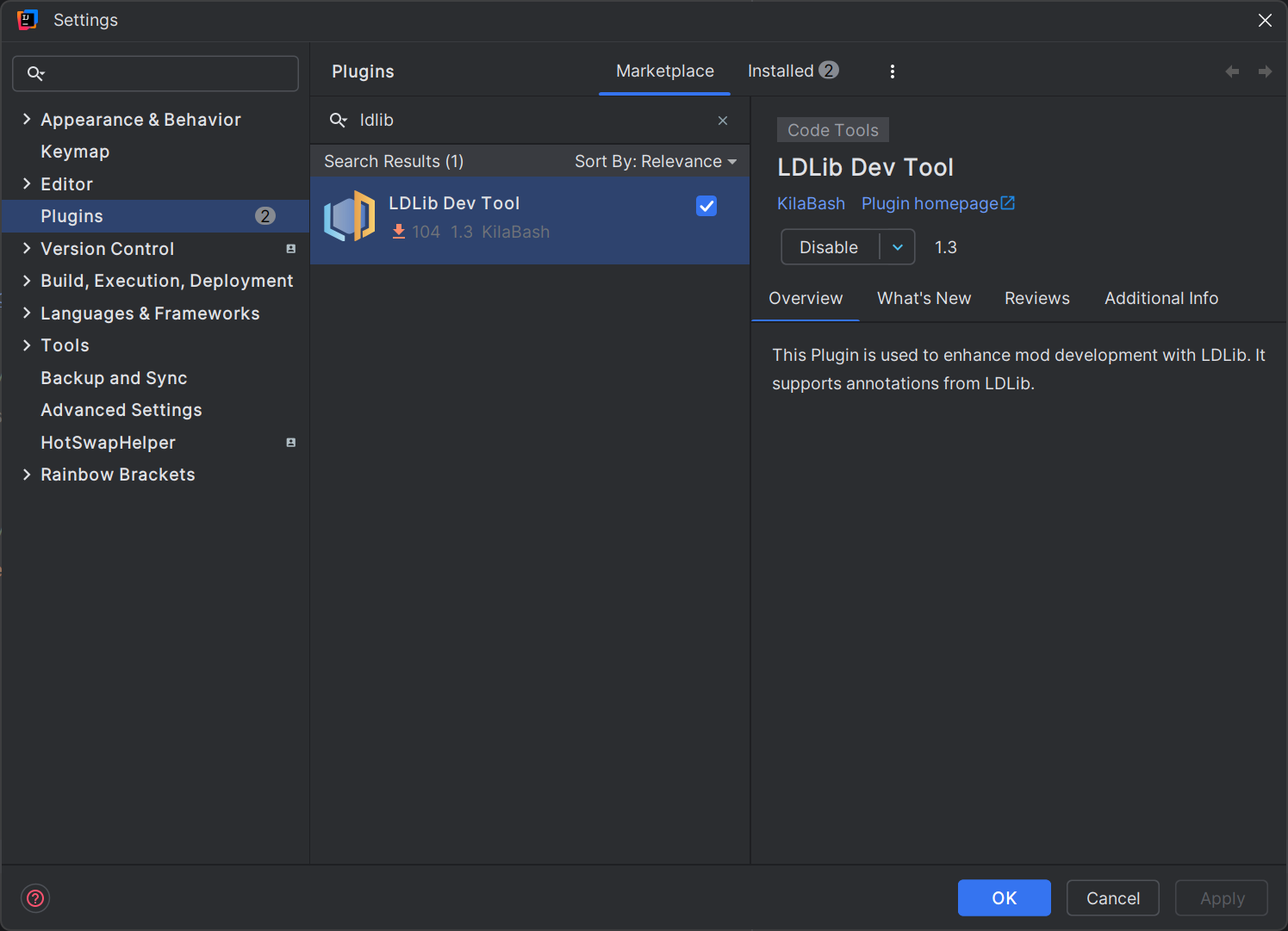
If you are going to develop with LDLib2, we strongly recommend you to install our IDEA Plugin LDLib Dev Tool. The plugin has:
- code highlight
- syntax check
- cdoe jumping
- auto complete
- others
which greatly assist you in utilizing features of LDLib2. Especially, all the annotations of LDLib2 have been supported for use.
Common Annotations
@DescSynced
Annotate a field, the value of this field (server side) should be synced to the client side (specifically, remote)
@DescSynced
int a;

@DescSynced
private ItemStack b = ItemStack.EMPTY;

@DescSynced
private List<ResourceLocation> c = new ArrayList<>();
@Persisted
Annotate a field, the value of this field (server side) will be written/read to/from BlockEntities' nbt.
String key() represent tag name in nbt. default -- use field name instead.
@Persisted(key = "fluidAmount")
int value = 100;
@Persisted
boolean isWater = true;
its nbt/json looks as below:
{
  "fluidAmount": 100,
  "isWater": true
}
boolean subPersisted() If true, it will wrap the field's internal value based on its non-null instance.
It is very useful for final instance which doesn't allow new instance creation. If the filed set subPersisted = true, LDLib2 will do:
- if the field inherits from
INBTSerializable<?>, it will try to use its api for serialization. - otherwise, it will serialize the field's internal values and wrap it as a map.
@Persisted(subPersisted = true) // @Persisted is also fine here, because INBTSerializable is also supported as a read-only field.
private final INBTSerializable<CompoundTag> stackHandler = new ItemStackHandler(5);
@Persisted(subPersisted = true)
private final TestContainer testContainer = new TestContainer();

public static class TestContainer {
    @Persisted
    private Vector3f vector3fValue = new Vector3f(0, 0, 0);
    @Persisted
    private int[] intArray = new int[]{1, 2, 3};
}
its nbt/json looks as below:
{
    "stackHandler": {
        "Size": 5,
        "Items": [],
    },
    "testContainer": {
        "vector3fValue": [0, 0, 0],
        "intArray": [1, 2, 3],
    }
}
@LazyManaged
An annotation that marks a field as being managed lazily. This means that the field will only be marked as dirty manually.automatically. This annotation is useful for fields that are not updated frequently, or for fields that are updated in a batch.
@DescSynced
@Persisted
int a;

@DescSynced
@Persisted
@LayzManaged
int b;

public void setA(int value) {
    this.a = value;  // will be sync/persist automatically, in general
}

public void setB(int value) {
    this.b = value;
    markDirty("b"); // mannually notify chagned
}
@ReadOnlyManaged
This annotation is used to mark a read-only field that is managed by the user.
read-only types (e.g. IManaged and INBTSerializable<?>) requires the field to be non-null and the field instance won't be changed (a final field).
What are read-only types?
read-only types refer to fields which are always non-null and immutable, and not sure how to create a new instance of this type. More details can be found in Types Support.
Because we don't know how to create a new instance for these types. In this case, you can use this annotation and provide methods to store a unique id from server with serializeMethod() and create a new instance at the client with deserializeMethod().
Furthermore, you can provide a method to self-control whether the field has changed with onDirtyMethod().
onDirtyMethod: specify a method for customize dirty checking. return whether it has changed.javaboolean methodName();serializeMethod: return a unique id (Tag) of given instance.javaTag methodName(@Nonnull T obj);deserializeMethod: create an instance via given uid.javaT methodName(@Nonnull Tag tag)
Synchronization Process (Persistence is similar)
- To check if a
read-onlyfield has internal changes, LDLib2 will first check if unique id is equal to previous snapshot.- If
not, mark this field as dirty, and store the latest snapshot. - If
true, go to step 2.
- If
- Check if the the value is dirty compared with previous snapshot.
- if
onDirtyMethodis not set, LDLib2 will check dirty according to the registeredread-onlytype. - if
true, use customized method to check if dirty.
- if
- If the field is dirty. LDLib2 will sync both uid and value data and ask remote (client) to update value.
- While the remote receive the changes, it will check uid first.
- if not equal, create a new instance based on
deserializeMethodfirst. - then update value based on registered
read-onlytype.
- if not equal, create a new instance based on
Example
@Persisted
@DescSync
@ReadOnlyManaged(serializeMethod = "testGroupSerialize", deserializeMethod = "testGroupDeserialize")
private final List<TestGroup> groupList = new ArrayList<>();

public static class TestGroup implements IPersistedSerializable {
    @Persisted
    private Range rangeValue = Range.of(0, 1);
    @Persisted
    private Direction enumValue = Direction.NORTH;
    @Persisted
    private Vector3i vector3iValue = new Vector3i(0, 0, 0);
}

public IntTag testGroupSerialize(List<TestGroup> groups) {
    return IntTag.valueOf(groups.size());
}

public List<TestGroup> testGroupDeserialize(IntTag tag) {
    var groups = new ArrayList<TestGroup>();
    for (int i = 0; i < tag.getAsInt(); i++) {
        groups.add(new TestGroup());
    }
    return groups;
}
INFO
In this example, onDirtyMethod is unncessary. Because TestGroup inherits from IPersistedSerializable, which also inherits from INBTSerializable<?>. Therefore, it is a supported read-only type.
@RPCMethod
Annotate a method, you can send RPC packet between server and remote. You are free to define the parameters of the methods long as the parameters support sync, and send rpc anywhere in your class. It is useful to spread an event (c->s / s->c).
INFO
if the RPCSender is defined as your first parameter of your method. LDLib2 will provide the sender information.
Make sure that all args match the parameters of annotated method.
@RPCMethod
public void rpcTestA(RPCSender sender, String message) {
    if (sender.isServer()) {
        LDLib2.LOGGER.info("Received RPC from server: {}", message);
    } else {
        LDLib2.LOGGER.info("Received RPC from client: {}", message);
    }
}

@RPCMethod
public void rpcTestB(ItemStack item) {
    LDLib2.LOGGER.info("Received RPC: {}", item);
}

// methods to send rpc
public void sendMsgToPlayer(ServerPlayer player, String msg) {
    rpcToServer(player, "rpcTestA", msg)
}

public void sendMsgToAllTrackingPlayers(ServerPlayer player, String msg) {
    rpcToTracking("rpcTestA", msg)
}

public void sendMsgToServer(ItemStack item) {
    rpcToServer("rpcTestB", item)
}rpcToTracking: send to all remote players if this chunk is loaded(tracked) in their remotes.rpcToPlayer: send to a specfic playerrpcToServer: send to server.
@RPCMethod
public void rpcTest(String msg) {
    if (level.isClient) { // receive
        LDLib2.LOGGER.info("Received RPC from server: {}", message);
    } else { // send
        rpcToTracking("rpcTest", msg)
    }
}
In this example, you can send and receive msg within one method, which is a neat method.
@UpdateListener
Use this annotation to add a listener of sync receiving on the remote side.
Specifies the name of the method to be called (remote side) when the annotated field is updated from the server.
The first parameter is the old value, and the second parameter is the new value.
@DescSynced
@UpdateListener(methodName = "onIntValueChanged")
private int intValue = 10;

private void onIntValueChanged(int oldValue, int newValue) {
    LDLib2.LOGGER.info("Int value changed from {} to {}", oldValue, newValue);
}
@ConditionalSynced
In general, all fields annotated with @DescSynced will be synced if chhanged. However, you may want to control whether to sync, e.g., conditional sync.
LDLib2 provide this annotation allow you to fine-grained control whether the field should be synced.
@Configurable
@ConditionalSynced(methodName = "shouldSync")
int intField = 10;

public boolean shouldSync(int value) {
    return value > 0;
}
@SkipPersistedValue
In general, all fields annotated with @Persisted will be serialized during persistence. However, you may want to skip serialization, e.g., reduce output size, skip unchanged value, etc.
LDLib2 provide this annotation allow you to fine-grained control whether the field should be serialized.
@Persisted
int intField = 10;

@SkipPersistedValue(field = "intField")
public boolean skipIntFieldPersisted(int value) {
    // 10 is the initial value of this class, there is no need to store it.
    return value == 10;
}
@ManagedCodec
Since 2.2.43Saves and syncs a field with a codec of your own instead of the accessor registered for its type. Use it when a type has no accessor, or when one field needs a different format from the registered one.
It works wherever the field is saved or synced: @Persisted and @DescSynced fields of a managed holder (such as a block entity), and @Persisted or persisted @Configurable fields serialized by PersistedParser.
public class MachineBlockEntity extends BlockEntity implements ISyncPersistRPCBlockEntity {
    @Persisted
    @DescSynced
    @ManagedCodec(value = "targetCodec", streamCodec = "targetStreamCodec")
    private BlockPos target = BlockPos.ZERO;

    protected Codec<BlockPos> targetCodec() {
        return Codec.LONG.xmap(BlockPos::of, BlockPos::asLong);
    }

    protected StreamCodec<ByteBuf, BlockPos> targetStreamCodec() {
        return ByteBufCodecs.VAR_LONG.map(BlockPos::of, BlockPos::asLong);
    }
}

public class AdvancedMachineBlockEntity extends MachineBlockEntity {
    @Override
    protected Codec<BlockPos> targetCodec() {
        return BlockPos.CODEC; // a subclass may save the field differently
    }
}| Attribute | Description |
|---|---|
value | Name of a no-arg method returning a Codec<T> for the field type, or an IAccessor<T> that takes over saving, syncing and change detection entirely. |
streamCodec | Optional. Name of a no-arg method returning a StreamCodec<? super RegistryFriendlyByteBuf, T>. Leave it empty when value returns an IAccessor. |
owner | Optional. Look the methods up on this class instead of the holder. The methods must then be static. |
Method lookup. The methods are looked up on the holder's own class, then its superclasses (any visibility), and last among its public methods, which includes interface default methods. An instance method can be overridden by a subclass; a static method works too.
How the value travels.
- Saves and the initial sync (the update tag a client gets when it loads the chunk) use the codec, with registry-aware ops, so codecs such as
ItemStack.CODECwork. - Later sync packets and buffer writes use the stream codec. Without one, the codec's value is written to the buffer as NBT, which is larger and slower but otherwise the same.
- A
nullfield is saved and synced asnullwithout calling either codec. - Reading a value back assigns a new instance to the field.
- Changes are detected by encoding the value on every update and comparing it with the last encoding, which also catches in-place changes such as adding to a list. To make the check cheaper, return an
IAccessorinstead, for example one built withCustomDirectAccessor.builder(...)and itscopyMarkorcustomMark.
The result is shared per class
The methods are called once per field and class, when the first ref for that field is created, and the result is shared by every instance of that class. They must not depend on instance state, must have no side effects, and must give the server and the client the same codecs. The codec and the stream codec must also agree on every value: a client that loads the chunk later reads what the codec decodes.
Mistakes. A method that cannot be found, throws, returns null or returns the wrong kind of value fails with an IllegalArgumentException naming the field, instead of falling back to the registered accessor. The codec type is not checked against the field type: a mismatch shows up as a ClassCastException the first time the value is saved or synced. Use the boxed type for a primitive field, such as Codec<Integer> for an int.
PersistedParser ignores @ManagedCodec on a field marked subPersisted or subConfigurable, because those save the value's own fields instead of the value.
Exclusive to BlockEntity
INFO
These annotations are designed specially for BlockEntity, check Manage BlockEntity before using them.
@DropSaved
Sometimes, you want to store the field values into the drop item while breaking the block. This annotation is used to mark a field to be saved to the drop item. However, it also require additional code work before using it.
public class MyBlock extends Block {
    @Override
    public void setPlacedBy(Level level, BlockPos pos, BlockState state, @Nullable LivingEntity placer, ItemStack stack) {
        if (!level.isClientSide) {
            if (level.getBlockEntity(pos) instanceof IPersistManagedHolder persistManagedHolder) {
                // you can use other DataComponents if you want.
                Optional.ofNullable(stack.get(DataComponents.CUSTOM_DATA)).ifPresent(customData -> {
                    persistManagedHolder.loadManagedPersistentData(customData.copyTag());
                });
            }
        }
    }

    @Override
    protected List<ItemStack> getDrops(BlockState state, LootParams.Builder params) {
        var opt = Optional.ofNullable(params.getOptionalParameter(LootContextParams.BLOCK_ENTITY));
        if (opt.isPresent() && opt.get() instanceof IPersistManagedHolder persistManagedHolder) {
            var drop = new ItemStack(this);
            var tag = new CompoundTag();
            persistManagedHolder.saveManagedPersistentData(tag, true);
            drop.set(DataComponents.CUSTOM_DATA, CustomData.of(tag));
            // you can move this part to LootTable if you want.
            return List.of(drop);
        }
        return super.getDrops(state, params);
    }

    @Override
    public ItemStack getCloneItemStack(BlockState state, HitResult target, LevelReader level, BlockPos pos, Player player) {
        // if you want to clone an item with drop data, don't forget it
        if (level.getBlockEntity(pos) instanceof IPersistManagedHolder persistManagedHolder) {
            var clone = new ItemStack(this);
            var tag = new CompoundTag();
            persistManagedHolder.saveManagedPersistentData(tag, true);
            clone.set(DataComponents.CUSTOM_DATA, CustomData.of(tag));
            return clone;
        }
        return super.getCloneItemStack(state, target, level, pos, player);
    }
}

public class MyBlockEntity extends BlockEntity implements ISyncPersistRPCBlockEntity {
    @Persisted
    private int intValue = 10;
    @Persisted
    @DropSaved
    private ItemStack itemStack = ItemStack.EMPTY;
}
After the above setup, the value of itemStack in the MyBlockEntity will be stored in the itemstack while breaking and clone. And the value stored in the itemstack will be resumed after placement.
@RequireRerender
When the annotated fields updated (synced from server) will schedule chunk rendering update. To use this feature, your BlockEntity must inherit from the IBlockEntityManaged.
public class MyBlockEntity extends BlockEntity implements ISyncPersistRPCBlockEntity {
    @Persisted
    @DescSync
    @RequireRerender
    private int color = -1;
}
it's actually equals to
public class MyBlockEntity extends BlockEntity implements ISyncPersistRPCBlockEntity {
    @Persisted
    @DescSync
    private int color = -1;

    public MyBlockEntity(BlockPos pos, BlockState state) {
        super(...)
        ...
        addSyncUpdateListener("color", this::onColorUpdated); // add a listener
    }

    private Consumer<Object> onColorUpdated(ManagedKey managedKey, Object currentValue) {
        return newValue -> scheduleRenderUpdate();
    }

    public void scheduleRenderUpdate() {
        var level = getLevel();
        if (level != null) {
            if (level.isClientSide) {
                var state = getBlockState();
                level.sendBlockUpdated(getBlockPos(), state, state, 1 << 3); // notify chunk rerender
            }
        }
    }
}