
TextElement
Since 2.2.1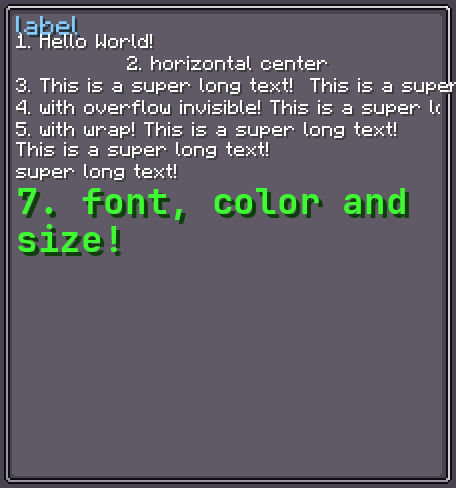
TextElement is a low-level text rendering element. It displays a Component (a Minecraft rich-text object) with configurable font, size, color, alignment, wrapping, and scrolling behaviour.
Most use cases are better served by Label (which adds data binding) or the built-in text labels inside Button, Toggle, etc.
INFO
Everything documented on UIElement (layout, styles, events, data bindings, etc.) applies here too.
Usage
var text = new TextElement();
text.setText("my.translation.key", true);  // translated
text.textStyle(style -> style
    .fontSize(12)
    .textColor(0xFFFF00)
    .textShadow(false)
    .textAlignHorizontal(Horizontal.CENTER)
);
parent.addChild(text);XML
Text content is read from the element's child nodes using Minecraft's component format:
<!-- Literal text via a plain text node -->
<text>Hello World</text>

<!-- Translatable via a translate child element -->
<text><translate key="my.translation.key"/></text>

<!-- Multiple inline components are concatenated -->
<text>Prefix: <translate key="my.key"/></text>
INFO
TextElement cannot have layout children added in XML — only text content.
Text Style
TextStyle controls all visual aspects of the rendered text.
INFO
font-size
Height of each line of text in pixels.
Default: 9
text.textStyle(style -> style.fontSize(12));INFO
text-color
ARGB colour of the text. Use 0xRRGGBB (alpha defaults to full opacity).
Default: 0xFFFFFF (white)
text.textStyle(style -> style.textColor(0xFFFF00));INFO
text-shadow
Whether to draw a drop-shadow under the text.
Default: true
text.textStyle(style -> style.textShadow(false));INFO
font
Resource location of the font to use.
Default: Vanilla default font (minecraft:default)
text.textStyle(style -> style.font(ResourceLocation.parse("minecraft:uniform")));INFO
horizontal-align
Horizontal alignment of text lines within the element. Values: LEFT, CENTER, RIGHT.
Default: LEFT
text.textStyle(style -> style.textAlignHorizontal(Horizontal.CENTER));INFO
vertical-align
Vertical alignment of the text block within the element. Values: TOP, CENTER, BOTTOM.
Default: TOP
text.textStyle(style -> style.textAlignVertical(Vertical.CENTER));INFO
text-wrap
Controls how text behaves when it exceeds the element width.
Default: NONE
| Value | Behaviour |
|---|---|
NONE | No wrapping; text is displayed on one line and may overflow. |
WRAP | Text wraps onto multiple lines. |
ROLL | Text scrolls horizontally in a continuous loop. |
HOVER_ROLL | Text scrolls horizontally only when the mouse hovers over the element. |
HIDE | Text is clipped to one line; overflow is hidden. |
text.textStyle(style -> style.textWrap(TextWrap.WRAP));INFO
roll-speed
Speed multiplier for ROLL / HOVER_ROLL scrolling. Higher values scroll faster.
Default: 1.0
text.textStyle(style -> style.rollSpeed(2f));INFO
line-spacing
Extra pixels of space added between lines when text wraps.
Default: 1
text.textStyle(style -> style.lineSpacing(3f));INFO
adaptive-height
When true, the element's height is set automatically to fit all text lines.
Default: false
text.textStyle(style -> style.adaptiveHeight(true));INFO
adaptive-width
When true, the element's width is set automatically to fit the first line's text.
Default: false
text.textStyle(style -> style.adaptiveWidth(true));Fields
| Name | Type | Access | Description |
|---|---|---|---|
textStyle | TextStyle | private (getter) | The style object for this element's text. |
text | Component | private (getter) | The current text Component. |
Methods
| Method | Returns | Description |
|---|---|---|
setText(String, boolean) | TextElement | Sets text. true = translatable, false = literal. |
setText(Component) | TextElement | Sets text from a Component directly. |
textStyle(Consumer<TextStyle>) | TextElement | Configures TextStyle fluently. |
recompute() | void | Forces a re-layout of the text lines (called automatically on style or size changes). |
getText() | Component | Returns the current text. |