
CodeEditor
Since 2.2.1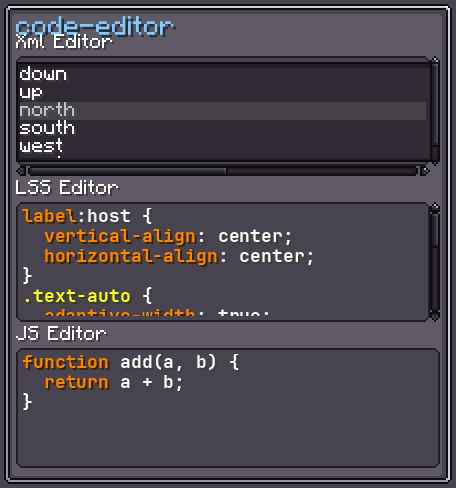
CodeEditor extends TextArea and adds syntax highlighting, code folding, and editor-quality keyboard shortcuts. It uses the built-in JetBrains Mono Bold font by default.
Additional shortcuts over TextArea:
| Shortcut | Action |
|---|---|
Tab | Inserts two spaces at the cursor. |
Ctrl+/ | Toggles // line comments on the current line or selection. |
Enter | Inserts a new line and preserves the leading indentation of the previous line. |
Everything from TextArea (styles, value binding, validators, scrollers, etc.) applies here too.
INFO
Everything documented on UIElement (layout, styles, events, data bindings, etc.) applies here too.
Usage
java
var editor = new CodeEditor();
editor.setLanguage(Languages.JSON);
editor.setValue(new String[] { "{", "  \"key\": \"value\"", "}" }, false);
editor.setLinesResponder(lines -> System.out.println(String.join("\n", lines)));
parent.addChild(editor);XML
xml
<code-editor>{"key": "value"}</code-editor>Text content is split by newlines into lines (same as TextArea).
Fields
| Name | Type | Access | Description |
|---|---|---|---|
syntaxParser | SyntaxParser | private (getter) | The parser that tokenises lines for highlighting. |
styleManager | StyleManager | getter/setter | The colour scheme applied to token types. Default: StyleManager.DEFAULT. |
Methods
| Method | Returns | Description |
|---|---|---|
setLanguage(ILanguageDefinition) | CodeEditor | Sets the language for syntax highlighting (e.g. Languages.JSON, Languages.SNBT). |
getLanguage() | ILanguageDefinition | Returns the current language. |
All methods from TextArea are also available.