
ProgressBar
Since 2.2.1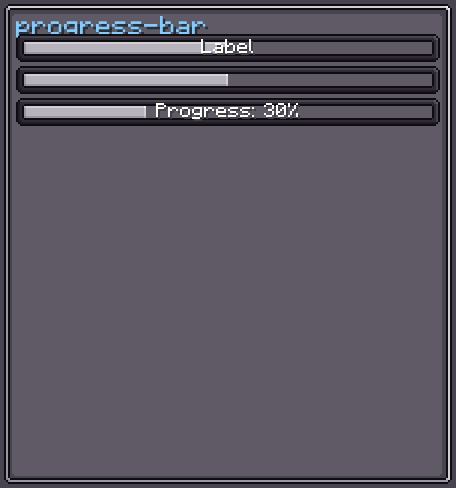
ProgressBar displays a value within a configurable [min, max] range as a partially-filled bar. The fill direction, interpolation animation, and inner textures are all configurable. An optional centered Label can overlay the bar.
ProgressBar implements IBindable<Float> and IDataConsumer<Float>, so its value can be driven by a data provider and kept in sync with the server automatically.
INFO
Everything documented on UIElement (layout, styles, events, data bindings, etc.) applies here too.
Usage
var bar = new ProgressBar();
bar.setRange(0, 100);
bar.setProgress(75f);
parent.addChild(bar);

// Data-bound (server → client, ticks every tick)
bar.bindDataSource(DataBindingBuilder.floatValS2C(
    () -> machine.getProgress() / (float) machine.getMaxProgress()
).build());XML
<!-- Basic progress bar at 50 % -->
<progress-bar min-value="0" max-value="100" value="50"/>

<!-- With a centered text label -->
<progress-bar min-value="0" max-value="200" value="100" text="my.progress.key"/>| XML Attribute | Type | Description |
|---|---|---|
min-value | float | Minimum value. Default: 0. |
max-value | float | Maximum value. Default: 1. |
value | float | Current value. Default: 0. |
text | string | Sets the overlay label (translated). |
Internal Structure
| Index | Field | Type | CSS class | Description |
|---|---|---|---|---|
0 | barContainer | UIElement | .__progress-bar_bar-container__ | Outer container with the background texture and padding. |
The following elements are nested inside the internal structure:
| Field | CSS class | Description |
|---|---|---|
bar | .__progress-bar_bar__ | The filled portion of the bar. |
label | .__progress-bar_label__ | The optional overlay Label (absolute-positioned, centred). |
Progress Bar Style
INFO
fill-direction
Direction in which the bar fills as the value increases.
Default: LEFT_TO_RIGHT
| Value | Description |
|---|---|
LEFT_TO_RIGHT | Bar grows from the left edge. |
RIGHT_TO_LEFT | Bar grows from the right edge. |
UP_TO_DOWN | Bar grows from the top edge. |
DOWN_TO_UP | Bar grows from the bottom edge. |
ALWAYS_FULL | Bar is always fully visible regardless of value. |
bar.progressBarStyle(style -> style.fillDirection(FillDirection.DOWN_TO_UP));INFO
interpolate
When true, the bar visually animates toward the target value each tick instead of jumping.
Default: true
bar.progressBarStyle(style -> style.interpolate(false));INFO
interpolate-step
Fraction of the total range (max - min) moved per tick during interpolation. Negative values use partial-tick lerp for extra smoothness.
Default: 0.1
bar.progressBarStyle(style -> style.interpolateStep(0.05f)); // slower animation
bar.progressBarStyle(style -> style.interpolateStep(-1f)); // partial-tick lerpCustomising the Bar Texture
The bar uses Sprites.PROGRESS_CONTAINER for the outer container and Sprites.PROGRESS_BAR for the fill. Override these via style or DSL:
bar.barContainer(c -> c.style(s -> s.background(myContainerTexture)));
bar.bar(b -> b.style(s -> s.background(myBarTexture)));Data Binding
ProgressBar subscribes to IDataProvider<Float> for automatic value updates.
var binding = DataBindingBuilder.floatValS2C(
    () -> machine.getProgress() / (float) machine.getMaxProgress()
).build();

bar.bindDataSource(binding);
bar.unbindDataSource(binding); // when doneSee Data Bindings for the full binding API.
Fields
| Name | Type | Access | Description |
|---|---|---|---|
barContainer | UIElement | public final | Outer container element. |
bar | UIElement | public final | The filled bar element. |
label | Label | public final | The overlay label element. |
progressBarStyle | ProgressBarStyle | private (getter) | Current progress bar style. |
minValue | float | private (getter) | Minimum range value. |
maxValue | float | private (getter) | Maximum range value. |
Methods
| Method | Returns | Description |
|---|---|---|
setProgress(float) | ProgressBar | Sets the current value (clamped to [min, max]). |
setRange(float, float) | ProgressBar | Sets the [min, max] range and re-evaluates the current value. |
setMinValue(float) | ProgressBar | Sets the minimum value. |
setMaxValue(float) | ProgressBar | Sets the maximum value. |
progressBarStyle(Consumer<ProgressBarStyle>) | ProgressBar | Configures ProgressBarStyle fluently. |
bar(Consumer<UIElement>) | ProgressBar | Configures the fill bar element. |
barContainer(Consumer<UIElement>) | ProgressBar | Configures the outer container element. |
label(Consumer<Label>) | ProgressBar | Configures the overlay label. |
bindDataSource(IDataProvider<Float>) | ProgressBar | Subscribes to a data provider. |
unbindDataSource(IDataProvider<Float>) | ProgressBar | Unsubscribes from a data provider. |
getValue() | Float | Returns the current value. |
getNormalizedValue() | float | Returns the current value normalized to [0, 1]. |