
Variables and Blackboard
Variables are graph-level declarations. They appear in the blackboard and can be referenced by variable nodes.
graph.graphModel.createVariable("speed", Float.class, 1f, VariableKind.LOCAL);Use variables when a value belongs to the whole graph instead of one node. Typical uses:
- share a value between multiple nodes,
- expose an input value when the graph is used as a subgraph,
- expose an output value from a subgraph back to the parent graph,
- define graph-level defaults edited by the inspector.
Blackboard
The blackboard is the built-in UI for graph variables.
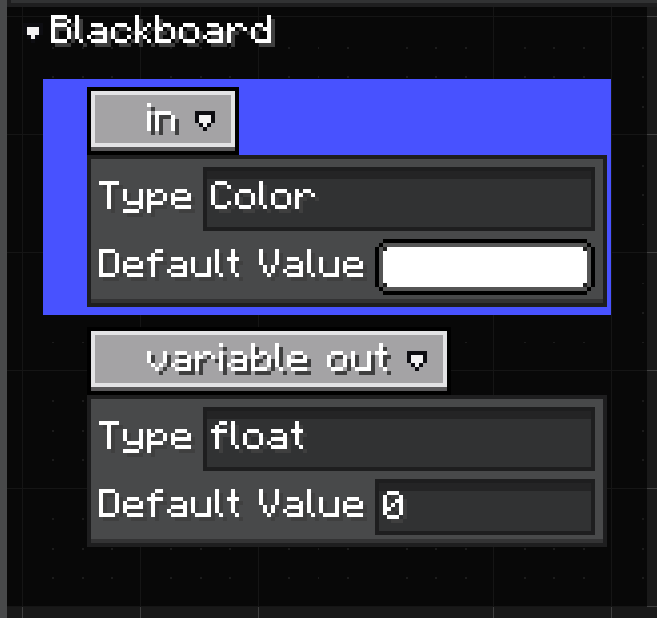
Each row is a variable declaration. The row shows the variable name and can expand to show its type and default value. Selecting a variable shows the full editable state in the inspector.
GraphView creates a Blackboard panel by default. GraphEditorView includes that graph view and is the recommended way to use it in an editor.
Variable Inspector
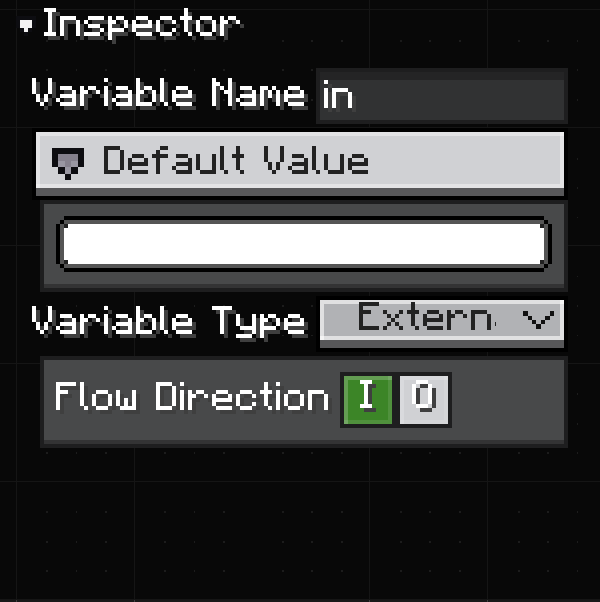
The inspector is where variable declarations become useful editor data:
| Field | Use |
|---|---|
| Variable Name | The declaration name. Variable nodes and subgraph ports use this name for display. |
| Default Value | The initial value stored in the declaration's Constant. |
| Variable Type | The variable scope/type mode shown by the editor. Exposed variables can be used outside the graph. |
| Flow Direction | Whether the variable is an input, output, both, or local-only value for subgraph usage. |
Changing the name, type, or direction updates variable nodes that reference the declaration. If the variable is exposed through a subgraph node, the subgraph node ports are redefined too.
Direction and Subgraph Ports
Variable direction is stored as ModifierFlags and exposed through VariableKind.
public enum VariableKind {
    LOCAL,
    INPUT,
    OUTPUT
}| UI meaning | Source model | Subgraph node result |
|---|---|---|
| Local | ModifierFlags.NONE / VariableKind.LOCAL | No subgraph port. |
| Input | ModifierFlags.READ / VariableKind.INPUT | Input port on the subgraph node. |
| Output | ModifierFlags.WRITE / VariableKind.OUTPUT | Output port on the subgraph node. |
| Input + Output | ModifierFlags.READ_WRITE | Both input and output ports. |
An input variable means the parent graph can pass a value into the subgraph.
An output variable means the subgraph can publish a value back to the parent graph.
See Subgraphs for how exposed variables become ports on SubgraphNodeModel.
Create Variables in Code
Use createVariable(...) on the graph model:
graph.graphModel.createVariable(
        "speed",
        Float.class,
        1f,
        VariableKind.INPUT
);
The type can also be provided as a TypeHandle:
graph.graphModel.createVariable(
        "color",
        TypeHandles.COLOR,
        -1,
        VariableKind.OUTPUT
);
If kind is null, LDLib2 creates a local variable.
Variable Nodes
Variable nodes are references to a variable declaration. They do not own the variable data.
Use them when node logic needs to read a graph variable or write to one. If the declaration type changes, variable node ports update from the declaration.
Variable nodes are separate from subgraph ports:
- variable nodes are used inside the graph,
- exposed variable declarations generate ports on the parent-facing subgraph node.
Supported Variable Types
Graph.getVariableSupportTypes() controls which types appear in the blackboard and variable inspector.
@Override
public @Nullable List<TypeHandle> getVariableSupportTypes() {
    return List.of(TypeHandles.FLOAT, TypeHandles.COLOR, TypeHandles.BOOL);
}
Return null to reuse getSupportTypes().
See Type Handles for built-in handles, custom registration, icons, default values, and configurators.