
Selector
Since 2.2.1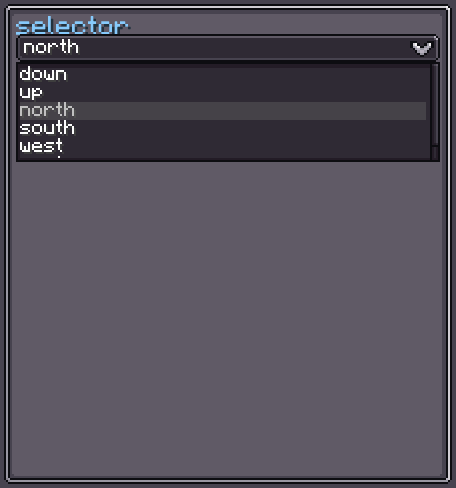
Selector<T> is a generic dropdown picker. Clicking it opens a floating list of candidate items; clicking an item selects it and optionally closes the dropdown. Each candidate is rendered by a configurable UIElementProvider<T>. When the candidate count exceeds max-item, the list switches to a scrollable ScrollerView.
INFO
Everything documented on UIElement (layout, styles, events, data bindings, etc.) applies here too.
Usage
var selector = new Selector<String>();
selector.setCandidates(List.of("Alpha", "Beta", "Gamma"));
selector.setSelected("Alpha");
selector.setOnValueChanged(value -> {
    System.out.println("Selected: " + value);
});
parent.addChild(selector);Custom Candidate UI
By default each candidate is displayed as its toString() text. Supply a custom provider to render items however you like:
selector.setCandidateUIProvider(candidate ->
    new UIElement()
        .addChild(new Label().setText(candidate.displayName(), false))
);XML
<!-- String selector with static candidates -->
<selector default-value="Beta">
    <candidate>Alpha</candidate>
    <candidate>Beta</candidate>
    <candidate>Gamma</candidate>
</selector>| XML Attribute | Type | Description |
|---|---|---|
default-value | string | Pre-selects a candidate by its string value. |
| XML Child | Description |
|---|---|
<candidate> | Adds a string candidate to the list. The element's text content is used as the value. |
Internal Structure
| Index | Field | Type | CSS class | Description |
|---|---|---|---|---|
0 | display | UIElement | — | The main display bar (contains preview and buttonIcon). |
The following children are nested inside the internal structure and can be targeted via CSS classes:
| Field | CSS class | Description |
|---|---|---|
preview | .__selector_preview__ | Shows the currently-selected item's UI. |
buttonIcon | .__selector_button-icon__ | The dropdown arrow icon on the right. |
dialog | .__selector_dialog__ | The floating dropdown panel (attached to root when open). |
listView | .__selector_list-view__ | Direct list used when count ≤ max-item. |
scrollerView | .__selector_scroller-view__ | Scrollable list used when count > max-item. |
Selector Style
SelectorStyle controls the dropdown overlay appearance and behavior.
INFO
focus-overlay
Texture drawn over the selector bar when it is hovered or focused.
Default: Sprites.RECT_RD_T_SOLID
selector.selectorStyle(style -> style.focusOverlay(myHighlight));INFO
max-item
Maximum number of items rendered in the flat listView. When the candidate list is longer, a ScrollerView is used instead.
Default: 5
selector.selectorStyle(style -> style.maxItemCount(8));INFO
view-height
Height of the ScrollerView when candidate count exceeds max-item.
Default: 50
selector.selectorStyle(style -> style.scrollerViewHeight(80f));INFO
show-overlay
Whether hovered and selected candidates are highlighted with a semi-transparent overlay.
Default: true
selector.selectorStyle(style -> style.showOverlay(false));INFO
close-after-select
Whether the dropdown closes automatically after the player selects an item.
Default: true
selector.selectorStyle(style -> style.closeAfterSelect(false));Value Binding
Selector<T> extends BindableUIElement<T>, so it supports the standard data-binding API:
selector.bind(DataBindingBuilder.string(
    () -> config.getMode(),
    mode -> config.setMode(mode)
).build());See Data Bindings for full details.
Fields
| Name | Type | Access | Description |
|---|---|---|---|
display | UIElement | public final | The main display bar. |
preview | UIElement | public final | Shows the selected item's UI. |
buttonIcon | UIElement | public final | The dropdown arrow icon. |
dialog | UIElement | public final | The floating dropdown panel. |
listView | UIElement | public final | Flat list used for short candidate lists. |
scrollerView | ScrollerView | public final | Scrollable list used for long candidate lists. |
selectorStyle | SelectorStyle | private (getter) | Current selector style. |
candidates | List<T> | private (getter) | Current candidate list. |
value | T | private (getter/nullable) | Currently selected value. |
Methods
| Method | Returns | Description |
|---|---|---|
setCandidates(List<T>) | Selector<T> | Replaces the candidate list and rebuilds the dropdown. |
setCandidateUIProvider(UIElementProvider<T>) | Selector<T> | Sets a custom factory for rendering each candidate. |
setSelected(T) | Selector<T> | Selects a value and notifies listeners. |
setOnValueChanged(Consumer<T>) | Selector<T> | Registers a listener for value changes. |
selectorStyle(Consumer<SelectorStyle>) | Selector<T> | Configures SelectorStyle fluently. |
show() | void | Opens the dropdown. |
hide() | void | Closes the dropdown. |
isOpen() | boolean | Returns true if the dropdown is currently open. |
getValue() | T | Returns the currently selected value (may be null). |