
Smooth Font Rendering
Since 2.2.31LDLib2 can render UI text through its own font pipeline. It chooses a renderer for each text draw, keeps glyphs in atlases, and falls back to Minecraft's Unicode font when a glyph is unavailable. Label, TextField, TextArea, and CodeEditor use this automatically.
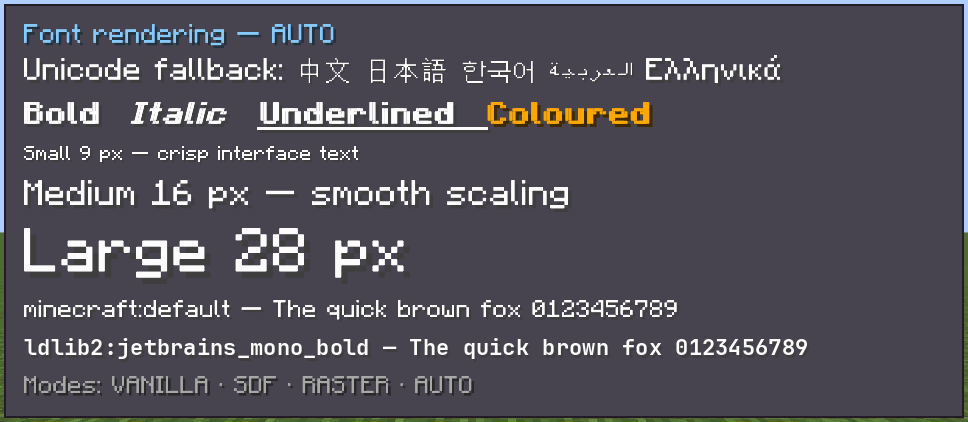
AUTO mode. It checks Unicode fallback, text styles, several sizes, and both Minecraft and LDLib2 font families. Choose a mode
The client config entry is font.fontRenderMode; its default is AUTO.
| Mode | Best for | Trade-off |
|---|---|---|
VANILLA | Compatibility or comparing output with Minecraft | LDLib2 does not render text itself. |
SDF | Scaled, rotated, skewed, or animated text | Smooth at every transform; small stationary text can look softer and corners round slightly. |
RASTER | Stationary text aligned to the pixel grid | Sharpest output; every rendered size needs an atlas and is baked on first use. |
AUTO | Most UI | Uses raster for small, pixel-aligned static text and SDF for transformed text. |
/ldlib2_font mode is a development-only command that cycles the mode and reinitializes the current screen. Change the normal client config for persistent settings.
WARNING
When Modern UI is installed, LDLib2 deliberately uses the fallback path instead of its own smooth renderer. Do not depend on an LDLib2-specific glyph atlas being present in that environment.
Config reference
| Config key | Default | Effect |
|---|---|---|
fontAtlasSize | 1024 | Glyph-atlas page edge in pixels. Larger pages reduce draw calls but use more GPU memory. |
sdfEmSize | 48 | Resolution used to generate SDF glyphs. Raise it for sharper large corners at the cost of atlas space. |
sdfSharpness | 1.0 | Anti-aliasing width multiplier. Above 1 is crisper; below 1 is softer. |
sdfWeight | 0.0 | Stroke thickening in pixels. Raise slightly if small text is too thin. |
fontRasterMaxSize | 256 | Largest device-pixel line height rendered as raster. Larger text uses SDF as a memory guard. |
fontRasterEvictSeconds | 30 | Removes unused raster-size atlases after this period. |
textLayoutCache | true | Reuses glyph layout for equivalent text between frames. Disable only when diagnosing stale text styling. |
Custom drawing
Use LDLibFonts.font() when custom code needs the same font selection as LDLib2 UI. Use LDLibFonts.drawText(...) for Component or retained FormattedCharSequence values; it can reuse the layout cache.
var font = LDLibFonts.font();
LDLibFonts.drawText(graphics, font, Component.literal("Status"), 8, 8, 0xFFFFFFFF, true);
The cache benefits most when the text is unchanged across frames. Keep dynamic counters and animated labels simple, and test with textLayoutCache disabled if a renderer change appears stale.