
TextArea
Since 2.2.1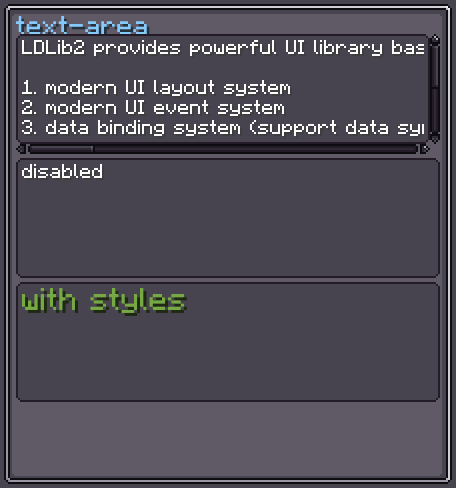
TextArea is a multi-line text editor. Its value is a String[] — one element per line. It has built-in horizontal and vertical scrollers, a text validator for error highlighting, and full keyboard support (arrows, Home/End, PageUp/PageDown, Ctrl+←/→ word navigation, selection, copy/cut/paste, undo/redo).
The editor becomes editable when focused (clicked). Double-click to select a word.
INFO
Everything documented on UIElement (layout, styles, events, data bindings, etc.) applies here too.
Usage
var area = new TextArea();
area.setValue(new String[] { "Line 1", "Line 2", "Line 3" });
area.setLinesResponder(lines -> {
    // called on each valid edit
    System.out.println("Lines: " + Arrays.toString(lines));
});
parent.addChild(area);XML
<!-- Pre-populated text (lines split by \n in source) -->
<text-area>Line 1
Line 2
Line 3</text-area>
INFO
TextArea cannot have layout children added in XML — only text content.
Internal Structure
| CSS class | Description |
|---|---|
.__text-area_content-view__ | The main editing surface. |
.__text-area_vertical-scroller__ | The vertical scroll bar (right side). |
.__text-area_horizontal-scroller__ | The horizontal scroll bar (bottom). |
Text Area Style
INFO
focus-overlay
Texture drawn over the content view when it is hovered or focused.
Default: Sprites.RECT_RD_T_SOLID
area.textAreaStyle(style -> style.focusOverlay(myHighlight));INFO
font / font-size
Font and size used for all lines.
Defaults: vanilla default font / 9
text-area {
    font: "minecraft:uniform";
    font-size: 9;
}INFO
text-color / error-color
Text color when valid / when the validator rejects the content.
Defaults: 0xFFFFFF / 0xFF0000
text-area {
    text-color: #EEEEEE;
    error-color: #FF4444;
}INFO
cursor-color
Color of the blinking caret.
Default: 0xEEEEEE
text-area {
    cursor-color: #FFFFFF;
}INFO
text-shadow
Whether to draw text with a drop shadow.
Default: true
text-area {
    text-shadow: false;
}INFO
placeholder
Ghost text shown when all lines are empty.
Default: translatable key text_field.empty
area.textAreaStyle(style -> style
    .placeholder(Component.literal("Enter code…"))
);INFO
scroller-view-mode
Which scroll axes are enabled. Values: HORIZONTAL, VERTICAL, BOTH.
Default: BOTH
area.textAreaStyle(style -> style.viewMode(ScrollerMode.VERTICAL));INFO
scroller-vertical-display / scroller-horizontal-display
Visibility policy for each scroll bar. Values: AUTO (show only when content overflows), ALWAYS, NEVER.
Default: AUTO
area.textAreaStyle(style -> style
    .verticalScrollDisplay(ScrollDisplay.ALWAYS)
    .horizontalScrollDisplay(ScrollDisplay.NEVER)
);INFO
scroller-view-margin
Right margin of the horizontal scroller when the vertical scroller is visible.
Default: 5
text-area {
    scroller-view-margin: 5;
}Value Binding
TextArea extends BindableUIElement<String[]>, so it integrates with the data-binding system:
area.bind(DataBindingBuilder.create(
    () -> config.getLines(),
    lines -> config.setLines(lines)
).build());See Data Bindings for full details.
Fields
| Name | Type | Access | Description |
|---|---|---|---|
horizontalScroller | Scroller.Horizontal | public final | The horizontal scroll bar. |
verticalScroller | Scroller.Vertical | public final | The vertical scroll bar. |
contentView | UIElement | public final | The visible editing surface. |
textAreaStyle | TextAreaStyle | private (getter) | Current style instance. |
isError | boolean | private (getter) | true when current lines fail the validator. |
cursorLine | int | private (getter) | Row of the cursor (0-indexed). |
cursorCol | int | private (getter) | Column of the cursor (0-indexed). |
Methods
| Method | Returns | Description |
|---|---|---|
setValue(String[]) | TextArea | Sets all lines and notifies listeners. |
setValue(String[], boolean) | TextArea | Sets all lines; second param controls notification. |
setLines(List<String>) | TextArea | Convenience for setValue(list.toArray(...)). |
setLinesResponder(Consumer<String[]>) | TextArea | Registers a listener called on each valid edit. |
setTextValidator(Predicate<String[]>) | TextArea | Custom validator; invalid content is shown in error-color. |
setCharValidator(Predicate<Character>) | TextArea | Filters characters before they are inserted. |
textAreaStyle(Consumer<TextAreaStyle>) | TextArea | Configures style fluently. |
getValue() | String[] | Returns the last validated line array. |
isEditable() | boolean | true when focused, active, visible and displayed. |
hasSelection() | boolean | true if there is an active text selection. |
setCursor(int, int) | void | Moves the cursor to a specific (line, col). |