
GraphView
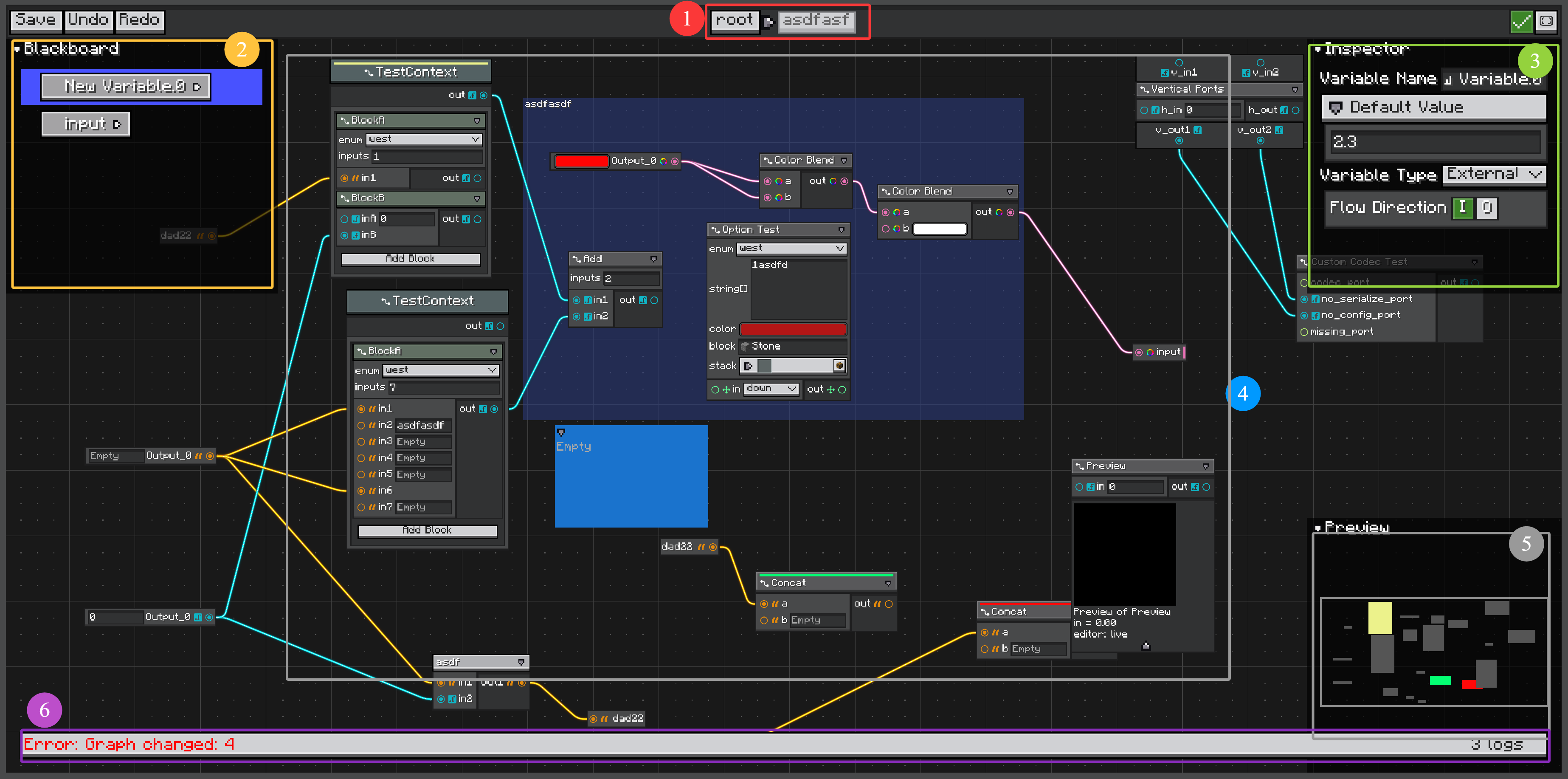
GraphView is the low-level editable UI for NGT graphs.
It contains a header, a pannable canvas, graph elements, the item library, blackboard, inspector, preview panel, history stack, command handling, and diagnostics footer.
TIP
Prefer GraphEditorView for real graph editors. It wraps GraphView and adds save handling, dirty state, breadcrumbs, subgraph dive, and external subgraph editing support.
Direct Loading
var graphView = new GraphView();
graphView.loadGraph(graph);
This is useful for test screens, previews, or embedded graph displays.
Inside a normal UI:
root.addChild(graphView.layout(layout -> {
    layout.widthPercent(100);
    layout.heightPercent(100);
}));
For a full editor view:
var editorView = new GraphEditorView();
editorView.loadGraph(graph, savedTag -> saveGraph(savedTag));
Built-in Tools
GraphView creates these tools:
| Tool | Field | Description |
|---|---|---|
| Item Library | itemLibrary | Popup for creating nodes, constants, blocks, and subgraphs. |
| Blackboard | blackboard | Variable declarations. |
| Inspector | inspector | Selected model properties. |
| Preview | preview | Graph-level preview tool. |
| Dock Manager | dockManager | Floating and corner-docked graph panels. |
| History | historyStack | Undo and redo for graph commands. |
The default panels are placed around the canvas:
- Blackboard: top-left.
- Inspector: top-right.
- Preview: bottom-right.
Commands and History
Most graph edits are commands dispatched through GraphView.dispatchCommand(...).
Commands are recorded in the view history stack when they are undoable. The header provides undo, redo, snap-to-grid, and fit buttons.
GraphView handles common editor actions:
- create node,
- create wire,
- delete,
- cut/copy/paste,
- duplicate,
- move,
- rename,
- recolor,
- create placemat,
- create subgraph from selection,
- convert wires to portals.
Subgraph dive is handled by GraphEditorView, not by using a bare GraphView alone.
Layers
Graph elements are rendered into named layers.
graphView.setLayers(List.of(
        PlacematElement.PLACEMAT_LAYER,
        WireElement.WIRE_LAYER,
        NodeElement.NODE_LAYER,
        StickyNoteElement.STICKY_NOTE_LAYER
));
Use getLayer(name) when a custom element needs a specific canvas layer.
Snap and Fit
Snap is enabled by default.
graphView.setSnapToGrid(true);
graphView.setGridSnapSize(16f);
Use the fit button or call:
graphView.fitGraphChildren();Diagnostics Footer
Graph.onGraphChanged(GraphLogger) feeds the graph log footer.
Use it for graph validation messages that should be visible while editing but not serialized.