
Label
Since 2.2.1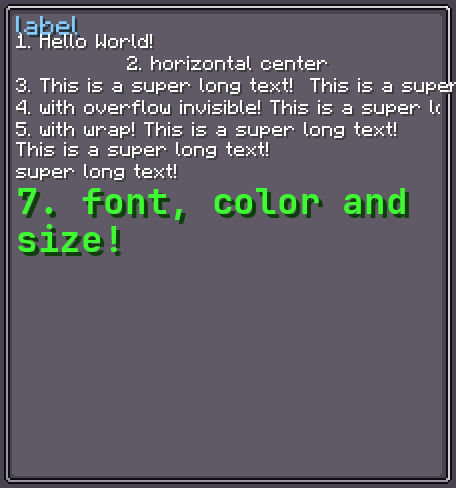
Label extends TextElement with data binding support. It implements IBindable<Component> and IDataConsumer<Component>, so its text can be driven by a server-to-client or client-side data provider that automatically updates the displayed text whenever the value changes.
Default size: inherits width from layout; height defaults to 9 px (one line at the default font size).
INFO
Everything documented on TextElement (text styles, wrapping, alignment) and UIElement (layout, events, etc.) applies here too.
Usage
// Static text
var label = new Label();
label.setText("my.translation.key", true);

// Data-bound text (server → client)
label.bind(DataBindingBuilder.componentS2C(
    () -> Component.literal("Value: " + someObject.getValue())
).build());

parent.addChild(label);XML
<!-- Literal text in element content -->
<label>Hello World</label>

<!-- Translatable text -->
<label><translate key="my.translation.key"/></label>
Label accepts the same text content syntax as TextElement — see TextElement § XML for details.
Data Binding
Label can subscribe to one or more data providers. Each subscription is kept alive until unbindDataSource is called or the element is removed.
// Server-to-client binding: updates on each server tick
var binding = DataBindingBuilder.componentS2C(() ->
    Component.literal("Burn time: " + furnaceData.get(2) + " t")
).build();

label.bindDataSource(binding);

// Unsubscribe when no longer needed
label.unbindDataSource(binding);See Data Bindings for the full binding API.
Fields
Inherits all fields from TextElement § Fields.
Methods
Inherits all methods from TextElement § Methods.
| Method | Returns | Description |
|---|---|---|
bindDataSource(IDataProvider<Component>) | Label | Subscribes to a data provider; text updates automatically. |
unbindDataSource(IDataProvider<Component>) | Label | Unsubscribes from a previously bound data provider. |
setValue(Component) | Label | Directly sets the text (same as setText(Component)). |
getValue() | Component | Returns the current text Component. |