
InventorySlots
Since 2.2.1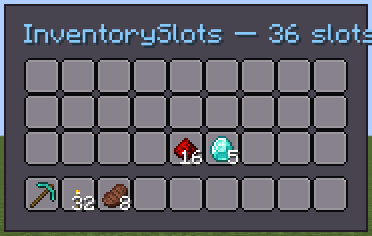
InventorySlots is a pre-built player inventory widget. It renders the standard 3-row main inventory and a 9-slot hotbar, and automatically binds them to the player's Inventory when a ModularUI is opened.
INFO
Everything documented on UIElement (layout, styles, events, data bindings, etc.) applies here too.
Usage
java
var inv = new InventorySlots();
// Slots are bound automatically when the UI opens.
// Optionally configure all slots:
inv.apply(slot -> slot.slotStyle(style -> style.showItemTooltips(true)));
parent.addChild(inv);XML
xml
<inventory-slots/>InventorySlots has no XML attributes beyond those inherited from UIElement.
Internal Structure
| CSS class | Description |
|---|---|
.__inventory_main__ | Container wrapping the three main inventory rows. |
.__inventory_row__ | Each of the four Row elements (three main + hotbar). |
.__inventory_hotbar__ | The hotbar row (separated by 5 px top margin). |
The slots inside each row are ItemSlot instances with is-player-slot: true and IDs inventory_0 … inventory_35.
Fields
| Name | Type | Access | Description |
|---|---|---|---|
rows | Row[3] | public final | The three main inventory rows (indices 9–35). |
hotbar | Row | public final | The hotbar row (indices 0–8). |
Row is a UIElement subclass with:
| Name | Type | Description |
|---|---|---|
slots | ItemSlot[9] | The nine item slots in this row. |
Methods
| Method | Returns | Description |
|---|---|---|
apply(Consumer<ItemSlot>) | InventorySlots | Applies a consumer to every slot across all rows and the hotbar. |