
Switch
Since 2.2.1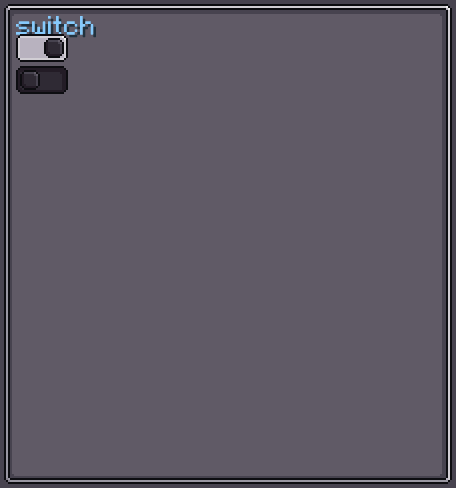
Switch is an animated on/off toggle that looks like a sliding pill. When toggled, the inner indicator slides from one end to the other with a smooth CSS transition. It has no text label — use a Label or Toggle if you need descriptive text.
Internally, Switch is a horizontal flex row containing a flex spacer (placeholder) and a square indicator (markIcon). The spacer grows from flex: 0 to flex: 1 on toggle, pushing the indicator to the far side.
INFO
Everything documented on UIElement (layout, styles, events, data bindings, etc.) applies here too.
Usage
var sw = new Switch();
sw.setOn(true);
sw.setOnSwitchChanged(isOn -> {
    // called whenever the state changes
});
parent.addChild(sw);XML
<!-- Default off switch -->
<switch/>

<!-- Switch in the on state -->
<switch is-on="true"/>| XML Attribute | Type | Description |
|---|---|---|
is-on | boolean | Initial on/off state. Default: false. |
Internal Structure
Switch contains two internal elements:
| Index | Field | Type | CSS class | Description |
|---|---|---|---|---|
0 | placeholder | UIElement | — | Flex spacer that grows/shrinks to animate the indicator. |
1 | markIcon | UIElement | .__switch_mark-icon__ | The sliding square indicator. |
Switch Style
SwitchStyle controls four textures: the container background in each state and the indicator texture in each state.
INFO
base-background
Container background when the switch is off.
Default: Sprites.RECT_RD_DARK
sw.switchStyle(style -> style.baseTexture(myOffBg));INFO
pressed-background
Container background when the switch is on.
Default: Sprites.RECT_RD_T
sw.switchStyle(style -> style.pressedTexture(myOnBg));INFO
unmark-background
Texture of the sliding indicator when the switch is off.
Default: Sprites.RECT_RD
sw.switchStyle(style -> style.unmarkTexture(myOffIndicator));INFO
mark-background
Texture of the sliding indicator when the switch is on.
Default: Sprites.RECT_RD
sw.switchStyle(style -> style.markTexture(myOnIndicator));Value Binding
Switch extends BindableUIElement<Boolean>, so it integrates with the data-binding system:
sw.bind(DataBindingBuilder.bool(
    () -> config.isEnabled(),
    val -> config.setEnabled(val)
).build());See Data Bindings for full details.
Fields
| Name | Type | Access | Description |
|---|---|---|---|
placeholder | UIElement | public final | The flex spacer that drives the slide animation. |
markIcon | UIElement | public final | The visible sliding indicator. |
switchStyle | SwitchStyle | private (getter) | Current switch style. |
isOn | boolean | private (getter) | Current on/off state. |
Methods
| Method | Returns | Description |
|---|---|---|
setOn(boolean) | Switch | Sets the on/off state and notifies listeners. |
setOnSwitchChanged(BooleanConsumer) | Switch | Registers a listener for state changes. |
switchStyle(Consumer<SwitchStyle>) | Switch | Configures SwitchStyle fluently. |
getValue() | Boolean | Returns the current on/off state. |