
Nodes and Ports
User-created graph nodes extend Node.
public abstract class Node implements INode {
    public abstract Component getDisplayName();

    public void onDefineOptions(IOptionDefinitionContext context) {}

    public void onDefinePorts(IPortDefinitionContext context) {}
}
onDefineOptions(...) runs before onDefinePorts(...). Use options when the node shape depends on editable values.
Item Library Description
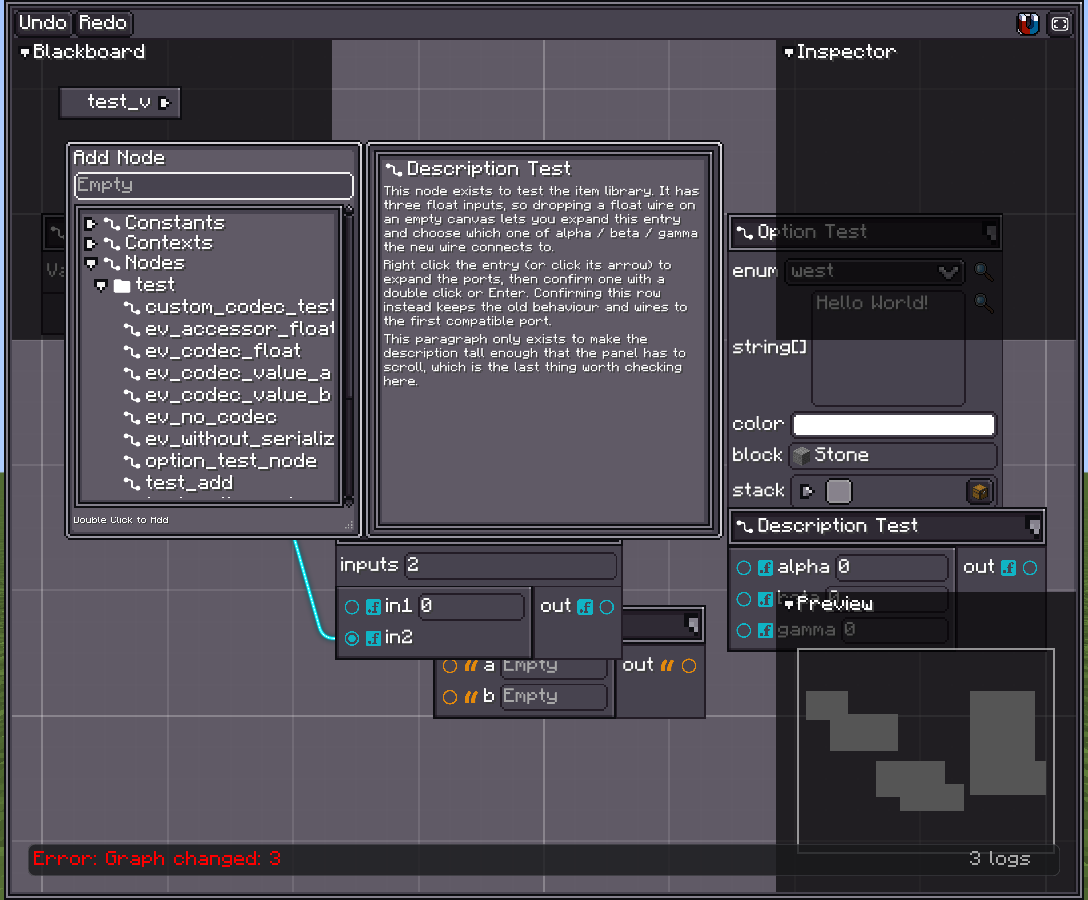
Since 2.2.30Override createDescriptionUI() to show documentation beside the Item Library when this node is selected. The returned UI is placed in a scrollable panel, so it can contain wrapped text, images, or a small preview.
@Override
public UIElement createDescriptionUI() {
    var description = new Label();
    description.setText(Component.translatable("node.example.description"));
    description.textStyle(style -> style
            .textWrap(TextWrap.WRAP)
            .adaptiveHeight(true));
    description.layout(layout -> layout.widthPercent(100));

    var root = new UIElement();
    root.layout(layout -> layout.widthPercent(100).gapAll(4));
    root.addChildren(
            UIElementProvider.iconText(Node::getNodeIcon, Node::getDisplayName)
                    .apply(this),
            description
    );
    return root;
}
createDescriptionUI() is called again whenever the Item Library selection changes. Return a fresh UI tree on every call; do not cache and reuse an attached UIElement. Return null when the node does not need a description panel.
This description belongs to the Item Library entry. It is not rendered inside nodes placed on the canvas; use Node Preview for content inside the node body.
Options
Options are node settings. They can appear in the node header or only in the inspector.
@Override
public void onDefineOptions(IOptionDefinitionContext context) {
    context.addOption("inputs", Integer.class)
            .withDisplayName(Component.literal("Inputs"))
            .withDefaultValue(2);
}
Read options while defining ports:
@Override
public void onDefinePorts(IPortDefinitionContext context) {
    getNodeOptionById("inputs").tryGetValue(Integer.class).ifSuccess(value -> {
        int count = (Integer) value;
        for (int i = 0; i < count; i++) {
            context.addInputPort("in" + (i + 1), Float.class);
        }
    });
    context.addOutputPort("out", Float.class);
}
Useful option builder methods:
| Method | Use |
|---|---|
withDisplayName(Component) | Label shown in UI. |
withTooltips(Tooltips) | Tooltip text. |
withDefaultValue(Object) | Initial value. |
showInInspectorOnly() | Hide from node header. |
withConfigurable(ITypeConfigurable) | Override editor UI for this option. |
withCodec(Codec<?>) | Override serialization. |
withoutSerialization() | Keep the type id, skip value persistence. |
withoutConfigurator() | Store the value without exposing a UI row. |
Ports
Ports define graph connectivity.
@Override
public void onDefinePorts(IPortDefinitionContext context) {
    context.addInputPort("a", String.class).build();
    context.addInputPort("b", String.class).build();
    context.addOutputPort("out", String.class).build();
}
Input ports can hold embedded constants while unconnected. This is why input builders expose configurator and serialization controls.
context.addInputPort("amount", Float.class)
        .withDefaultValue(1f)
        .build();
Useful port builder methods:
| Method | Use |
|---|---|
withDisplayName(Component) | Label shown beside the port. |
withConnectorUI(PortConnectorUI) | Custom connector icon. |
withOrientation(PortOrientation) | Horizontal side port or vertical top/bottom port. |
withDefaultValue(Object) | Initial embedded constant. |
withConfigurable(ITypeConfigurable) | Input only: override editor UI. |
withCodec(Codec<?>) | Input only: override constant serialization. |
withoutSerialization() | Input only: non-persistent value. |
withoutConfigurator() | Input only: hide constant editor. |
Vertical Ports
Vertical ports render above or below the node body.
context.addInputPort("flow", TypeHandles.EXECUTION_FLOW)
        .withOrientation(PortOrientation.Vertical)
        .build();
Vertical input ports hide their inline configurator by default. Override GraphModel.showVerticalPortConfigurator() if a graph type needs visible vertical port values.
Node Anatomy
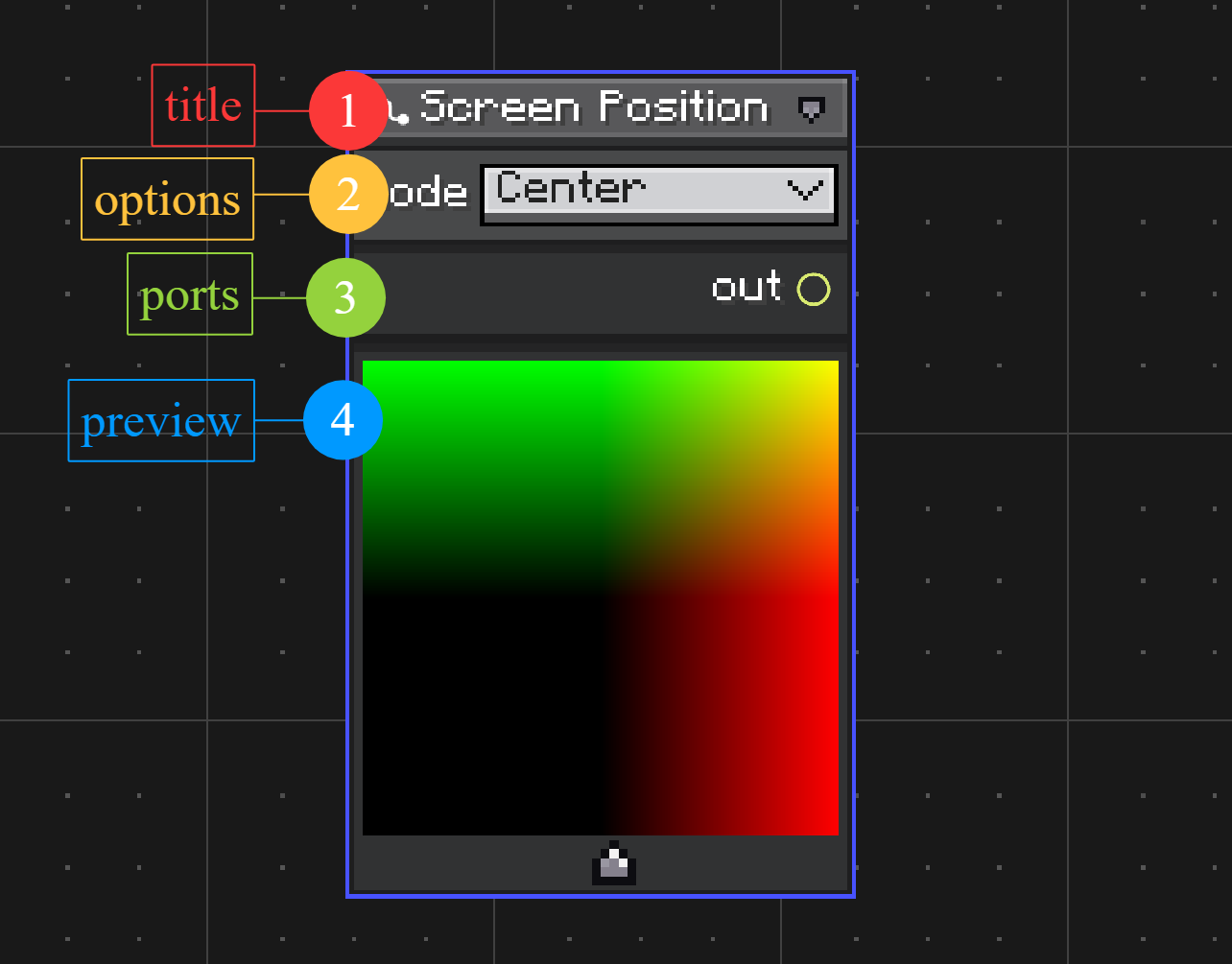
The marked areas in the screenshot are:
Title
Shows the node display name fromgetDisplayName(). The title row also holds small node controls, such as collapse and preview controls when they are available.Options
Shows node options defined inonDefineOptions(...). Options are useful for values that change how the node is built, such as enum modes, counts, or configuration fields.Ports
Shows input and output ports defined inonDefinePorts(...). Ports are connection points for wires. Input ports can also show an embedded constant editor while they are not connected.Preview
Shows the optional preview panel created byhasNodePreview()andonBuildNodePreview(...). Use it for nodes that need visual feedback, such as color, texture, shader, or procedural result nodes.
Node Types
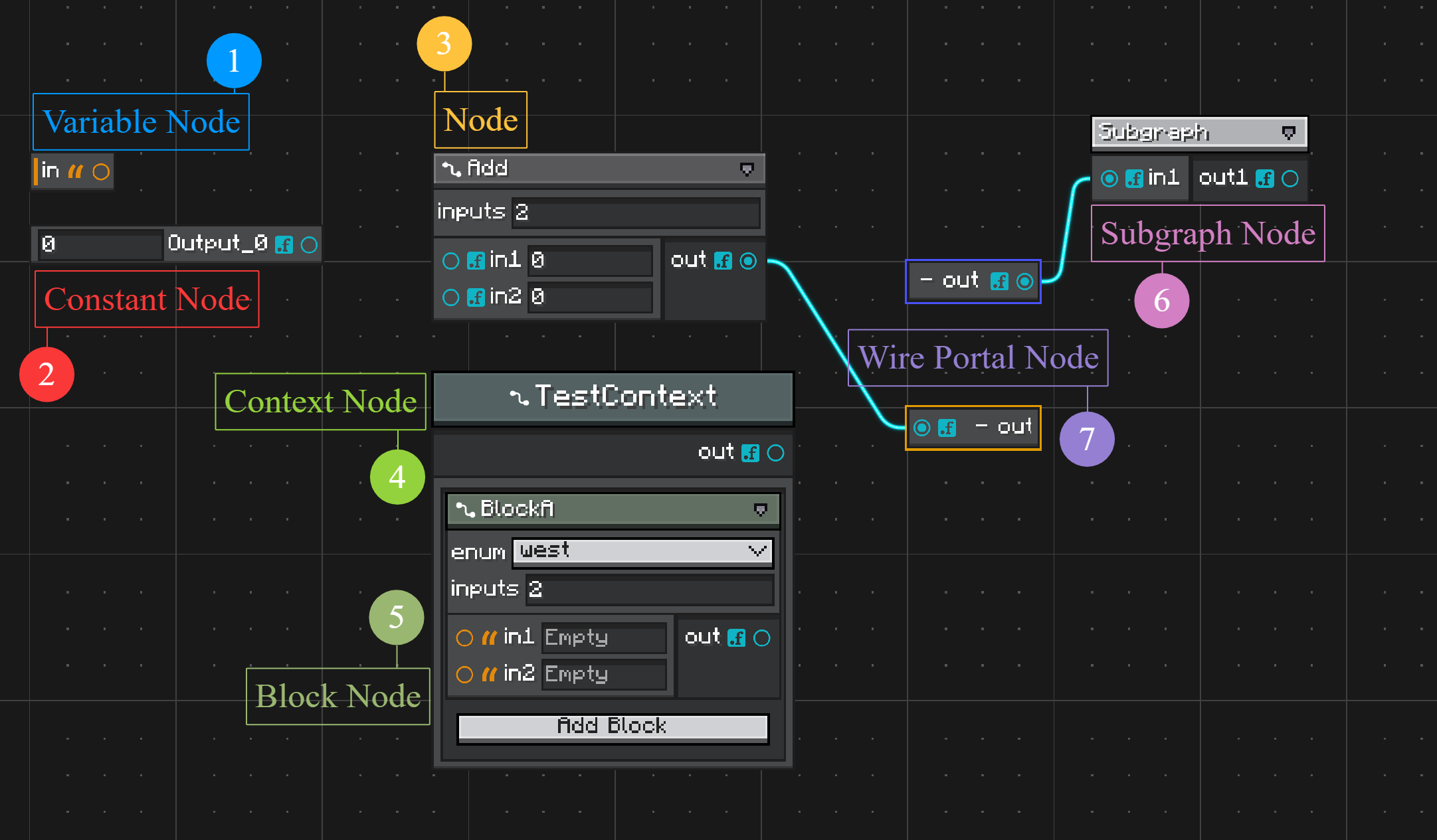
The graph editor uses several node model types. They share the same canvas and wire system, but they are created and used differently.
Variable Node
Reads from or writes to a graph variable. Create variables in the blackboard, then create variable nodes from that declaration. Variables are covered in Variables and Blackboard.Constant Node
Provides a fixed value as an output port. Use it when a value should be visible as a node instead of an inline input-port constant. Constant values useTypeHandlesupport and the same configurable system as port values. See Type Handles.Node
A normal user-defined node created by extendingNodeand registering it with@NodeAttribute. Define its editable options inonDefineOptions(...)and its ports inonDefinePorts(...).Context Node
A node that owns an ordered list of child block nodes. Use it for structures such as sequences, branches, states, or grouped operations. See Context and Block Nodes.Block Node
A child node that lives inside a context node instead of directly on the graph canvas. Create block node classes by extendingBlockNodeand binding them to compatible contexts with@UseWithContext. See Context and Block Nodes.Subgraph Node
Represents another graph. Its ports are generated from the inner graph's exposed variables. Use it to reuse graph logic or edit nested graphs throughGraphEditorView's breadcrumb. See Subgraphs.Wire Portal Node
Routes a wire through a named portal pair, useful when long wires make a graph hard to read. Create portals from wire commands or graph context actions. See Commands and Customization.
Node Preview
A node can render a preview panel under its body.
@Override
public boolean hasNodePreview() {
    return true;
}

@Override
public void onBuildNodePreview(NodePreviewContext context) {
    context.content().addChild(createPreviewElement());
}

@Override
public void onUpdateNodePreview(NodePreviewContext context) {
    context.rebuild();
}
Use previews for nodes that benefit from visual feedback, such as shader, texture, color, or procedural output nodes.