
Toggle
Since 2.2.1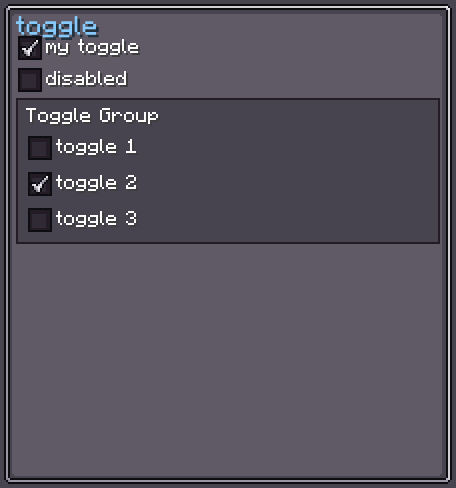
Toggle is a checkable UI component — a square button with a mark icon and an optional label. Clicking toggles its on/off state. Multiple toggles can be linked into a ToggleGroup for exclusive (radio-button-like) selection.
Internally, Toggle is a horizontal flex row containing a Button (the clickable box with the mark icon inside) and a Label (the text label). Both are internal children.
INFO
Everything documented on UIElement (layout, styles, events, data bindings, etc.) applies here too.
Usage
var toggle = new Toggle();
toggle.setText("my.toggle.label", true); // translated
toggle.setOn(true);
toggle.setOnToggleChanged(isOn -> {
    // called whenever the state changes
});
parent.addChild(toggle);XML
<!-- Simple toggle with a translated label -->
<toggle text="my.toggle.label"/>

<!-- Toggle in the on state -->
<toggle text="my.toggle.label" is-on="true"/>

<!-- Empty text attribute hides the label (calls noText()) -->
<toggle text=""/>

<!-- Style internals -->
<toggle text="my.toggle.label">
    <internal index="0">
        <!-- Button (the square box) attributes / children -->
    </internal>
    <internal index="1">
        <!-- Label attributes -->
    </internal>
</toggle>| XML Attribute | Type | Description |
|---|---|---|
text | string | Sets the label text. Pass an empty string to hide the label. |
is-on | boolean | Initial on/off state. Default: false. |
Internal Structure
Toggle contains two internal elements:
| Index | Field | Type | CSS class | Description |
|---|---|---|---|---|
0 | toggleButton | Button | .__toggle_button__ | The clickable square box (contains the mark icon). |
1 | toggleLabel | Label | .__toggle_label__ | The text label to the right of the box. |
The mark icon lives inside toggleButton and can be targeted via CSS:
/* Style the mark / unmark icon */
.__toggle_mark-icon__ {
    /* override size, padding, etc. */
}

/* Target the label specifically */
toggle > label.__toggle_label__ {
    font-size: 9;
    text-color: #CCCCCC;
}
Toggle Style
ToggleStyle controls both the box button textures and the mark/unmark icon.
INFO
base-background / hover-background
Textures for the inner Button in idle and hovered states (delegated to ButtonStyle).
Default: Sprites.RECT_DARK / Sprites.RECT_DARK + white border
toggle.toggleStyle(style -> {
    style.baseTexture(myIdleTexture);   // sets both base & pressed
    style.hoverTexture(myHoverTexture);
});INFO
unmark-background
The icon displayed inside the box when the toggle is off.
Default: none (transparent)
toggle.toggleStyle(style -> style.unmarkTexture(myUncheckedIcon));INFO
mark-background
The icon displayed inside the box when the toggle is on.
Default: Icons.CHECK_SPRITE
toggle.toggleStyle(style -> style.markTexture(myCheckedIcon));Toggle Group
A ToggleGroup links multiple Toggle instances so that only one can be active at a time (like a radio button group). When allowEmpty is false (default), at least one toggle is always active.
var group = new Toggle.ToggleGroup();
// group.setAllowEmpty(true); // allow all toggles to be off

var t1 = new Toggle().setText("Option A", true).setToggleGroup(group);
var t2 = new Toggle().setText("Option B", true).setToggleGroup(group);
var t3 = new Toggle().setText("Option C", true).setToggleGroup(group);

group.getCurrentToggle(); // the currently active Toggle (or null if allowEmpty)TIP
Use ToggleGroupElement to manage the group automatically through the XML / editor — it registers children as they are added and unregisters them when removed.
Text
setText / noText / enableText
Controls the label displayed to the right of the toggle box.
toggle.setText("my.translation.key", true);  // translated
toggle.setText("Literal label", false);        // literal
toggle.noText();                               // hide the label
toggle.enableText(); // show it againValue Binding
Toggle extends BindableUIElement<Boolean>, so it integrates with the data-binding system:
toggle.bind(DataBindingBuilder.bool(
    () -> myState.isEnabled(),
    val -> myState.setEnabled(val)
).build());See Data Bindings for full details.
Fields
| Name | Type | Access | Description |
|---|---|---|---|
toggleButton | Button | public final | The inner clickable box. |
markIcon | UIElement | public final | The icon element inside the box. |
toggleLabel | Label | public final | The label element to the right. |
toggleStyle | ToggleStyle | private (getter) | Current toggle style. |
isOn | boolean | private (getter) | Current on/off state. |
toggleGroup | ToggleGroup | private (getter/nullable) | The group this toggle belongs to. |
Methods
| Method | Returns | Description |
|---|---|---|
setOn(boolean) | Toggle | Sets the on/off state and notifies listeners. |
setToggleGroup(ToggleGroup) | Toggle | Joins a ToggleGroup. Pass null to leave the group. |
setOnToggleChanged(BooleanConsumer) | Toggle | Registers a listener for state changes. |
setText(String, boolean) | Toggle | Sets label text. true = translatable. |
noText() | Toggle | Hides the label. |
enableText() | Toggle | Shows the label. |
toggleStyle(Consumer<ToggleStyle>) | Toggle | Configures ToggleStyle fluently. |
toggleButton(Consumer<Button>) | Toggle | Configures the inner Button directly. |
toggleLabel(Consumer<Label>) | Toggle | Configures the label directly. |
markIcon(Consumer<UIElement>) | Toggle | Configures the mark icon element directly. |
getValue() | Boolean | Returns the current on/off state. |