
SplitView
Since 2.2.1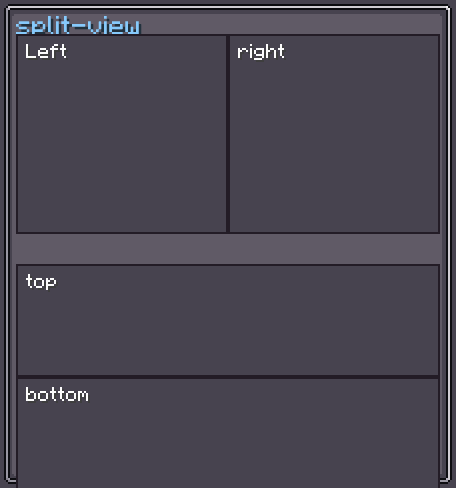
SplitView is a two-pane container whose divider can be dragged to resize the panes. Two concrete variants are registered:
split-view-horizontal— left/right split with a vertical divider.split-view-vertical— top/bottom split with a horizontal divider.
The divider position is expressed as a percentage (0–100 %). Dragging the border adjusts it in real time.
INFO
Everything documented on UIElement (layout, styles, events, data bindings, etc.) applies here too.
Usage
java
var split = new SplitView.Horizontal();
split.left(leftContent);
split.right(rightContent);
split.setPercentage(30f);
parent.addChild(split);

var vsplit = new SplitView.Vertical();
vsplit.top(topContent);
vsplit.bottom(bottomContent);
parent.addChild(vsplit);XML
xml
<split-view-horizontal percentage="30">
    <first>
        <!-- left pane content -->
    </first>
    <second>
        <!-- right pane content -->
    </second>
</split-view-horizontal>

<split-view-vertical percentage="50">
    <first>
        <!-- top pane content -->
    </first>
    <second>
        <!-- bottom pane content -->
    </second>
</split-view-vertical>| XML Attribute | Type | Description |
|---|---|---|
percentage | float | Initial divider position (0–100). Default: 50. |
The <first> and <second> child elements configure the two panes.
Internal Structure
| Field | CSS class | Description |
|---|---|---|
first | .__split_view_first__ | First pane (left for horizontal, top for vertical). |
second | .__split_view_second__ | Second pane (right for horizontal, bottom for vertical). |
Fields
| Name | Type | Access | Description |
|---|---|---|---|
first | UIElement | public final | First pane. |
second | UIElement | public final | Second pane. |
borderSize | float | getter/setter | Width of the draggable border hit area. Default: 2. |
minPercentage | float | getter/setter | Minimum allowed divider percentage. Default: 5. |
maxPercentage | float | getter/setter | Maximum allowed divider percentage. Default: 95. |
Methods
Common
| Method | Returns | Description |
|---|---|---|
first(UIElement) | SplitView | Replaces the content of the first pane. |
second(UIElement) | SplitView | Replaces the content of the second pane. |
setPercentage(float) | SplitView | Sets the divider position, clamped to [minPercentage, maxPercentage]. |
getPercentage() | float | Returns the current divider position as a percentage. |
setBorderSize(float) | SplitView | Sets the draggable border width. |
setMinPercentage(float) | SplitView | Sets the lower bound for the divider. |
setMaxPercentage(float) | SplitView | Sets the upper bound for the divider. |
Horizontal-only
| Method | Returns | Description |
|---|---|---|
left(UIElement) | Horizontal | Alias for first(). |
right(UIElement) | Horizontal | Alias for second(). |
Vertical-only
| Method | Returns | Description |
|---|---|---|
top(UIElement) | Vertical | Alias for first(). |
bottom(UIElement) | Vertical | Alias for second(). |