
Event
Since 2.1.0LDLib2 UI provides events that communicate user actions or notifications to UI elements. The event system shares the same terminology and event naming as HTML events.
Dispatch events
The event system listens for events that come from the ModularUI or mannually triggers, then uses the UIEventDispatcher to dispatch those events to UI elements. The event dispatcher determines an appropriate dispatching strategy for each event it sends. Once determined, the dispatcher executes the strategy.
Event propagation
Each event phase has its own dispatch behavior. The behavior of each event type breaks down into two stages:
Capture Phase: Events sent to elements during the capture-down phase.Bubbles Phase: Events sent to elements during the bubble-up phase.
After the event dispatcher selects the event target, it computes the propagation path of the event. The propagation path is an ordered list of UI elements that receive the event. The propagation path occurs in the following order:
- The path starts at the root of the UI element tree and descends towards the
target. This is the capture-down phase. - The event target receives the event.
- The event then ascends the tree towards the root. This is the bubble-up phase.
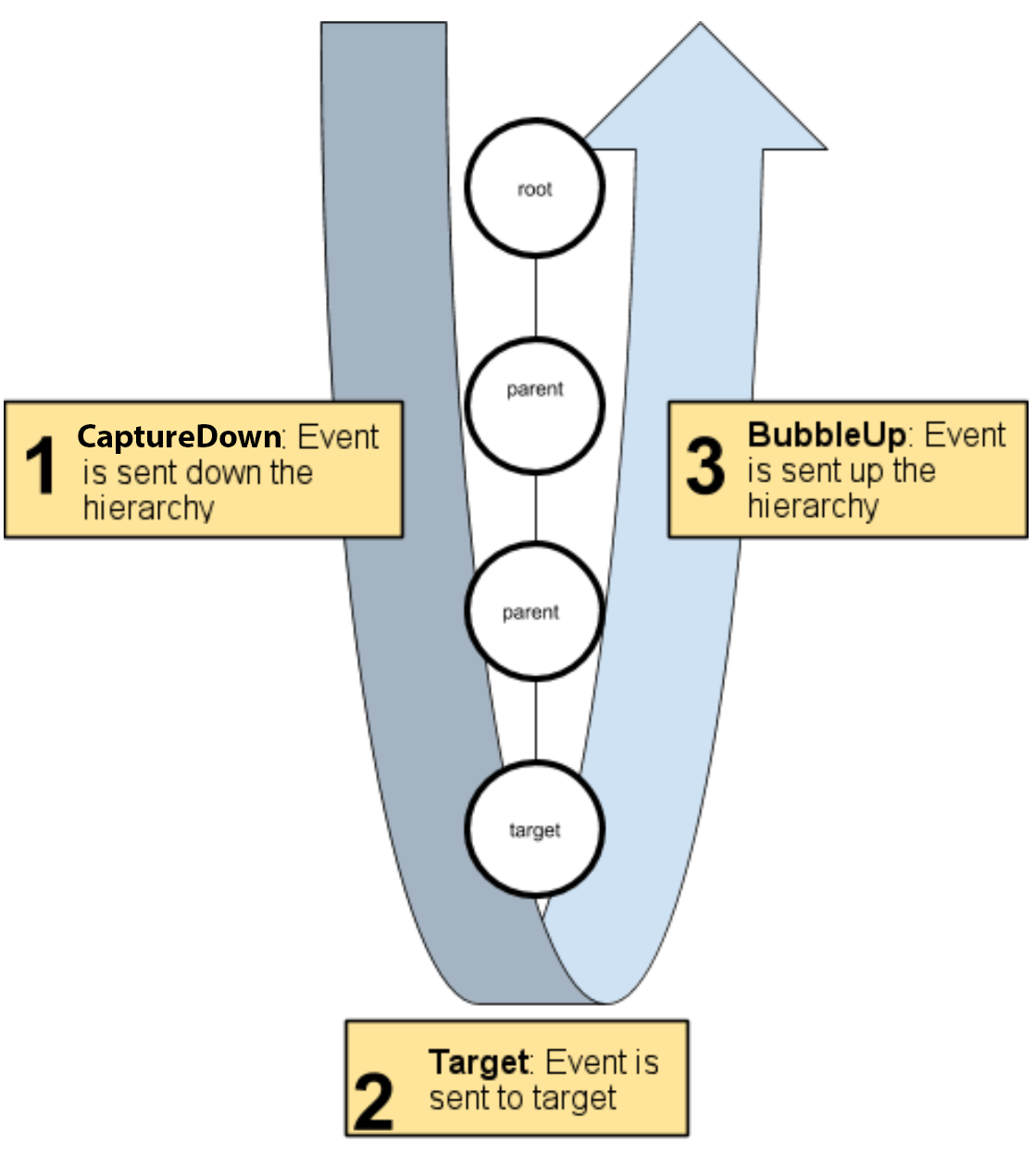
Most event are sent to all elements along the propagation path. Some event skip the bubble-up phase, and some event are sent to the event target only.
Event target
As a UIEvent travels along the propagation path, UIEvent.currentElement is updated to the element that is currently handling the event. This makes it easy to know “which element is running my listener right now”.
Within an event listener, LDLib2 distinguishes two important element references:
UIEvent.target: the element where the event originated (the dispatch target).UIEvent.relatedTarget(Optional): the other element may be involved in some events.UIEvent.currentElement: the element whose listener is currently being executed.
target is determined before dispatch begins and does not change during propagation.currentElement changes as the dispatcher moves through the tree (capture → target → bubble).
Stopping propagation
LDLib2 provides two levels of cancellation:
event.stopPropagation()
Stops the event from reaching later elements and later phases (capture/bubble will cease).event.stopImmediatePropagation()
Stops other listeners on the current element from running, and also stops further propagation.
Register event listeners
LDLib2 uses a DOM-like event model: events travel through the UI tree and a listener can be registered for either:
- Bubble phase (default)
- Capture phase (set
useCapture = true)
Use addEventListener(eventType, listener) to register a bubble-phase listener:
var root = new UIElement().setId("root");
var button = new UIElement().setId("button");
root.addChild(button);

// UIEvents.CLICK == "mouseClick"
button.addEventListener(UIEvents.CLICK, e -> {
    LDLib2.LOGGER.info("Bubble listener: current={}, target={}",
            e.currentElement.getId(), e.target.getId());
});To register a capture-phase listener, pass true as the third argument:
root.addEventListener(UIEvents.CLICK, e -> {
    LDLib2.LOGGER.info("Capture: current={}, target={}",
            e.currentElement.getId(), e.target.getId());
}, true);We also provide method allow you to listen events on the server. Events are triggered on the client-side and sync to the server. Not all events support server listeners, check Event reference below.
root.addServerEventListener(UIEvents.CLICK, e -> {
    LDLib2.LOGGER.info("Triggered on the server";
});To remove a listener, call removeEventListener(...). Make sure the useCapture flag matches how the listener was registered:
UIEventListener onClick = e -> LDLib2.LOGGER.info("clicked!");

button.addEventListener(UIEvents.CLICK, onClick);       // bubble
root.addEventListener(UIEvents.CLICK, onClick, true);   // capture

button.removeEventListener(UIEvents.CLICK, onClick);          // remove bubble listener
root.removeEventListener(UIEvents.CLICK, onClick, true); // remove capture listenerEvent reference
LDLib2 raises an event when a user interacts with and changes the state of elements. The event design is similar to the Event interface for HTML elements.
Event types fit into a hierarchy based on the UIEvent.class. Each event family implements an interface that defines the common characteristics of all events of the same family.
Here, we list common events available for all ui elemetns below. Select any of the event types listed below for more information on the event, and links to the API documentation.
INFO
We'd recommend to use UIEvents.xxx instead of an event type string.
Mouse Events
Mouse Events are most used events. Event sent after a handler starts capturing the mouse.
| Event | Description | Capture down | Bubbles up | Support Server |
|---|---|---|---|---|
mouseDown | Fired when the user presses a mouse button. | ✅ | ✅ | ✅ |
mouseUp | Fired when the user releases a mouse button. | ✅ | ✅ | ✅ |
mouseClick | Fired when the user clicks a mouse button (press + release). | ✅ | ✅ | ✅ |
doubleClick | Fired when the user double-clicks a mouse button. | ✅ | ✅ | ✅ |
mouseMove | Fired when the mouse moves over the element. | ✅ | ✅ | ✅ |
mouseEnter | Fired when the mouse enters an element or one of its descendants. | ✅ | ❌ | ✅ |
mouseLeave | Fired when the mouse leaves an element or one of its descendants. | ✅ | ❌ | ✅ |
mouseWheel | Fired when the user scrolls the mouse wheel. | ✅ | ✅ | ✅ |
| Field | Description | Supported Event |
|---|---|---|
x | mouse position x | All |
y | mouse position y | All |
button | mouse button code (0 - left, 1 - right, 2 - middle, others...) | mouseDown mouseUp mouseClick doubleClick |
deltaX | scroll delta x | mouseWheel |
deltaY | scroll delta y | mouseWheel |
Usage
elem.addEventListener(UIEvents.DOUBLE_CLICK, e -> {
    LDLib2.LOGGER.info("double click {} with button {}", e.target, e.button)
});Drag and Drop Events
Drag and drop events are dispatched during drag operations. These events are client-side only and will not be sent to the server.
| Event | Description | Capture down | Bubbles up | Support Server |
|---|---|---|---|---|
dragEnter | Fired when the pointer enters an element during a drag operation. | ✅ | ❌ | ❌ |
dragLeave | Fired when the pointer leaves an element during a drag operation. | ✅ | ❌ | ❌ |
dragUpdate | Fired when the pointer moves over an element during dragging. | ✅ | ✅ | ❌ |
dragSourceUpdate | Fired on the drag source while dragging. | ✅ | ❌ | ❌ |
dragPerform | Fired when the dragged object is released over an element. | ✅ | ❌ | ❌ |
dragEnd | Fired on the drag source when the drag operation ends. | ✅ | ❌ | ❌ |
| Field | Description | Supported Event |
|---|---|---|
x | mouse position x | All |
y | mouse position y | All |
relatedTarget | If the relatedTarget is not null, it means the new element entered. | dragLeave |
deltaX | dragging delta x | All |
deltaY | dragging delta y | All |
dragStartX | start position x before dragging | All |
dragStartY | start position y before dragging | All |
dragHandler | DragHandler is used to handle drag events. | All |
All drag events will only be triggered after the drag is started startDrag. The drag and drop lifecycle is as follows:
- To trigger dragging, for example, in mouse events, you can call
startDrag. - do something with drag events,
dragEnter,dragLeave,dragUpdate, anddragSourceUpdate(if th drag source is defined). - When the drag is finished, trigger
dragPerform, anddragEnd(if th drag source is defined)
Method: #!java DragHandler.startDrag(Object draggingObject, IGuiTexture dragTexture, UIElement dragSource)
Parameters:
draggingObject: the object being dragged; can be of any type to represent the drag payloaddragTexture: used to visually represent the drag operationdragSource: theUIElementthat acts as the source of the drag operation
INFO
dragSourceUpdate and dragEnd are only dispatched to the drag source.
You could also start a drag by using UIElement.startDrag which can help you pass the dragSource directly.
Usage
elem.addEventListener(UIEvents.MOUSE_DOWN, e -> {
    // start drag when the mouse down
    elem.startDrag(null, null);
});
elem.addEventListener(UIEvents.DRAG_SOURCE_UPDATE, e -> {
    LDLib2.LOGGER.info("{} dragged ({}, {})", e.target, e.deltaX, e.deltaY)
});Focus Events
Focus events are dispatched when focusable elements gain or lose focus.
| Event | Description | Capture down | Bubbles up | Support Server |
|---|---|---|---|---|
focusIn | Fired when an element is about to gain focus. | ✅ | ❌ | ❌ |
focus | Fired after an element has gained focus. | ✅ | ❌ | ✅ |
focusOut | Fired when an element is about to lose focus. | ✅ | ❌ | ❌ |
blur | Fired after an element has lost focus. | ✅ | ❌ | ✅ |
| Field | Description | Supported Event |
|---|---|---|
relatedTarget | For focusIn and focus, refers to last focused element. For focusOut and blur, refers to last focused element. | All |
INFO
focusInandfocusOutare not sent to the server.relatedTargetindicates the element losing or gaining focus.
Usage
elem.setFocusable(true)
elem.addEventListener(UIEvents.MOUSE_DOWN, e -> {
    // request focus
    elem.focus();
});
elem.addEventListener(UIEvents.FOCUS, e -> {
    LDLib2.LOGGER.info("{} gained the focus", elem);
});Keyboard Events
Keyboard events are dispatched to the element that currently has focus.
| Event | Description | Capture down | Bubbles up | Support Server |
|---|---|---|---|---|
keyDown | Fired when the user presses a key on the keyboard. | ✅ | ✅ | ✅ |
keyUp | Fired when the user releases a key on the keyboard. | ✅ | ✅ | ✅ |
| Field | Description | Supported Event |
|---|---|---|
keyCode | key code | All |
scanCode | sccan code | All |
modifiers | modifiers | All |
Usage
elem.setFocusable(true)
elem.addEventListener(UIEvents.MOUSE_DOWN, e -> {
    // request focus
    elem.focus();
});
elem.addEventListener(UIEvents.KEY_DOWN, e -> {
    LDLib2.LOGGER.info("key {} pressed", e.keyCode);
});Text Input Events
Text input events are used for character-level input, such as typing into text fields, which also dispatched to the element that currently has focus.
| Event | Description | Capture down | Bubbles up | Support Server |
|---|---|---|---|---|
charTyped | Fired when a character is input into an element. | ❌ | ❌ | ✅ |
| Field | Description | Supported Event |
|---|---|---|
codePoint | code point | All |
modifiers | modifiers | All |
Usage
elem.setFocusable(true)
elem.addEventListener(UIEvents.MOUSE_DOWN, e -> {
    // request focus
    elem.focus();
});
elem.addEventListener(UIEvents.CHAR_TYPED, e -> {
    LDLib2.LOGGER.info("key {} pressed", e.codePoint);
});Hover Tooltip Events
Hover tooltip events are dispatched when dynamic tooltip information needs to be shown.
| Event | Description | Capture down | Bubbles up | Support Server |
|---|---|---|---|---|
hoverTooltips | Fired to provide hover tooltip content for an element. | ❌ | ❌ | ❌ |
| Field | Description | Supported Event |
|---|---|---|
hoverTooltips | Set your hover tooltips to display | All |
TooltipComponent
 `hoverTooltips` allow you to append a `TooltipComponent` after text components. You could append a LDLib2 UI into the tooltip by using `ModularUITooltipComponent`.
 Usage
elem.addEventListener(UIEvents.HOVER_TOOLTIPS, e -> {
    e.hoverTooltips = HoverTooltips.empty()
        // add text tooltips
        .append(Component.literal("Hello"), Component.literal("World"))
        // add a image
        .tooltipComponent(new ModularUITooltipComponent(new UIElement().layout(layout -> {
            layout.width(100).height(100);
        }).style(style -> style.background(SpriteTexture.of("ldlib2:textures/gui/icon.png")))));
});Command Events
Command events are used to handle high-level UI commands (e.g. copy, paste, select all). They follow a validation → execution flow. To claim a command during validateCommand, call UIEvent.stopPropagation().
| Event | Description | Capture down | Bubbles up | Support Server |
|---|---|---|---|---|
validateCommand | Fired to check whether an element can handle a command. | ❌ | ❌ | ❌ |
executeCommand | Fired when a command is executed on an element. | ❌ | ❌ | ❌ |
| Field | Description | Supported Event |
|---|---|---|
keyCode | key code | All |
scanCode | sccan code | All |
modifiers | modifiers | All |
command | command | All |
Commands
| Command | Description |
|---|---|
copy | ctrl + c |
cut | ctrl + x |
paste | ctrl + v |
select-all | ctrl + a |
undo | ctrl + z |
redo | ctrl + y / ctrl + shift + z |
find | ctrl + f |
save | ctrl + s |
INFO
If a command input is detected. A command event will be sent to the focus element first (if exists). If it doesn't be consumed, it will be sent to the UI tree elements until an element cconsumes it.
Usage
elem.addEventListener(UIEvents.VALIDATE_COMMAND, e -> {
    if (CommandEvents.COPY.equals(event.command)) {
        // notify cosnuming
        event.stopPropagation();
    }
});

elem.addEventListener(UIEvents.EXECUTE_COMMAND, e -> {
    if (CommandEvents.COPY.equals(event.command)) {
        ClipboardManager.copyDirect("data");
    }
});Layout Events
Layout events are dispatched when the layout state of an element changes.
| Event | Description | Capture down | Bubbles up | Support Server |
|---|---|---|---|---|
layoutChanged | Fired when the yoga layout of an element changes. | ❌ | ❌ | ❌ |
Usage
elem.addEventListener(UIEvents.LAYOUT_CHANGED, e -> {
    LDLib2.LOGGER.info("{} layout changed", e.target)
});Lifecycle Events
Lifecycle events describe changes to an element’s presence in the UI tree.
| Event | Description | Capture down | Bubbles up | Support Server |
|---|---|---|---|---|
added | Fired when the element is added to the UI tree. | ❌ | ❌ | ❌ |
removed | Fired when the element is removed from the UI tree. | ❌ | ❌ | ❌ |
muiChanged | Fired when the element’s ModularUI instance changes. | ❌ | ❌ | ❌ |
INFO
removed will be sent not only the element removing but also UI closing. You could use this event to disponse resource.
Usage
elem.addEventListener(UIEvents.REMOVED, e -> {
    // release resource here for safe
});Tick Event
The tick event is dispatched once per game tick while the element is active and visible.
| Event | Description | Capture down | Bubbles up | Support Server |
|---|---|---|---|---|
tick | Fired every tick when the element is active and displayed. | ❌ | ❌ | ✅ |
INFO
tickis not sent to the server automatically.- You may still listen to it on the server side if needed.
elem.addEventListener(UIEvents.TICK, e -> {
});