
SearchComponent
Since 2.2.1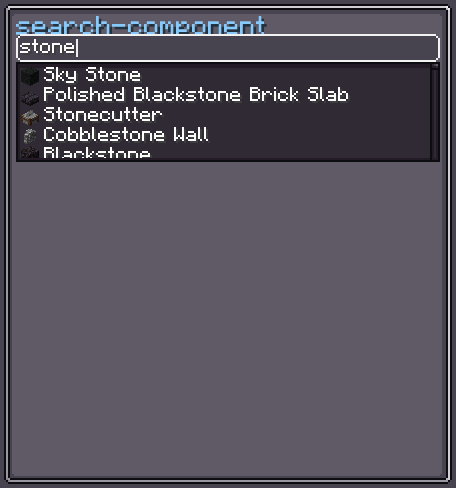
SearchComponent<T> is a generic search-and-select widget. It shows a preview of the currently selected value and, when clicked, opens a floating dialog with a text field and a list of matching candidates. Candidates are produced by an ISearchUI<T> implementation that can run on the client or be delegated to the server.
SearchComponent extends BindableUIElement<T>, so the selected value integrates with the data-binding system.
INFO
Everything documented on UIElement (layout, styles, events, data bindings, etc.) applies here too.
Usage
var search = new SearchComponent<String>();
search.setSearchUI(new SearchComponent.ISearchUI<>() {
    @Override
    public String resultText(String value) { return value; }
    @Override
    public void onResultSelected(String value) { }
    @Override
    public void search(String word, IResultHandler<String> find) {
        List.of("Alpha", "Beta", "Gamma").stream()
            .filter(s -> s.toLowerCase().contains(word.toLowerCase()))
            .forEach(find::handle);
    }
});
search.setOnValueChanged(v -> System.out.println("Selected: " + v));
parent.addChild(search);Internal Structure
| CSS class | Description |
|---|---|
.__search-component_preview__ | Preview area showing the selected value. |
.__search-component_text-field__ | Text input shown when the component is open. |
.__search-component_dialog__ | Floating overlay dialog containing the candidate list. |
.__search-component_list-view__ | Plain list (used when candidates ≤ max-item). |
.__search-component_scroller-view__ | Scrollable list (used when candidates > max-item). |
Search Style
INFO
focus-overlay
Texture drawn over the component when it is hovered or focused.
Default: Sprites.RECT_RD_T_SOLID
search.searchStyle(style -> style.focusOverlay(myTexture));INFO
max-item
Maximum number of results shown in the flat listView before switching to a scrollerView.
Default: 5
search.searchStyle(style -> style.maxItemCount(10));INFO
view-height
Height of the scrollerView when the candidate count exceeds max-item.
Default: 50
search.searchStyle(style -> style.scrollerViewHeight(80f));INFO
show-overlay
Whether to highlight the hovered and selected candidate rows.
Default: true
search.searchStyle(style -> style.showOverlay(false));INFO
close-after-select
Whether the dialog closes automatically after a candidate is selected.
Default: true
search.searchStyle(style -> style.closeAfterSelect(false));ISearchUI<T> Interface
Implement this interface to provide search logic:
public interface ISearchUI<T> extends ISearch<T> {
    /** Convert a result value to its text representation. */
    String resultText(T value);

    /** Called when the user selects a candidate. */
    void onResultSelected(@Nullable T value);

    /** Perform the search; call find.handle(result) for each match. */
    void search(String word, IResultHandler<T> find);
}
Fields
| Name | Type | Access | Description |
|---|---|---|---|
textField | TextField | public final | The text input for entering search words. |
preview | UIElement | public final | Container showing the selected value's UI. |
dialog | UIElement | public final | The floating candidate dialog (attached to the root). |
listView | UIElement | public final | Flat list container (visible when ≤ max-item results). |
scrollerView | ScrollerView | public final | Scrollable list (visible when > max-item results). |
searchStyle | SearchStyle | private (getter) | Current style. |
value | T (nullable) | private (getter) | The currently selected value. |
searchOnServer | boolean | private (getter) | true when search is delegated to the server. |
Methods
| Method | Returns | Description |
|---|---|---|
setSearchUI(ISearchUI<T>) | SearchComponent<T> | Sets the search logic provider. |
setCandidateUIProvider(UIElementProvider<T>) | SearchComponent<T> | Sets the factory that builds the UI for each candidate. |
setSearchOnServer(Class<T[]>) | SearchComponent<T> | Enables server-side search (RPC). |
setSelected(T) | SearchComponent<T> | Selects a value and notifies listeners. |
setSelected(T, boolean) | SearchComponent<T> | Selects a value; second param controls notification. |
setOnValueChanged(Consumer<T>) | SearchComponent<T> | Registers a listener for value changes. |
searchStyle(Consumer<SearchStyle>) | SearchComponent<T> | Configures style fluently. |
show() | void | Opens the candidate dialog. |
hide() | void | Closes the candidate dialog. |
isOpen() | boolean | Returns true when the dialog is visible. |