
SceneEditor
SceneEditor is an embeddable 3D editing component. It can be placed inside a View or any other LDLib2 UI layout.
It provides:
- a top bar,
- a
Scene, - orthographic / perspective camera switch,
- right mouse camera movement,
- mouse wheel movement speed changes while moving,
- a transform gizmo bar,
- translate / rotate / scale modes.
Scene Objects
IScene owns scene objects by UUID.
ISceneObject is the base object contract. It provides:
- a
Transform, - scene attach/detach lifecycle,
- child traversal,
- tick and frame update hooks.
SceneObject is the default implementation.
ISceneInteractable adds mouse hit testing through Ray and VoxelShape, plus click/release/drag callbacks.
ISceneRendering adds rendering hooks and applies the object's transform before drawInternal(...).
TransformGizmo targets an ITransform and updates it in translate, rotate, or scale mode.
Minimal Use
var sceneEditor = new SceneEditor();
sceneEditor.layout(layout -> {
    layout.widthPercent(100);
    layout.flex(1);
});

sceneEditor.scene
        .createScene(player.level())
        .setTickWorld(true)
        .useCacheBuffer();

var object = new BlockModelObject();
object.transform().position(player.position().toVector3f().add(0, 1, 0));

sceneEditor.addSceneObject(object);
sceneEditor.setTransformGizmoTarget(object.transform());
TestSceneEditor is the best source reference for a complete minimal screen.
Transform Gizmo
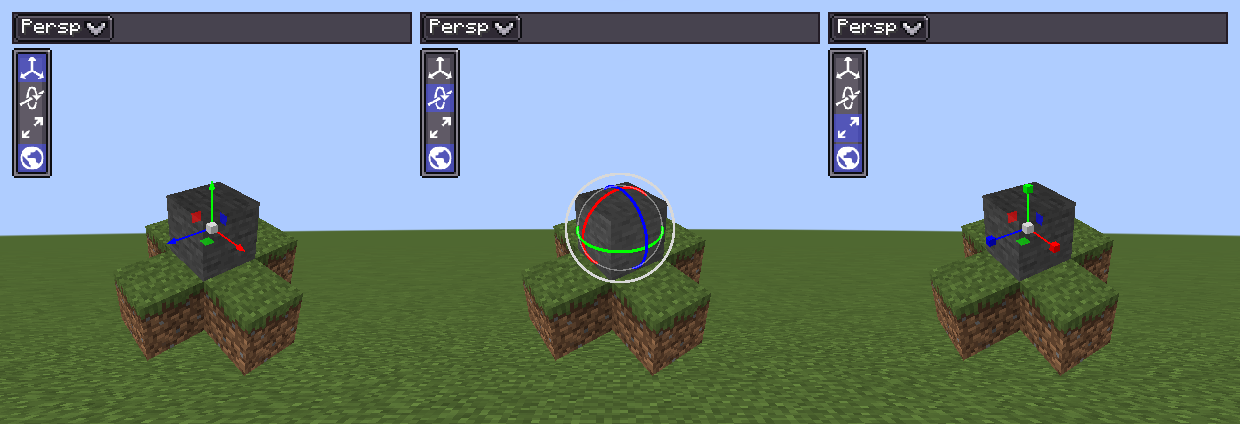
The gizmo is drawn over the scene and gets the first chance at every left click. A drag that starts on a handle is never passed to the objects behind it.
| Mode | Handle | Effect | Since |
|---|---|---|---|
| Translate | Axis arrow | Moves along one axis. | |
| Translate | Planar handle | Moves in the plane of two axes. | |
| Translate | Centre box (FREE) | Moves freely in the plane of the screen. | 2.2.39 |
| Rotate | Axis ring | Rotates about one axis. Since 2.2.39, only the near half of each ring is drawn, over a faint ball outline. | |
| Rotate | Outer ring (SCREEN) | Rotates in the plane of the screen, about the camera's view direction. | 2.2.38 |
| Rotate | Inside the ball (TRACKBALL) | Free rotation; the grabbed point follows the cursor. | 2.2.38 |
| Scale | Axis box | Scales one axis. | |
| Scale | Planar handle | Scales the two axes it spans. | 2.2.39 |
| Scale | Centre box (UNIFORM) | Scales all three axes, keeping proportions. | 2.2.39 |
The handles are listed in TransformGizmo.Handle. The gizmo keeps a constant size on screen in both perspective and orthographic cameras.
Gizmo Targets
Since 2.2.38The gizmo can drive anything that implements com.lowdragmc.lowdraglib2.math.ITransform, not only a scene object's Transform. Transform implements ITransform, and the Transform overloads remain.
sceneEditor.setTransformGizmoTarget(myTransform, () -> markDirty());Use this when your objects are not scene objects, for example because their data must load on a dedicated server or they already have their own hierarchy. You no longer need to mirror them with a proxy Transform.
ITransform getters follow two different rules:
| Getters | Returns | Rule |
|---|---|---|
position(), rotation() | World space | A snapshot you own. Safe to keep as a drag anchor. |
localPosition(), localRotation(), localScale() | Local space | A read-only view that may be the live field. Do not mutate or keep it; change it through the setter. |
There is no world scale: a world-space scale through a rotated parent cannot be expressed as a parent-relative transform. The gizmo writes world position, world rotation, and local scale.
An implementation whose world matrix comes from somewhere else, such as an animated bone, may refuse world-space writes.
Binary-incompatible change in 2.2.38
TransformGizmo#getTargetTransform() now returns ITransform instead of Transform. Code compiled against an older LDLib2 that calls it must be recompiled; cast the result if you need a Transform.
Clicking Objects
Changed 2.2.39A left click in the scene is dispatched in this order:
- The gizmo, if active.
- Every
ISceneInteractablewhose collision shape the mouse ray hits, nearest first. - Interactables with an empty collision shape, in visiting order.
Dispatch stops at the first onMouseClick(ray) that returns true. Interactables that have a shape but are not hit by the ray do not receive the click.
Before 2.2.39, every interactable received every click and the results were combined, so overlapping objects were all told they were clicked.