
Asset Browser
Since 2.2.33AssetBrowser is a file browser over the ldlib2 folder in the game directory. It works like Unity's Project window: a folder tree on the left, the selected folder's contents as a grid or list on the right.
It is the Assets tab, pinned in front of the resource type tabs in ResourceView. It stays when a project is loaded or closed.
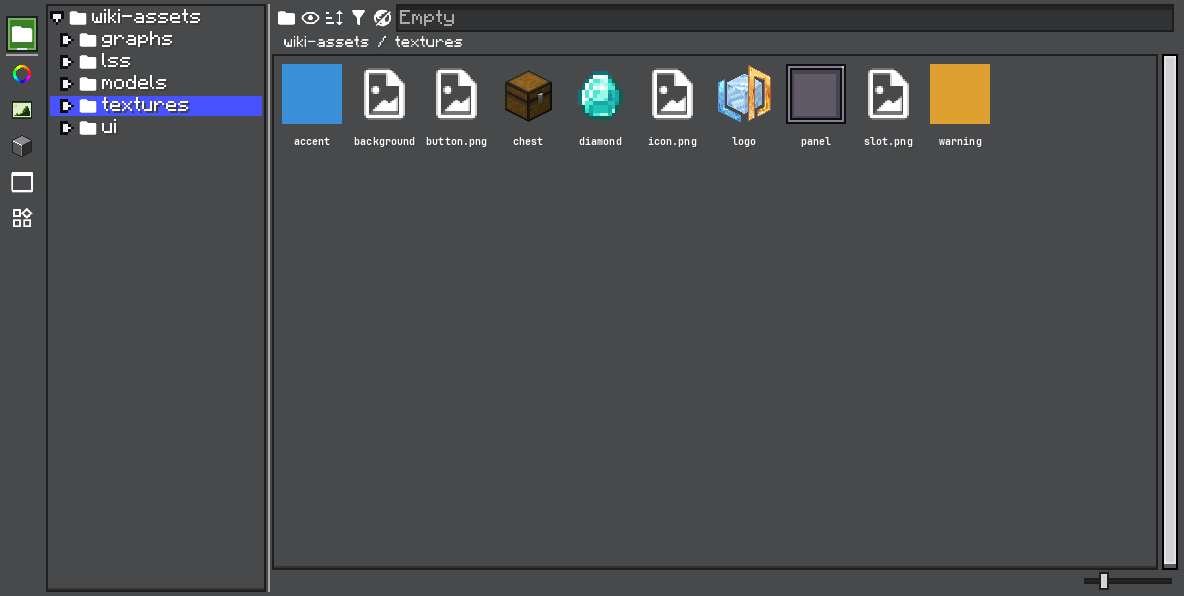
Files that a loaded Resource type can read are shown with that type's thumbnail and open in that type's editor. Project files open through their ProjectType. Everything else is a plain file that can be renamed, copied, moved, or deleted.
Get the browser from the editor:
AssetBrowser browser = editor.resourceView.getAssetBrowser();Working with Files
| Action | How |
|---|---|
| Open | Double-click. A resource opens in its type's editor; a project file opens through ProjectType#openProject; a folder opens in the browser. |
| Create | Right-click empty space → New → a new folder, or a resource of any loaded type. The resource entries are the same ones the resource panel offers. Resources are created in the open folder only; on another folder, the menu offers Open Folder In Browser instead. |
| Rename, Copy, Cut, Paste, Remove | Right-click a file or folder. |
| Duplicate | Right-click a resource file. Makes a copy beside it. |
| Move | Drag files onto another folder in the grid or tree. |
| Copy Path | Right-click a file. Copies the typed resource path, or the absolute path for a plain file. |
| Open the folder on disk | Right-click → Open Folder. |
| Import from the desktop | Drop files from your system file manager. A menu offers Copy into "folder", or Import as <type> for each resource type that can read them. |
Moves are recorded in the editor's history and can be undone. Removing a resource file goes through its resource type, so that is undoable too.
The browser checks the open folder for outside changes every 10 ticks.
Toolbar
| Control | Description |
|---|---|
| Search field | Filters the open folder by name. |
| Search scope | Switches between this folder and everything under the root. Since 2.2.42. |
| Sort | Name, Type, Size, or Date Modified; ascending or descending. Folders always come first. |
| Type filter | Shows only the selected resource types. |
| Show all files | Also lists files that no loaded resource type can read. |
| List / grid, preview size | Display mode and cell size. The cell size is local to the browser and does not change the resource types' saved display settings. |
Global Search
Since 2.2.42Click the scope button beside the search field to search everything under the root by name instead of only the open folder. Results stream into the grid while the search runs, and the breadcrumb shows a status line.
Right-click a result → Show In Folder to open its folder with the file selected.
A global search stops after 2000 matches and shows the first 500. Narrow the search to see the rest.
Use a Folder as a Resource Provider
Since 2.2.42Right-click a folder → Use As Resource Provider, then pick a resource type. The folder becomes a FileResourceProvider of that type and appears in the resource panel. Only types for which the folder is not already a provider are offered.
// false when the folder already is a file provider of that type
browser.addFileProvider(TexturesResource.INSTANCE.getResourceInstance(), folder);
Accept Drops from Other Views
Since 2.2.42By default, the browser only accepts its own files and files from the desktop. Add a DropHandler to let users drop another view's drag payload on a folder, and write it there as a file:
editor.resourceView.getAssetBrowser().addDropHandler(new AssetBrowser.DropHandler() {
    @Override
    public boolean accepts(Object payload, File directory) {
        return payload instanceof ShopEntryReference;
    }

    @Override
    public void drop(Object payload, File directory) {
        var entry = (ShopEntryReference) payload;
        writeShopEntryFile(entry, new File(directory, entry.name() + ".shop_entry.nbt"));
    }
});
The target is the folder cell under the pointer, or the open folder when the drop lands on empty space. The first handler whose accepts returns true handles the drop, and the grid refreshes afterward. Remove a handler with removeDropHandler.
Drag payloads that start in the browser are AssetBrowser.DraggedAssets, which carries the dragged Files.
Project Files
Since 2.2.42A ProjectType decides how its files open and what their context menu offers:
public class ShopProjectType extends ProjectType {
    public static final ShopProjectType TYPE = new ShopProjectType();

    private ShopProjectType() {
        super("project.shop", ".shop.nbt", ShopProject::new);
    }

    @Override
    public void openProject(Editor editor, File file) throws Exception {
        if (file.getName().endsWith(".generated.shop.nbt")) {
            Dialog.showNotification("shop.generated.title", "shop.generated.tips", null).show(editor);
            return;
        }
        super.openProject(editor, file);
    }

    @Override
    public void appendFileMenu(Editor editor, File file, TreeBuilder.Menu menu) {
        menu.leaf("shop.menu.export", () -> exportShop(file));
        menu.disabledLeaf("shop.menu.publish");
    }
}
openProject is what the File menu's Open, Recent Projects, and a double-click in the browser all call. The default loads the file. A type whose files are not all meant to be edited can explain or open something else instead. Throw an exception when the file cannot be loaded; the caller tells the user.
appendFileMenu adds entries after Open in the browser's menu for that file. TreeBuilder.Menu#disabledLeaf adds an entry that is shown dimmed and cannot be picked.
ProjectType#getIcon(File) returns the icon for one file. Override it to show a per-project thumbnail; cache the result, because it is called for every entry when a folder is listed.
Browser API
| Method | Description |
|---|---|
setRoot(File) | Changes the root folder. Creates it if missing. |
openDirectory(File) / getCurrentDirectory() | Opens or reads the shown folder. |
revealFile(File) | Opens the file's folder and selects the file. |
setGlobalSearch(boolean) | Sets the search scope. |
setSortMode(SortMode) / setSortAscending(boolean) | NAME, TYPE, SIZE, or MODIFIED. |
toggleTypeFilter(Resource) / clearTypeFilter() | Filters by resource type. |
setShowAllFiles(boolean) | Lists files that are not resources. |
setDisplayMode(DisplayMode) / setUiWidth(int) | Grid or list, and cell size. |
requestGridRebuild() | Rebuilds the grid on the next update. |
When Settings → Behavior → Restore Asset Browser Folder When Opening Project is on, the browser reopens the folder that was shown the last time the project was open.