
Compose
Since 2.2.44ldlib2-compose lets you build LDLib2 UI with @Composable functions. You change state, and the element tree follows. You don't call clearAllChildren(), rebuild the tree, or track dirty flags.
@Composable
fun DynamicButtonList() {
    var items by remember { mutableStateOf(listOf("A", "B", "C")) }

    ScrollView {
        items.forEach { item ->
            key(item) {
                Button(onClick = { println(item) }, text = item)
            }
        }
        Button(onClick = { items = items + "Button ${items.size + 1}" }, text = "Add")
    }
}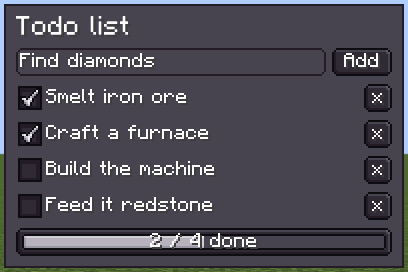
List in state: adding, ticking or removing an item changes the list, and the element tree follows. Every widget is a composable wrapper around a regular LDLib2 element. Optional module
Install it first. Nothing on these pages works until your mod depends on ldlib2-compose: follow Optional module: ldlib2-compose on the Java Integration page.
ldlib2-compose (mod id ldlib2_compose) is a separate mod, built once per Minecraft version; its version starts with the Minecraft line, so 21.0.0.1 is the first release for 1.21.x (see Versions). It is published to Maven only and is not inside the LDLib2 jar. It needs LDLib2 2.2.44 or later, and your composables must be written in Kotlin. See Getting Started.
How it works
The runtime is the JetBrains Compose runtime 1.8.2 (package androidx.compose.runtime). @Composable, recomposition, snapshot state, remember, key and effects work as they do in Compose.
Only the runtime is included. There is no compose.ui and no compose.foundation, so there is no Modifier, no pointerInput, and none of the foundation layouts. LDLib2 provides the rest:
- an applier that turns the composition's tree edits into
UIElementinserts, moves and removals; - a frame clock driven by the
ModularUIrender loop.
Layout is still Taffy, styling is still LSS, and events are still LDLib2 UI events.
| Object | Role |
|---|---|
ComposeElement | A UIElement whose children come from a composition. The entry point. |
composeUI / composeModularUI | Build a UI or ModularUI whose root is a ComposeElement. |
UIElementNode | Emits any UIElement subclass as a node. Every wrapper is built on it. |
rememberServerMessenger | Sends named messages from a composition to the server. |
ComposeSavedState | Keeps rememberSaveable state while a screen with a stateKey is closed. |
When to use it
The Kotlin DSL and XML build a tree once. Compose suits UI whose structure follows data: lists that grow and shrink, panels that appear on a condition, tabs added at runtime.
You can mix the two. Put a ComposeElement into a tree built any other way, or place an existing element inside a composition with Mount.
Pages
- Getting Started: dependencies, a first screen, a first menu.
- Styling and Events: the named parameters, style blocks, event handlers, hover state.
- Components: the widget wrappers, controlled values, containers, wrapping your own elements.
- State and Sync:
rememberSaveable, the binding bridges, server-driven UI. - Lazy Lists and Animation:
LazyColumn,LazyRow,LazyVerticalGrid, animations,AnimatedVisibility. - Limitations: differences from Jetpack Compose, side and lifecycle rules.